

Arikara Media Player
Arikara Media Player is made and published by The Language Conservancy, Inc. AppBrain is an independent app data site and isn't affiliated with The Language Conservancy, Inc. The app name, icon, screenshots and description belong to The Language Conservancy, Inc. and are shown as published on the App Store.
AppBrain's verdict
- Last updated
- February 23, 2022
Rankings
App Store top chartsApp Store Rankings for Arikara Media Player
Competitors
Similar apps and more from The Language Conservancy, Inc.Alternatives to Arikara Media Player





More from The Language Conservancy, Inc.






Releases
Updates seen on the App Store- Version
- 1.2
- Launched
- July 2017
No changelog data
User feedback
Ratings and reviews on the App StoreComments on Arikara Media Player for iOS
We don't have enough comments to show example comments. Please check back later.
Technology
Found in the app by AppBrain- Price
- Free
- App size
- 127.2 MB
- Content rating
- Everyone
Technologies used by Arikara Media Player
About the app and developer
About Arikara Media Player
Arikara Media Player is an education app developed by The Language Conservancy, Inc.
What is the rating of Arikara Media Player?
Arikara Media Player has no ratings yet.
Is Arikara Media Player free?
Arikara Media Player is free. The app size is 127.20 MB. The latest version available is 1.2. The last update was on February 23, 2022.
What are the requirements for Arikara Media Player?
The app has a content rating of Everyone. The app has been available on the App Store since July 2017.
Developer information for The Language Conservancy, Inc.
The Language Conservancy, Inc.
Address:
Store listing
By The Language Conservancy, Inc., from the App Store


Description by The Language Conservancy, Inc. Written by the developer, not by AppBrain. Click to read.
Audio available for:
Speak Arikara Level 1 Alphabet Book
The Prairie Dog Goes To School
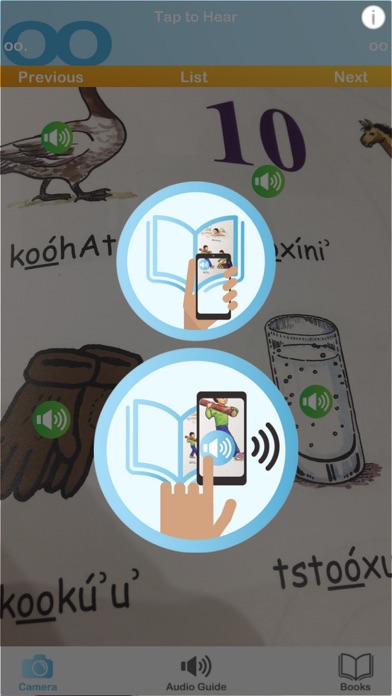
The Arikara Media Player is a companion to the MHA Language Project's series of textbooks and children's books. Just point your phone at the page and tap to hear native speakers pronounce the words. The audio guide section gives you complete access to the textbook vocabulary with an easy tap and swipe interface.
-More than 300 words and phrases!
-Two Arikara books included (and more to come!)
-Augmented reality (AR) places audio players right on the page!
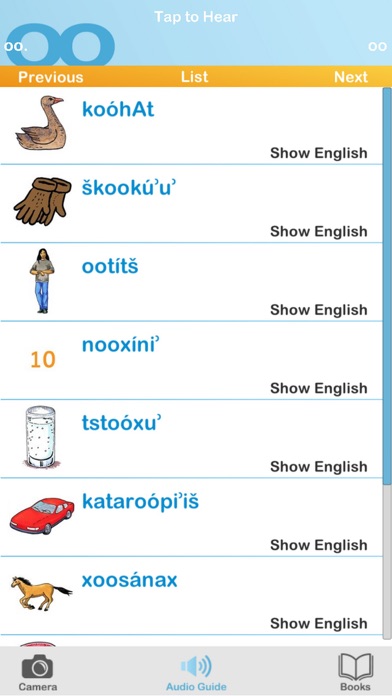
-Audio guide reveals the English with a tap.
Instructions:
The Arikara Media Player is easy to use. You’ll start out in Books, where you can select and download the content for your Arikara books. The Camera mode lets you use your phone’s camera to put audio content right on the page. The Audio Guide mode has the Arikara spellings, images, English translations and audio, all in one easy tap and swipe interface.
Books
- Tap download to receive the content for your Arikara book.
- Tap the image of the book’s cover to enter Camera mode.
- Select a book and tap Audio Guide to go directly to the Audio Guide.
- New books will automatically pop up in the books list when they become available.
- Occasionally, new content will be added to existing books. Just tap Update Now when it appears below one of your books.
Camera Mode
- Tap the Camera to enter Camera mode
- Look at the page through your iPhone or iPad's camera.
- Looking at the first page of each unit will set the current section; or you can select it from the list by tapping "list".
- Explore the page and play buttons will pop up right on the page!
- Tap the buttons to hear the Arikara words.
*Image recognition performance may vary depending on device. Try the Audio Guide if you are having trouble getting all the play buttons to appear.
Audio Guide Mode
- Tap Audio Guide to enter Audio Guide mode.
- Select the section of the book from the list.
- Tap anywhere on the entry to hear the Arikara audio.
- Swipe down to scroll through the content for that section.
- If you aren’t sure from the image, tap Show English to make the English translation appear.
- Use the Next and Previous buttons to go to the next section, or go back to the list by tapping Audio Guide or List.
About the Arikara Language Project:
The Arikara Language Project provides accessible language-learning tools and resources — textbooks, apps, dictionaries and more — to help preserve Arikara. Get to know us at http://www.arikara.org and check out some of our other Arikara products!
Questions? Concerns? Please let us know!
We’re always working to improve our Arikara language-learning products. If you have any questions, comments or concerns, please send us an email at customersupport@languageconservancy.org