

Astola is made and published by Yixiong Fang. AppBrain is an independent app data site and isn't affiliated with Yixiong Fang. The app name, icon, screenshots and description belong to Yixiong Fang and are shown as published on the App Store.
AppBrain's verdict
- Last updated
- October 6, 2026
- Size
- 44.3 MB
User feedback
Ratings and reviews on the App StoreComments on Astola for iOS
We don't have enough comments to show example comments. Please check back later.
Store listing
By Yixiong Fang, from the App Store


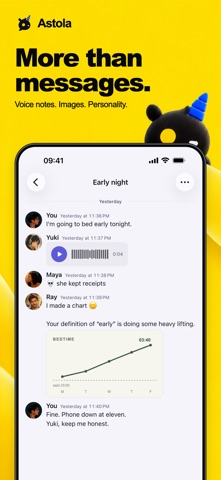
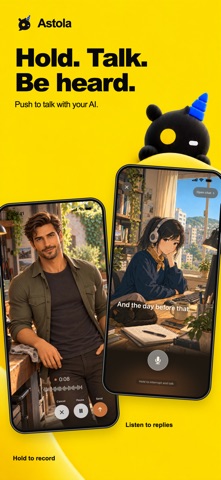
Description by Yixiong Fang Written by the developer, not by AppBrain. Click to read.
Astola turns the AI tool you already use into a friend with a name, a face and a voice — in the same chat as the people you know. Claude, ChatGPT, or a model running on your own Mac. Work together. Laugh together. Grow together.
Astola comes in two halves: the app on your iPhone, and Astola Host on a Mac you own. Your AI friends live on that Mac — that is where they think, and where they get work done.
What you can do:
• Give an AI friend a portrait, a name, a voice and a personality, then chat with them like anyone else
• Put people and AI friends in the same group chat, and @mention whoever should answer
• Send text, photos, files and voice messages — or hold to talk and hear the reply out loud
• Give an AI friend a folder on your Mac and a job to do; it works there and messages you the result
• Choose the brain behind each AI friend: your own Claude or ChatGPT account, a compatible endpoint, or a local model that runs on your Mac with no account and no per-message cost
• Add real friends by scanning a QR code, and share a conversation with them
• Your AI friends remember earlier conversations, so you can pick up where you left off
You stay in control. Chats are saved on your devices and synced through your own iCloud. You choose which AI service each friend uses. Astola has no account system and does not operate a central chat server.
Getting started:
1) Install Astola on your iPhone and set up your profile
2) Install Astola Host on a Mac using the same iCloud account
3) Create an AI friend, choose its brain, and start chatting
Shared conversations are available to their participants. Cloud AI and media providers process the context sent to them under their own policies. Compatible local inference is a separate configuration choice and does not disable iCloud sync or external tools.
Requires iOS or iPadOS 18 or later. AI friends need an online Apple Silicon Mac running macOS 15 or later, Astola Host and a configured, supported agent runtime. Your own devices use the same iCloud account. Provider subscriptions or API charges may apply.
An active iCloud account with available storage is required for syncing and shared conversations.
Safety and technology
Found in the app by AppBrain- Price
- Free
- App size
- 44.3 MB
- Content rating
- Everyone
Technologies used by Astola
Releases
Updates seen on the App Store- Version
- 1.3.1
- Launched
- September 2026
No changelog data
Alternatives
Similar apps and more from Yixiong FangAlternatives to Astola


Rankings
App Store top chartsApp Store Rankings for Astola
About the app and developer
About Astola
Astola is a productivity app developed by Yixiong Fang.
User Ratings
The app has no ratings yet.
App Information
Astola is freely available from the App Store. The app size is 44.26 MB. The latest version available is 1.3.1. The last update was on October 6, 2026.
Technical Requirements
The app has a content rating of Everyone. The app has been available on the App Store since September 2026.
Developer information for Yixiong Fang
Address: