

Audio Tools - Reco
Audio Tools - Reco is made and published by Emine Saridogan. AppBrain is an independent app data site and isn't affiliated with Emine Saridogan. The app name, icon, screenshots and description belong to Emine Saridogan and are shown as published on the App Store.
AppBrain's verdict
- Last updated
- July 29, 2026
Rankings
App Store top chartsApp Store Rankings for Audio Tools - Reco
Competitors
Similar apps and more from Emine SaridoganAlternatives to Audio Tools - Reco


More from Emine Saridogan


Releases
Updates seen on the App Store- Version
- 1.0
- Launched
- July 2026
No changelog data
User feedback
Ratings and reviews on the App StoreComments on Audio Tools - Reco for iOS
We don't have enough comments to show example comments. Please check back later.
Technology
Found in the app by AppBrain- Price
- Free
- App size
- 13.1 MB
- Content rating
- Everyone
Technologies used by Audio Tools - Reco
About the app and developer
About Audio Tools - Reco
Audio Tools - Reco is a music app developed by Emine Saridogan.
What is the rating of Audio Tools - Reco?
Audio Tools - Reco has no ratings yet.
Is Audio Tools - Reco free?
Audio Tools - Reco is free. The app size is 13.15 MB. The latest version available is 1.0. The last update was on July 29, 2026.
What are the requirements for Audio Tools - Reco?
The app has a content rating of Everyone. The app has been available on the App Store since July 2026.
Developer information for Emine Saridogan
Address:
Frequently asked questions about Audio Tools - Reco
Is Audio Tools - Reco free?
Yes. Audio Tools - Reco is free on the App Store.
Is Audio Tools - Reco still available?
Yes. Audio Tools - Reco is on the App Store, and the last update we saw was on July 29, 2026.
How large is Audio Tools - Reco?
Audio Tools - Reco is 13.15 MB.
Is Audio Tools - Reco suitable for children?
App Store rates the content of Audio Tools - Reco as suitable for everyone.
Who made Audio Tools - Reco?
Audio Tools - Reco was developed by Emine Saridogan. It is listed in the music category on the App Store.
What are the best alternatives to Audio Tools - Reco?
People looking at Audio Tools - Reco also look at these music apps: Audio Trimmer & Cutter, Audio Fade In & Out Editor, AI Song Generator: Musician, Accompanist: Music Speed, Audio Editor Ringtone Clipex.
Store listing
By Emine Saridogan, from the App Store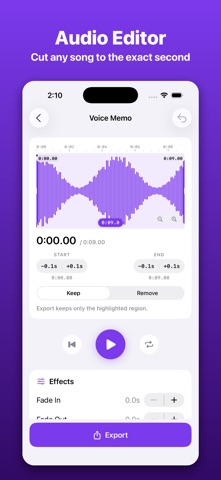

Description by Emine Saridogan Written by the developer, not by AppBrain. Click to read.
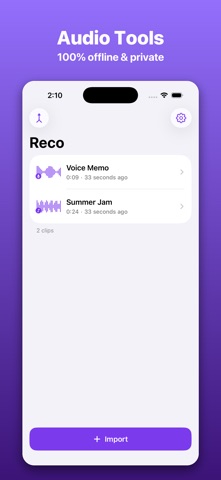
Most audio tools on desktop are overkill for a 20-second cut, and most mobile audio tools want your files on someone's server. Reco is different: every one of its audio tools works 100% offline. No account, no upload, no waiting. Your audio never leaves your device.
YOUR COMPLETE AUDIO TOOLBOX
• Audio cutter and trimmer with a zoomable waveform
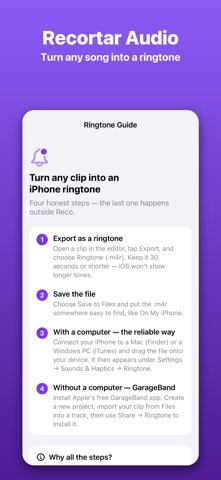
• Ringtone maker with ready-to-use M4R files
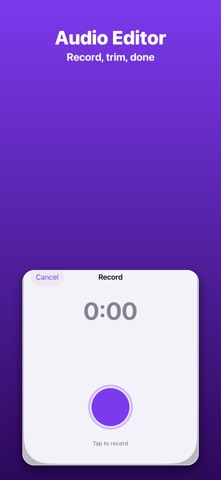
• Voice recorder with live waveform monitoring
• Audio converter: M4A, MP3, WAV, AIFF output
• Audio extractor: pull the soundtrack out of any video
• Audio merger: stitch clips into one seamless track
• Fades, volume and speed — sound-shaping tools built in
FREE AUDIO TOOLS — YOURS FOREVER
• Precision trimmer: cut on the waveform down to a tenth of a second, with pinch-to-zoom, a real time ruler and 0.1s nudge buttons
• Keep the highlighted part, or cut a section out of the middle
• Fade in, fade out, volume and speed controls — included, not paywalled
• Microphone recorder with live scrolling waveform
• Ringtone maker: one-tap M4R files plus a simple setup guide
• M4A (AAC) export that plays everywhere
• Unlimited clips, organized with waveform previews
• Every free tool stays free. Forever.
PRO AUDIO TOOLS — ONE OPTIONAL SUBSCRIPTION
• MP3 export at 128, 192 or 320 kbps — real MP3 files, encoded on your device
• Lossless WAV and AIFF export for studio-grade quality
• Merge: combine several clips into a single track
• Video-to-audio extractor: grab the sound from any video in your library
MADE FOR REAL EVERYDAY JOBS
• Turn the chorus of a song into your ringtone before your coffee cools
• Trim the silence off a voice memo and send just the good part
• Convert a WAV recording into a small M4A for chat apps
• Pull a quote out of a lecture video as an audio clip
• Cut a sample, slow it down, fade it out — and export it as MP3
PRECISION YOU CAN FEEL
The editor is built around a waveform you can actually work with: pinch to zoom into a single beat, drag two handles with haptic feedback, scrub the playhead with your finger, and fine-tune each edge by a tenth of a second. Loop your selection until the cut is perfect, then export.
PRIVATE BY DESIGN
Audio tools should not need your data. Reco asks for no account, collects nothing, and works in airplane mode. The only network feature in the entire app is subscription validation for Pro.
HOW IT WORKS
1. Import a song or video, or record something new
2. Drag two handles on the waveform — zoom, nudge, loop until it is right
3. Export in the format you need, or save it as a ringtone
Reco Pro is optional: a weekly plan with a 3-day free trial, or a yearly plan. Prices are always shown in the app before you pay. Subscriptions renew automatically unless canceled at least 24 hours before the end of the current period; manage or cancel anytime in your Apple ID settings. Everything in the free tier stays free — the audio tools you start with are yours for good.
Privacy Policy: https://leomarston.github.io/manycode-legal/privacy.html
Terms of Use: https://www.apple.com/legal/internet-services/itunes/dev/stdeula/