AppBrain
AppBrain
  • Apps
  • Apps being viewed right now Trending apps today Most popular apps All-time most installed apps Top rated apps iPhone and iPad apps
  • Intelligence ▾
    Intelligence overview → Track any Android app or your whole market
    Track & analyze
    Keyword Tracker & OptimizerTrack & improve Play rankings App Performance ReportOne-off PDF for any app StatisticsFree Android & Play market stats
    Promote your app
    Featured Apps App Links
  • Intelligence
  • Pricing
  • Dashboard
  • Sign up
  • Log in
App Store Apps > Productivity > Autodesk Vault Mobile
Autodesk Vault Mobile icon

Autodesk Vault Mobile

by Autodesk Inc. · Productivity · Free
On the App Store since August 2020 · Data updated 2026-10-27

Autodesk Vault Mobile is made and published by Autodesk Inc. AppBrain is an independent app data site and isn't affiliated with Autodesk Inc. The app name, icon, screenshots and description belong to Autodesk Inc. and are shown as published on the App Store.

AppBrain's verdict

Established
Rating on App Store
4.42
12 ratings
Last updated
September 3, 2026
Size
64.1 MB

It doesn't have enough ratings yet to judge what users think.

Official page on the App Store

User feedback

Ratings and reviews on the App Store

Comments on Autodesk Vault Mobile for iOS

We don't have enough comments to show example comments. Please check back later.

Store listing

By Autodesk Inc., from the App Store
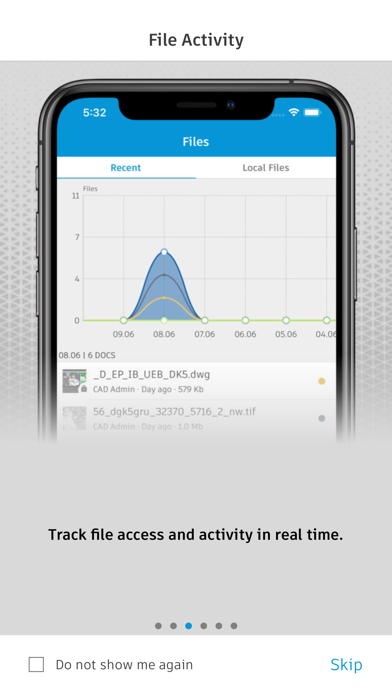
Autodesk Vault Mobile Screenshot 1 of 6
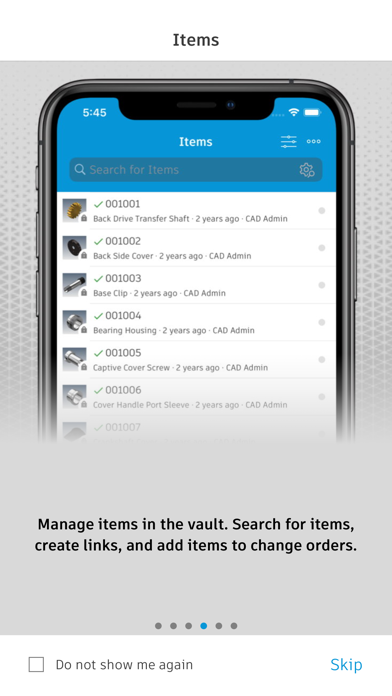
Autodesk Vault Mobile Screenshot 2 of 6
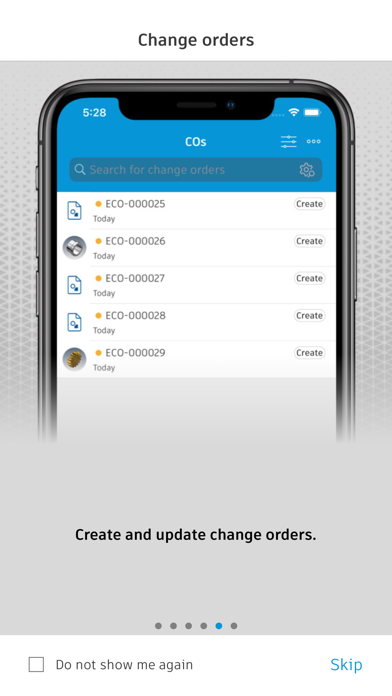
Autodesk Vault Mobile Screenshot 3 of 6
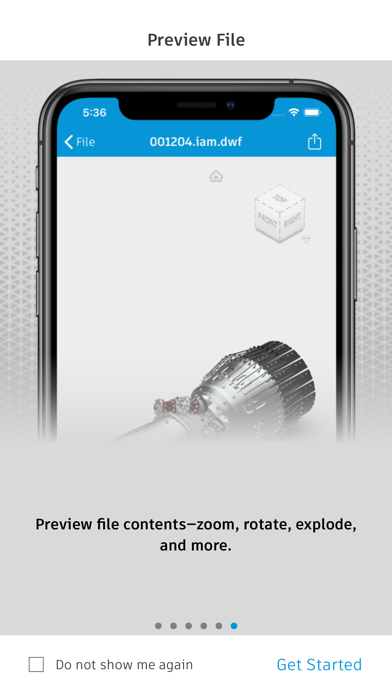
Autodesk Vault Mobile Screenshot 4 of 6
Autodesk Vault Mobile Screenshot 5 of 6
Autodesk Vault Mobile Screenshot 6 of 6
Screenshots by Autodesk Inc., from the the App Store listing
Description by Autodesk Inc. Written by the developer, not by AppBrain. Click to read.
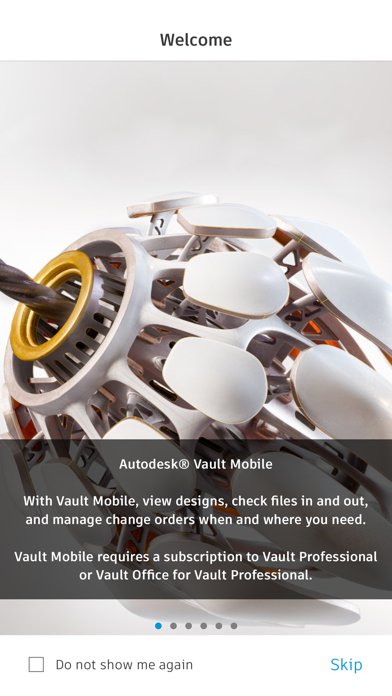
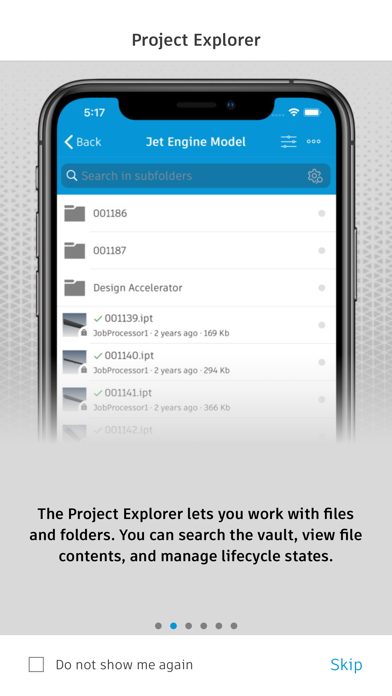
Autodesk® Vault for iPhone and iPad allows you to work with your design and engineering data on your mobile device. You can use the Vault mobile app to view 2D and 3D designs, check non-CAD files in and out, approve and sign documents, create and participate in change orders, perform QR, barcode, simple and extended data searches, and more. Supporting over 100 file formats, the Vault mobile app makes it easy to stay up to date on your projects and collaborate with others anytime, anywhere.
The mobile app works in conjunction with its companion desktop product, Autodesk® Vault product data management software.
To use the Vault mobile app for iPhone and iPad, you will need to sign in with your Vault account information.

Capabilities:

File Workflows:
Properties, History, Uses, Where Used, & Attachments
Add to Change Order
Send Link, or File
Change Lifecycle State
Check-in\Check-out non-CAD files
Set Favorites
Save files locally
Preview Capabilities:
View DWF files with a new viewing experience
Ability to submit a job to create the visualization file
Preview images, PDF & Office files
Change Order Capabilities:
Create New Change Orders for Files or Items
View User Worklist
View Details
Edit State
View Comments
Add Records & Attachments
View Records &Attachments
Add to Favorites
Item Capabilities:
View All Items
View Details
Edit Item Lifecycle State
View Versions & Revisions
View Bill of Materials (BOM)
Search Capabilities:
Search files, items and change orders
Advanced Search
Saved Searches
QR & Bar code Search capability
Files Capabilities:
Recent Files List
Insights on file activities in Vault
Local File Storage List
Favorites:
Select Favorites for Files, Items Change Orders
View Favorites for Files, Items & Change Orders
Official page on the App Store

Safety and technology

Found in the app by AppBrain
Price
Free
App size
64.1 MB
Content rating
Everyone

Technologies used by Autodesk Vault Mobile

Releases

Updates seen on the App Store
Version
1.15.0
Launched
August 2020

No changelog data

Alternatives

Similar apps and more from Autodesk Inc.

Alternatives to Autodesk Vault Mobile

DWG View - CAD Viewer & Editor icon DWG View - CAD Viewer & Editor
沦 彭
2.0
Free
7 ratings
CAD HD icon CAD HD
JIN HWAN KIM
2.4
Free
5 ratings
ZWCAD Mobile - Mobile CAD icon ZWCAD Mobile - Mobile CAD
ZWCAD Software Co.,Ltd.
4.3
Free
306 ratings
Onshape 3D CAD icon Onshape 3D CAD
PTC Inc.
3.5
Free
414 ratings
eDrawings icon eDrawings
Dassault Systemes SolidWorks Corporation
2.5
$1.99
17 ratings
ARES Touch: DWG Viewer & CAD icon ARES Touch: DWG Viewer & CAD
Graebert GmbH
4.7
Free
157 ratings
eDrawings Pro icon eDrawings Pro
Dassault Systemes SolidWorks Corporation
2.1
$9.99
26 ratings
iRhino 3D icon iRhino 3D
Robert McNeel & Associates
4.6
Free
81 ratings

More from Autodesk Inc.

Autodesk Forma icon Autodesk Forma
Autodesk Inc.
4.7
Free
21.6K ratings
Tinkercad icon Tinkercad
Autodesk Inc.
4.6
Free
20.2K ratings
AutoCAD icon AutoCAD
Autodesk Inc.
4.4
Free
6.3K ratings
Autodesk Fusion icon Autodesk Fusion
Autodesk Inc.
4.5
Free
4.1K ratings
Autodesk | Events icon Autodesk | Events
Autodesk Inc.
4.7
Free
499 ratings
BIM 360 icon BIM 360
Autodesk Inc.
1.8
Free
148 ratings
BIM 360 Field icon BIM 360 Field
Autodesk Inc.
2.4
Free
29 ratings
BIM 360 Field for iPhones icon BIM 360 Field for iPhones
Autodesk Inc.
1.7
Free
28 ratings

Rankings

App Store top charts

App Store Rankings for Autodesk Vault Mobile

This app is not ranked

About the app and developer

About Autodesk Vault Mobile

Autodesk Vault Mobile is a productivity app developed by Autodesk Inc.

What is the rating of Autodesk Vault Mobile?

Autodesk Vault Mobile is rated 4.42 out of 5 stars, based on 12 ratings.

Is Autodesk Vault Mobile free?

Autodesk Vault Mobile is free. The app size is 64.08 MB. The latest version available is 1.15.0. The last update was on September 3, 2026.

What are the requirements for Autodesk Vault Mobile?

The app has a content rating of Everyone. The app has been available on the App Store since August 2020.

Developer information for Autodesk Inc.

Autodesk Inc.

Address:

Share Autodesk Vault Mobile

Today's trending apps Price drops on Google Play Popular Productivity Apps Top new apps Apps other people are watching
DWG View - CAD Viewer & Editor icon DWG View - CAD Viewer & Editor
CAD HD icon CAD HD
ZWCAD Mobile - Mobile CAD icon ZWCAD Mobile - Mobile CAD
Onshape 3D CAD icon Onshape 3D CAD
eDrawings icon eDrawings
ARES Touch: DWG Viewer & CAD icon ARES Touch: DWG Viewer & CAD
eDrawings Pro icon eDrawings Pro
iRhino 3D icon iRhino 3D
Overview Alternatives Reviews Rankings Technology
AppBrain Intelligence premium content

Subscribe now to get full and unlimited access to AppBrain Intelligence. You'll have access to:

  • App Intelligence dashboard (performance timeline, competitor comparison, country rankings, insight cards)
  • Detailed ranking data per app
  • Full timeline per developer
  • Device market shares data per country
  • Unlimited keyword tracking
1 Month

$75/mo
(billed every month)

SAVE 0%
Subscribe
3 Months

$65/mo
($195 billed every 3 months)

SAVE 13%
Subscribe
1 Year

$57.50/mo
($690 billed every year)

SAVE 23%
Subscribe
Each subscription will automatically renew 3 days before the expiration date for the same time period. Subscriptions can be cancelled at any time before the renewal.

AppBrain is an app data site, we track rankings, ratings, installs for all apps and games on Google Play and the App Store. AppBrain doesn't host app files or APKs, all install links go directly to the official store. All trademarks are owned by their respective owners.

More apps

  • Top Android apps being viewed
  • GolfFix AI Golf Swing Analyzer
  • Cine Joy-Movie & TV Shows
  • GoWish - Your Digital Wishlist

App statistics

  • Android statistics
  • Google Play Developer stats
  • Trending Android Apps
  • Trending iOS apps
  • Top popular Apps
  • Buy the best Android phone
  • Buy & sell app businesses

About AppBrain

  • Contact
  • Privacy
  • Documentation
  • DMCA takedowns
  • Blog
  • The AppBrain advertising system
© 2010-2026 - AppBrain