

AutoFill – Flash Checkout
AutoFill – Flash Checkout is made and published by 小虎 周. AppBrain is an independent app data site and isn't affiliated with 小虎 周. The app name, icon, screenshots and description belong to 小虎 周 and are shown as published on the App Store.
AppBrain's verdict
- Last updated
- October 16, 2026
- Size
- 20.3 MB
User feedback
Ratings and reviews on the App StoreComments on AutoFill – Flash Checkout for iOS
We don't have enough comments to show example comments. Please check back later.
Store listing
By 小虎 周, from the App Store




Description by 小虎 周 Written by the developer, not by AppBrain. Click to read.
A Safari extension purpose-built for Apple’s online store, engineered to streamline checkout on iPhone, iPad, and Mac. Cut the steps to a minimum and secure your order faster. Supports both “Ship to Home” and “Pick-up at Store” order types, auto-filling every required field in one click.
Key Features
• One-Tap Auto-Fill
Pre-save shipping addresses, payment details, in-store pickup contact, name, phone, email, etc. Launch-day checkout is now a single tap away.
•Multi-Profile Management (NEW)
Create and store multiple independent personal profiles. Profiles can be duplicated, deleted, and reordered by drag-and-drop. AutoFill always uses the currently selected profile, enabling instant switching between personal, family, or friends’ information.
• Smart Field Mapping
Recognizes the exact fields for “Ship to Home” or “Pick-up at Store” forms, cutting down on omissions and format errors.
• Manual / Auto Dual Mode
• Manual: tap the floating button on the right edge of Safari or press Command+Shift+L to trigger a one-time fill.
• Auto: fills the form automatically once the page loads; switch to Manual if you need to edit any fields.
Toggle between modes instantly with the switch on the right edge of Safari.
• Full Localization
UI, labels, and prompts are fully localized in:
English · 简体中文 · 繁體中文 · 日本語 · 한국어 · Deutsch · Français · Italiano · Español · Русский · العربية
• Privacy First
All data is stored locally and can be edited or deleted at any time.
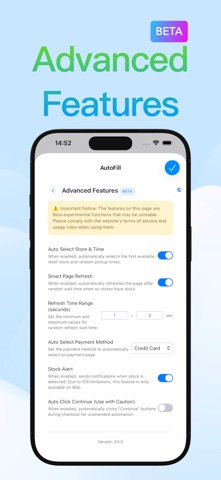
New Advanced Features (BETA):
· Auto select retail store and pickup time
· Smart page refresh
· Auto select payment method
· Stock alert
· Auto click “Continue”
· Preselect model
How to Use
1. Before launch: open the Safari AutoFill extension and store your “Ship to Home” or “Pick-up at Store” templates.
2. At launch: visit Apple’s online store, choose the order type, and let AutoFill populate every field instantly.
Usage Scope
• This extension only optimizes the checkout flow within Safari on Apple’s online store.
• Supports both “Ship to Home” and “Pick-up at Store” order types.
• Does not support other e-commerce sites or in-app purchases.
Important Notes
AutoFill does not guarantee product availability or successful checkout; success depends on stock levels, network conditions, and Apple’s site rules.
AutoFill is not affiliated with, endorsed by, or representative of Apple Inc.
Privacy Policy
https://gabby-individual-c79.notion.site/AutoFill-Privacy-Policy-3cb15855067c80bfa95adb0014159359
Terms of Use
https://www.apple.com/legal/internet-services/itunes/dev/stdeula/
Safety and technology
Found in the app by AppBrain- Price
- $5.99
- App size
- 20.3 MB
- Content rating
- Everyone
Technologies used by AutoFill – Flash Checkout
Releases
Updates seen on the App Store- Version
- 3.2.1
- Launched
- September 2025
No changelog data
Alternatives
Similar apps and more from 小虎 周More from 小虎 周





Rankings
App Store top chartsApp Store Rankings for AutoFill – Flash Checkout
About the app and developer
About AutoFill – Flash Checkout
AutoFill – Flash Checkout is a productivity app developed by 小虎 周.
What is the rating of AutoFill – Flash Checkout?
AutoFill – Flash Checkout has no ratings yet.
Is AutoFill – Flash Checkout free?
AutoFill – Flash Checkout costs $5.99. The app size is 20.31 MB. The latest version available is 3.2.1. The last update was on October 16, 2026.
What are the requirements for AutoFill – Flash Checkout?
The app has a content rating of Everyone. The app has been available on the App Store since September 2025.
Developer information for 小虎 周
Address: