

ShiftAlarm — AI Schedule Alarm
ShiftAlarm — AI Schedule Alarm is made and published by 小虎 周. AppBrain is an independent app data site and isn't affiliated with 小虎 周. The app name, icon, screenshots and description belong to 小虎 周 and are shown as published on the App Store.
AppBrain's verdict
- Last updated
- November 2, 2026
Rankings
App Store top chartsApp Store Rankings for ShiftAlarm — AI Schedule Alarm
Competitors
Similar apps and more from 小虎 周Alternatives to ShiftAlarm — AI Schedule Alarm


More from 小虎 周





Releases
Updates seen on the App Store- Version
- 1.2
- Launched
- August 2026
No changelog data
User feedback
Ratings and reviews on the App StoreComments on ShiftAlarm — AI Schedule Alarm for iOS
We don't have enough comments to show example comments. Please check back later.
Technology
Found in the app by AppBrain- Price
- Free
- App size
- 24.1 MB
- Content rating
- Everyone
Technologies used by ShiftAlarm — AI Schedule Alarm
About the app and developer
About ShiftAlarm — AI Schedule Alarm
ShiftAlarm — AI Schedule Alarm is an utilities app developed by 小虎 周.
User Ratings
The app has no ratings yet.
App Information
ShiftAlarm — AI Schedule Alarm is freely available from the App Store. The app size is 24.12 MB. The latest version available is 1.2. The last update was on November 2, 2026.
Technical Requirements
The app has a content rating of Everyone. The app has been available on the App Store since August 2026.
Developer information for 小虎 周
Address:
Frequently asked questions about ShiftAlarm — AI Schedule Alarm
Is ShiftAlarm — AI Schedule Alarm free?
Yes. ShiftAlarm — AI Schedule Alarm is free on the App Store.
Is ShiftAlarm — AI Schedule Alarm still available?
Yes. ShiftAlarm — AI Schedule Alarm is on the App Store, and the last update we saw was on November 2, 2026.
How large is ShiftAlarm — AI Schedule Alarm?
ShiftAlarm — AI Schedule Alarm is 24.12 MB.
Is ShiftAlarm — AI Schedule Alarm suitable for children?
App Store rates the content of ShiftAlarm — AI Schedule Alarm as suitable for everyone.
Who made ShiftAlarm — AI Schedule Alarm?
ShiftAlarm — AI Schedule Alarm was developed by 小虎 周. It is listed in the utilities category on the App Store.
What are the best alternatives to ShiftAlarm — AI Schedule Alarm?
People looking at ShiftAlarm — AI Schedule Alarm also look at these utilities apps: Gugu Alarm: Shift Worker Alarm, Shift Alarm-Skip Holidays-Todo, Punctual: Smart Alarm Clock, 有期|重要日子提醒, Sweet Alarm - Holiday & Shift.
Store listing
By 小虎 周, from the App Store

Description by 小虎 周 Written by the developer, not by AppBrain. Click to read.
Key Features:
AI-Powered Schedule Recognition
Quickly digitize schedules by uploading photos or screenshots; AI accurately identifies the month/year, staff details, and daily shifts. It seamlessly recognizes various shift types—such as Early/Mid/Late/Night shifts or letter-coded shifts (A/B/C/D)—and intelligently matches them to specific time slots. Cells with unclear data are highlighted for manual verification, ensuring zero errors in data entry.
One-Tap Calendar Sync for Monthly Schedules
After selecting your name and configuring custom shift times, sync your entire month's schedule to your phone's system calendar with a single tap. The app automatically detects duplicate events to prevent data redundancy and generates a detailed report upon completion, clearly displaying successfully imported and skipped shifts for total visibility and control.
Robust System-Level Smart Alarms
Built on Apple’s advanced AlarmKit framework, the app overcomes standard permission limitations; alarms ring reliably and powerfully even in Silent or Focus modes, or when the app is closed or the screen is locked—ensuring you never miss a notification. Flexible, multi-dimensional reminder rules allow you to filter conditions by calendar, day of the week, or specific time windows, with options to set custom "early reminder" intervals or skip alerts for specific conditions. Customizable snooze intervals and persistent pop-up alerts (which remain until manually dismissed) effectively eliminate the risk of being late.
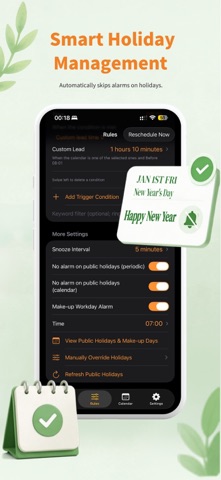
Localized Holiday Support
Features a built-in, real-time database of local statutory holidays that automatically syncs with official schedules. It intelligently adapts to workplace routines by automatically disabling alarms on statutory holidays and respecting "Do Not Disturb" settings, eliminating the need for manual toggling and perfectly aligning with your shift schedule. Versatile Recurring Alarms for Every Scenario
Beyond calendar-based shift monitoring, the app supports recurring alarms set for specific dates or days of the week. It accommodates various shift patterns and handles routine reminders—such as mortgage payment dates, weekly meetings, and scheduled on-duty rotations—all within a single app.
Key Product Advantages
Hassle-Free & Convenient: Simply snap a photo to input your entire shift schedule. Eliminate the inefficiency of manual typing and setting individual alarms, saving significant time.
Stable & Reliable: Powered by system-level native alarms, the app remains unaffected by silent modes, Focus modes, or background app closures, ensuring every reminder is delivered reliably.
Smart & Intuitive: Automatically adapts to public holidays and schedule adjustments, intelligently managing reminders without manual intervention.
Flexible Customization: Configure reminders using multi-dimensional criteria and flexible rule combinations to precisely match any shift pattern, including "Day-Night-Rest-Rest," three-shift rotations, and irregular schedules.
Tailored for Professionals: Designed specifically for shift workers, the app addresses the complexities and pain points of shift work, effectively preventing missed shifts and overlooked reminders.
---
Terms of Use: https://www.apple.com/legal/internet-services/itunes/dev/stdeula/
Privacy Policy: https://gabby-individual-c79.notion.site/ShiftAlarm-Privacy-Policy-3af15855067c80b28b07f40c8ee2cfdb