

Avid Control is made and published by Avid®. AppBrain is an independent app data site and isn't affiliated with Avid®. The app name, icon, screenshots and description belong to Avid® and are shown as published on the App Store.
AppBrain's verdict
Established- Rating on App Store
- 2.65
- 72 ratings
- Last updated
- April 22, 2026
It doesn't have enough ratings yet to judge what users think.
Rankings
App Store top chartsApp Store Rankings for Avid Control
Competitors
Similar apps and more from Avid®Alternatives to Avid Control




More from Avid®





Releases
Updates seen on the App Store- Version
- 2026.4.0
- Launched
- August 2015
No changelog data
User feedback
Ratings and reviews on the App StoreComments on Avid Control for iOS
We don't have enough comments to show example comments. Please check back later.
Technology
Found in the app by AppBrain- Price
- Free
- App size
- 47.5 MB
- Content rating
- Everyone
Technologies used by Avid Control
About the app and developer
About Avid Control
Avid Control is a music app developed by Avid®.
User Ratings
Avid Control is rated 2.65 out of 5 stars. The rating is based on 72 ratings.
App Information
Avid Control is freely available from the App Store. The app size is 47.48 MB. The latest version available is 2026.4.0. The last update was on April 22, 2026.
Technical Requirements
The app has a content rating of Everyone. The app has been available on the App Store since August 2015.
Developer information for Avid®
Address:
Frequently asked questions about Avid Control
Is Avid Control free?
Yes. Avid Control is free on the App Store.
Is Avid Control still available?
Yes. Avid Control is on the App Store, and the last update we saw was on April 22, 2026.
How large is Avid Control?
Avid Control is 47.48 MB.
Is Avid Control suitable for children?
App Store rates the content of Avid Control as suitable for everyone.
How do people rate Avid Control?
Avid Control scores 2.65 out of 5 stars, from 72 ratings on the App Store.
Who made Avid Control?
Avid Control was developed by Avid®. It is listed in the music category on the App Store.
What are the best alternatives to Avid Control?
People looking at Avid Control also look at these music apps: Pro Tools Shortcuts Trainer, Quiztones: EQ Ear Training, Auto-Key | Music key detection, Studio Pro Remote, SoundFlow.
Store listing
By Avid®, from the App Store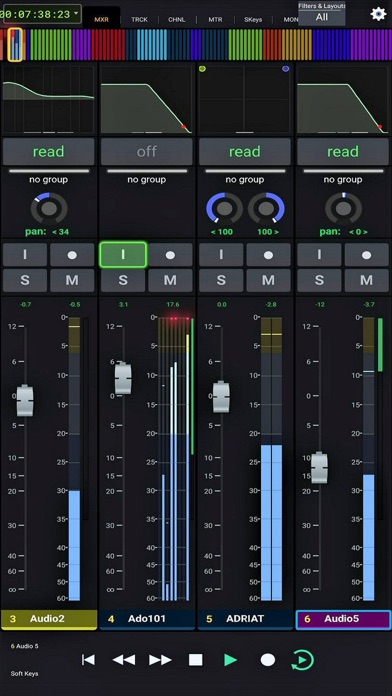
Description by Avid® Written by the developer, not by AppBrain. Click to read.
SYSTEM REQUIREMENTS
• Qualified Mac or Windows-based computer running any supported EUCON-enabled application and EuControl 2026.4 (NOTE: The free EUCON 2026.4 software must be downloaded from Avid and installed before using Avid Control)
• One of the following connections:
- Accessible wireless network (5 Ghz Wi-Fi network recommended), or
- Lightning-to-USB 3 Camera Adapter + USB 2-to-Ethernet Adapter to connect an Ethernet cable directly to iPad (be sure to disable Wi-Fi on your iPad when using this connection type)
ABOUT AVID CONTROL
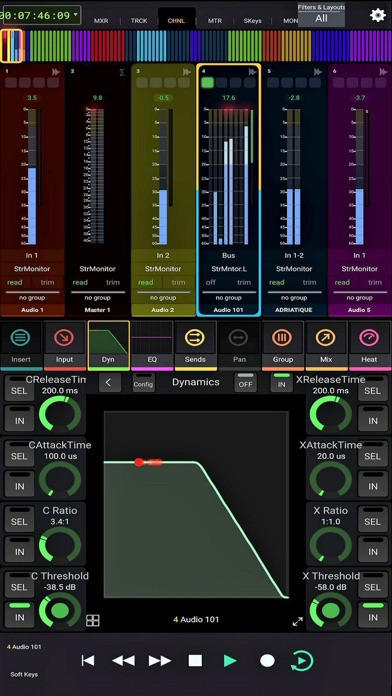
Take wireless control of your favorite audio and video software—right from your iPad. With Avid Control, you can record and mix audio in Pro Tools, Media Composer, Logic, Cubase, Nuendo, Digital Performer, Premiere and other media software, faster and more easily than working with a mouse and keyboard alone. The app combines the tight hardware/software integration and high-speed communication power of EUCON technology with the multi-touch advancements of iOS, so you get deep control, with great mixing flexibility. And when used with an Avid control surface (including the new Avid S1), you gain new touch workflows and custom control. Best of all… it’s free!
Track and mix with just a touch
• Speed up your efficiency using a host of controls
• Record, mute, and solo tracks with a tap
• Ride multiple faders to bring more life to your mix
• Get insight into your mix with extensive visual feedback
Get unrivaled audio and video control
• Access and control hundreds of software commands
• Punch in audio and toggle automation modes
• Trigger complex macros that will save you tons of time
• Switch control to different applications using a single app
Mix faster with intelligent design
• Gain multitouch control to speed up your efficiency
• Interact with and control your mix in whole new ways
• Perform keystroke shortcuts and more with a single tap
• Bring tactile control with you, anywhere you go
Navigate huge mixes easily
• Get fast access to any channel with Tracks view
• Quickly scroll through large mixes
• Select, record-enable, solo, and mute multiple tracks
• Keep an eye on levels with S6-style metering
Free yourself from the cables that bind
• Work in ways not possible with a wired mouse or control surface
• Record yourself in a different room from your DAW
• Control up to two networked workstations across a facility
• Trigger playback or recording from anywhere
Extend your control surface's workflows
• Get enhanced touch control and customizable layouts
• Navigate mixes faster with Tracks view
• View a counter display and additional visual feedback
• Recall layouts and trigger macros
Work with your favorite audio and video software*
• Avid Pro Tools
• Avid Media Composer
• Apple Logic Pro X
• Steinberg Cubase
• Steinberg Nuendo
• Merging Pyramix
• Mackie Control
* Please see Avid’s Control app support page for a full compatibility list.