


AppBrain's verdict
- Last updated
- October 26, 2026
- Size
- 311.5 MB
User feedback
Ratings and reviews on the App StoreComments on Awayk: Alarm Clock to Wake Up for iOS
We don't have enough comments to show example comments. Please check back later.
Store listing
By Lalitkumar Sharma, from the App StoreDescription by Lalitkumar Sharma Written by the developer, not by AppBrain. Click to read.
Awayk is made for people who struggle to wake up, hit snooze too often, or want a stronger morning routine. It turns waking up into action so you can start the day with purpose and momentum.
How Awayk works:
1) Choose a mission before bed
2) When the alarm rings, complete the task
3) The alarm only stops when the mission is done
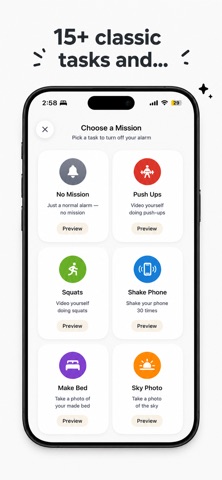
Mission examples:
- Find a random object around you
- Do squats or push-ups
- Take a photo of the sky
- Make your bed
- Walk a set number of steps
- Solve a math problem
- Say an affirmation out loud
- Breathe through a guided box-breathing round
Why people use Awayk:
- Stop snoozing and get up faster
- Build a more consistent morning routine
- Add accountability to your wake-up time
- Start the day with discipline and purpose
- Turn your alarm into a daily win
More than just an alarm clock:
- Mission-based wake-up system
- Built for heavy snoozers and people who struggle with mornings
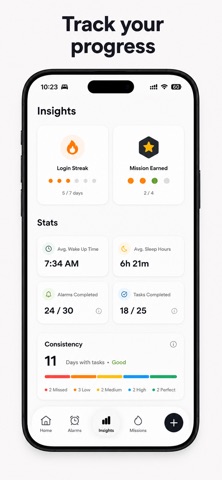
- Track streaks and morning insights
- Set unlimited alarms
- Choose your own alarm sound
- Great for anyone trying to improve discipline, routine, and productivity
SUBSCRIPTION REQUIRED
After you complete the short setup questions, an active Awayk Pro subscription is required to set alarms and use missions. Awayk Pro starts with a 3-day free trial.
Payment is charged to your Apple Account at confirmation of purchase. The subscription renews automatically unless auto-renew is turned off at least 24 hours before the end of the current period. Your account is charged for renewal within 24 hours prior to the end of the current period. Any unused portion of a free trial is forfeited when you purchase a subscription. You can manage or turn off auto-renew in your Apple Account settings at any time.
If you have any ideas or questions, please email us at hello.lalit11@gmail.com
PRIVACY POLICY: https://lalit127.github.io/awayk_legal/#privacy
TERMS OF USE: https://www.apple.com/legal/internet-services/itunes/dev/stdeula/
Safety and technology
Found in the app by AppBrain- Price
- Free
- App size
- 311.5 MB
- Content rating
- Everyone
Technologies used by Awayk: Alarm Clock to Wake Up
Releases
Updates seen on the App Store- Version
- 1.0.8
- Launched
- July 2026
No changelog data
Alternatives
Similar apps and more from Lalitkumar SharmaAlternatives to Awayk: Alarm Clock to Wake Up


More from Lalitkumar Sharma

Rankings
App Store top chartsApp Store Rankings for Awayk: Alarm Clock to Wake Up
About the app and developer
About Awayk: Alarm Clock to Wake Up
Awayk: Alarm Clock to Wake Up is a health & fitness app developed by Lalitkumar Sharma.
User Ratings
The app has no ratings yet.
App Information
Awayk: Alarm Clock to Wake Up is freely available from the App Store. The app size is 311.45 MB. The latest version available is 1.0.8. The last update was on October 26, 2026.
Technical Requirements
The app has a content rating of Everyone. The app has been available on the App Store since July 2026.
Awayk: Alarm Clock to Wake Up is made and published by Lalitkumar Sharma. AppBrain is an independent app data site and isn't affiliated with Lalitkumar Sharma. The app name, icon, screenshots and description belong to Lalitkumar Sharma and are shown as published on the App Store.
Developer information for Lalitkumar Sharma
Address: