

Baby's Musical Hands
Baby's Musical Hands is made and published by Milkbag Games. AppBrain is an independent app data site and isn't affiliated with Milkbag Games. The app name, icon, screenshots and description belong to Milkbag Games and are shown as published on the App Store.
AppBrain's verdict
EstablishedTop 10- Best rank
- #5
- Top Paid, Denmark
- Rating on App Store
- 4.32
- 19 ratings
- Last updated
- June 26, 2017
It doesn't have enough ratings yet to judge what users think. Its best ranking is #5 in Top Paid, Music Games in Denmark.
Rankings
App Store top charts- Highest rank
- #5
- Chart
- Top Paid
- Music Games
- Country
- Denmark
App Store Rankings for Baby's Musical Hands
Top rankings
| Rank | Country | Category | List |
|---|---|---|---|
| 5 | Denmark | Music Games | Top Paid |
| 20 | United States | Music Games | Top Paid |
| 8 | United Kingdom | Music Games | Top Paid |
| 11 | Switzerland | Music Games | Top Paid |
| 23 | Germany | Music Games | Top Paid |
| 26 | Canada | Music Games | Top Paid |
| 13 | Norway | Music Games | Top Paid |
| 17 | Sweden | Music Games | Top Paid |
| 18 | Austria | Music Games | Top Paid |
| 19 | Finland | Music Games | Top Paid |
Ranking history in Denmark
Competitors
Similar apps and more from Milkbag GamesAlternatives to Baby's Musical Hands


 RMB Games: Car Racing & Music


More from Milkbag Games


Releases
Updates seen on the App Store- Version
- 1.2.1
- Launched
- July 2011
No changelog data
User feedback
Ratings and reviews on the App StoreComments on Baby's Musical Hands for iOS
We don't have enough comments to show example comments. Please check back later.
Technology
Found in the app by AppBrain- Price
- $0.99
- App size
- 50.8 MB
- Content rating
- Everyone
Technologies used by Baby's Musical Hands
About the app and developer
About Baby's Musical Hands
Baby's Musical Hands is a games app developed by Milkbag Games.
User Ratings
Baby's Musical Hands is rated 4.32 out of 5 stars. The rating is based on 19 ratings.
App Information
Baby's Musical Hands costs $0.99. The app size is 50.76 MB. The latest version available is 1.2.1. The last update was on June 26, 2017.
Technical Requirements
The app has a content rating of Everyone. The app has been available on the App Store since July 2011.
Developer information for Milkbag Games
Address:
Store listing
By Milkbag Games, from the App Store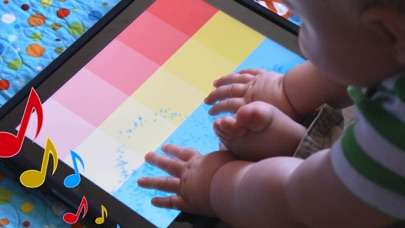
Description by Milkbag Games Written by the developer, not by AppBrain. Click to read.
As a game designer and developer, I love my iOS devices. But as a new father, I realized how much my son loves them too. I decided I could put my experience developing for iOS to use, and build an app for my son to play with. Baby's Musical Hands was born!
--= Awards for Baby's Musical Hands =--
Best Infant App (iOS) - 2011 Best App Ever Awards
Editor's Choice Award - Children's Technology Review
--= Reviews for Baby's Musical Hands =--
"Baby's Musical Hands Is a Magical App" - GeekDad - Wired.com
"Baby's Musical Hands is a great choice to increase the understanding of cause and effect in the youngest app users" - GiggleApps
"...any kid would find the fun in this one" - TUAW
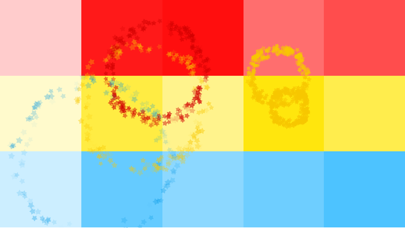
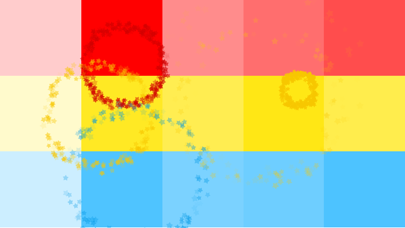
Baby's Musical Hands features 15 brightly colored squares that your baby can touch. Red squares make drum sounds, yellow squares play piano notes, and blue squares play guitar notes.
Every time your baby touches the screen, colorful stars will burst from their fingers. Watch them delight in the audio and visual feedback!
Baby's Musical Hands supports full multi-touch, meaning your baby gets the kind of feedback they expect when touching the screen.
I'd love to hear from you if your son or daughter loves Baby's Musical Hands as much as mine!
Please like the Baby's Musical Hands facebook page to stay up to date on what's new with the app: http://www.facebook.com/BabysMusicalHands
Owen Goss
Father
Founder, Streaming Colour Studios
==========
TIP: In iOS 6 or later, you can use your device's Accessibility options to disable the home button, so your child won't accidentally quit Baby's Musical Hands:
- Open your iPhone or iPad's Settings app
- Tap on: General > Accessibility > Guided Access
- Turn Guided Access on
- Set a Passcode (remember what this is)
- Press the Home button to quit the settings app
- Open Baby's Musical Hands
- Triple-click the Home button
- Tap "Start" in the top-right corner of the screen
- The Home button is now disabled
When you are ready to quit Baby's Musical Hands:
- Triple-click the Home button
- Enter your Passcode
- Tap "End" in the top-left corner of the screen
- Press the Home button to quit the app