

BaiOCR - Text grabber scanner
BaiOCR - Text grabber scanner is made and published by 新乐 陶. AppBrain is an independent app data site and isn't affiliated with 新乐 陶. The app name, icon, screenshots and description belong to 新乐 陶 and are shown as published on the App Store.
AppBrain's verdict
Established- Rating on App Store
- 4.95
- 62 ratings
- Last updated
- January 16, 2022
It doesn't have enough ratings yet to judge what users think.
Rankings
App Store top chartsApp Store Rankings for BaiOCR - Text grabber scanner
Competitors
Similar apps and more from 新乐 陶Alternatives to BaiOCR - Text grabber scanner






More from 新乐 陶







Releases
Updates seen on the App Store- Version
- 2.1.8
- Launched
- October 2018
No changelog data
User feedback
Ratings and reviews on the App StoreComments on BaiOCR - Text grabber scanner for iOS
We don't have enough comments to show example comments. Please check back later.
Technology
Found in the app by AppBrain- Price
- $1.99
- App size
- 9.62 MB
- Content rating
- Everyone
Technologies used by BaiOCR - Text grabber scanner
About the app and developer
About BaiOCR - Text grabber scanner
BaiOCR - Text grabber scanner is a productivity app developed by 新乐 陶.
User Ratings
BaiOCR - Text grabber scanner is rated 4.95 out of 5 stars. The rating is based on 62 ratings.
App Information
BaiOCR - Text grabber scanner costs $1.99. The app size is 9.62 MB. The latest version available is 2.1.8. The last update was on January 16, 2022.
Technical Requirements
The app has a content rating of Everyone. The app has been available on the App Store since October 2018.
Developer information for 新乐 陶
Address:
Frequently asked questions about BaiOCR - Text grabber scanner
Is BaiOCR - Text grabber scanner free?
No. BaiOCR - Text grabber scanner costs $1.99 on the App Store.
Is BaiOCR - Text grabber scanner still available?
Yes. BaiOCR - Text grabber scanner is on the App Store, and the last update we saw was on January 16, 2022.
How large is BaiOCR - Text grabber scanner?
BaiOCR - Text grabber scanner is 9.62 MB.
Is BaiOCR - Text grabber scanner suitable for children?
App Store rates the content of BaiOCR - Text grabber scanner as suitable for everyone.
How do people rate BaiOCR - Text grabber scanner?
BaiOCR - Text grabber scanner scores 4.95 out of 5 stars, from 62 ratings on the App Store.
Who made BaiOCR - Text grabber scanner?
BaiOCR - Text grabber scanner was developed by 新乐 陶. It is listed in the productivity category on the App Store.
What are the best alternatives to BaiOCR - Text grabber scanner?
People looking at BaiOCR - Text grabber scanner also look at these productivity apps: Pin - Clipboard Extensions, Priori - Simple List, 小历 - 小而美的日历, progress bar - quantifying, Bookmark.house.
Store listing
By 新乐 陶, from the App Store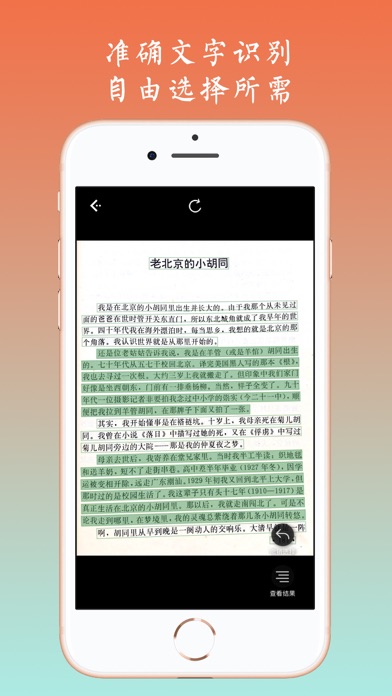

Description by 新乐 陶 Written by the developer, not by AppBrain. Click to read.
KEY FEATURES:
- Machine learning make OCR more accurate.
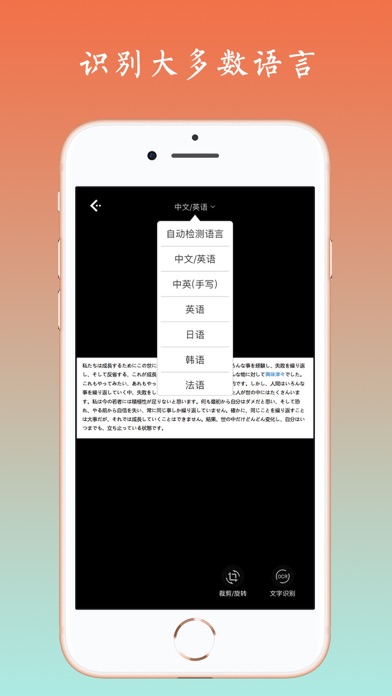
- 360° text recognition in 10+ languages , including Chinese(Simplified), Chinese(Traditional), English, Russian, German, Spanish, Greek, Turkish, Korean and so on.
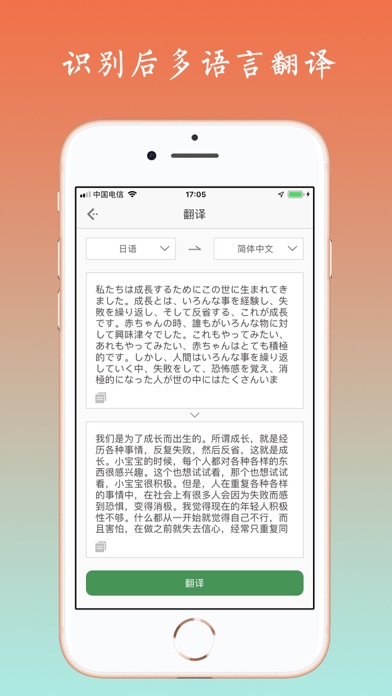
- Support multiply language translation, support business negotiation, study work, travel abroad, and other requirements.
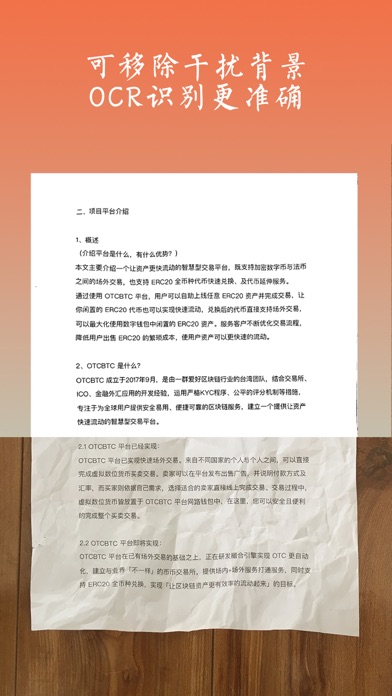
- Clean the background of paper to make OCR much accurate.
- Copy, Paste and Edit recognized result with one-click.
- Automatically save extracted text.
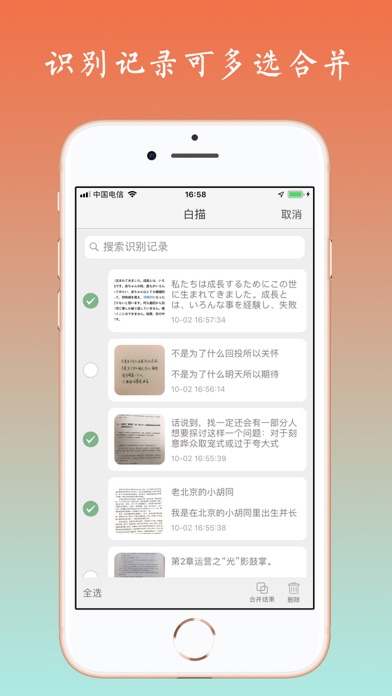
- Find history recognition results in "Records".
- Support combination of multiple recognized text.
下载即可享受没有任何限制的OCR文字识别、批量识别以及翻译功能,无内购,无账号系统,无广告,拍照识别速度更快。
-----使用场景-----
拍照翻译文字、图片文字提取、公司文件转录、纸质书阅读笔记摘录、截图文字内容提取、身份证识别、购物小票识别,纸质文件电子化存档等等多种场景适用。
----功能亮点----
● 竖排文字、繁体文字,都能识别
● 多语言识别
支持中文、英语、日语、韩语、法语、德语、俄语、西班牙语等大多数语言的OCR识别;留学生说“白描用来处理上课笔记实在是太好用了”;
● 云端识别
云端OCR识别引擎,识别准确度随着自动学习越来越高,识别速度快;另外可以放心的是,图片上传经过加密处理,无需担心隐私。
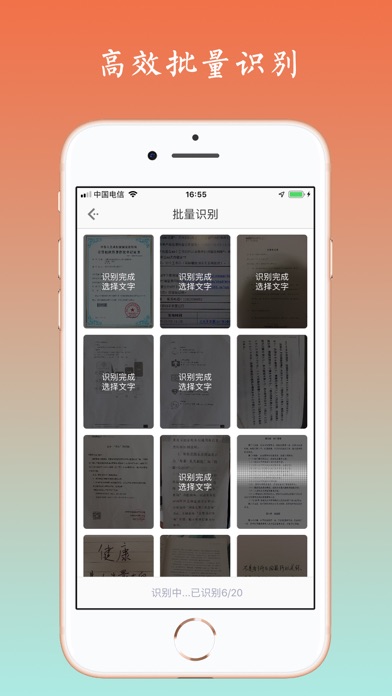
● 批量识别。
同类app里的领跑者,能一次识别50张图片,批量识别后也可以对多张原图同时进行校对。
● 识别结果自动存为历史记录,检索方便。
●清理纸张背景
有些书页或者纸张太薄,会透出背面的字,对识别结果造成影响,可点击识别页面的「清理背景」按钮进行优化,从而使识别结果更准确,
● 识别结果翻译
支持简体中文、日语、英语、韩语、法语、西班牙语、阿拉伯语、俄语、德语、葡萄牙语、意大利语、繁体中文、粤语、文言文、泰语、希腊语、波兰语、荷兰语、保加利亚语、爱沙尼亚语、丹麦语、芬兰语、捷克语、罗马尼亚语、斯洛文尼亚语、瑞典语、匈牙利语、越南语的互译;
● 灵活选择
手指流畅顺滑,即可分块选择需要的文字,想要哪段点哪段(想查看所有文本,不需要按行点选);识别结果可编辑且选择复制到各种app中使用,支持微信、QQ、有道云、印象笔记等软件。
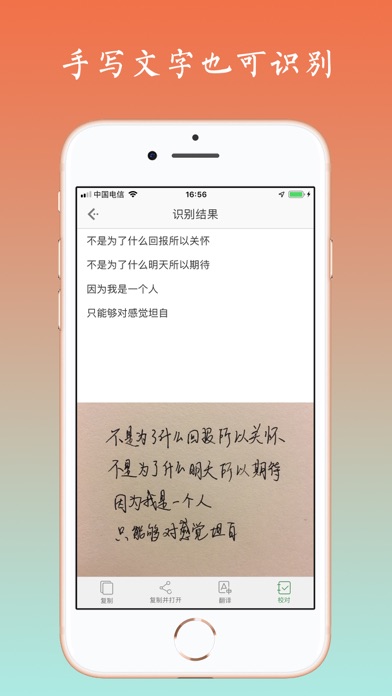
● 快速校对
在识别结果页面点击“校对”按钮进行校对,可以在不离开编辑区域的情况下方便对照着原文修改,弥补OCR技术的不完美之处。
● 通过 iOS 12 上的捷径功能,可以自定义动作及参数,你的效率你做主;
● 识别结果自动分段,弥补了大多数识别软件无法还原原文段落的问题;
使用中遇到任何问题,欢迎发送邮件到tolecen@163.com,或者联系微博@凉子的狗狗