

Barcode Sender: Scan to Sheets
Barcode Sender: Scan to Sheets is made and published by Filippo Tortomasi. AppBrain is an independent app data site and isn't affiliated with Filippo Tortomasi. The app name, icon, screenshots and description belong to Filippo Tortomasi and are shown as published on the App Store.
AppBrain's verdict
- Rating on App Store
- 3.00
- 2 ratings
- Last updated
- April 16, 2026
- Size
- 16.1 MB
It doesn't have enough ratings yet to judge what users think.
User feedback
Ratings and reviews on the App StoreComments on Barcode Sender: Scan to Sheets for iOS
We don't have enough comments to show example comments. Please check back later.
Store listing
By Filippo Tortomasi, from the App Store



Description by Filippo Tortomasi Written by the developer, not by AppBrain. Click to read.
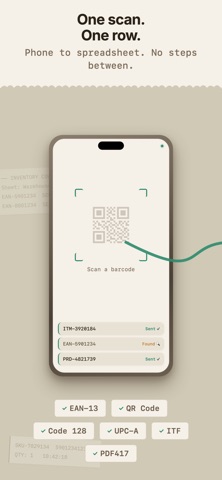
Scan a barcode. It appears in your spreadsheet. That's it.
No PC required. No desktop software. No CSV exports. Just point your phone's camera at a barcode and the data lands in the exact column you configured — from anywhere, on any network.
— WHAT IT DOES
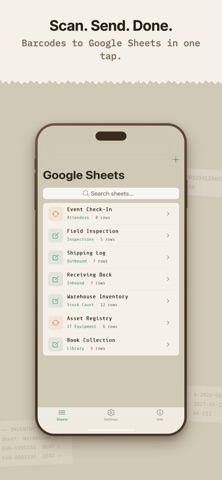
• Scan barcodes and QR codes directly into Google Sheets
• Configure which columns receive data: timestamps, quantities, locations, custom fields
• Update existing rows or append new ones
• Search and browse your scanned data on your phone
• Share sheet configurations across your team
— WHO IT'S FOR
Warehouse teams counting inventory.
Field technicians tracking equipment.
Retail staff logging shipments.
Anyone who types barcodes into spreadsheets and wishes they didn't.
— WHY TEAMS CHOOSE BARCODE SENDER
2-minute setup. Open the app, connect your Google Sheet, configure your columns. Done.
No PC needed. Other apps require desktop software running on a computer. We don't. Your phone talks directly to Google Sheets via the cloud.
Works on mobile data. Scan from a warehouse floor, a loading dock, or a parking lot. No WiFi required.
Your data stays yours. We use Google authentication. Your spreadsheet stays in your Google account. We never store your data.
Custom columns. Map barcode data to specific columns. Add timestamps, quantities, aisle locations, or any custom field.
Update in place. Scan a barcode that already exists in your sheet and update its row instead of creating a duplicate.
— SUPPORTED FORMATS
QR Code, EAN-13, EAN-8, UPC-A, UPC-E, Code 128, Code 39, Code 93, ITF, Codabar, Data Matrix, PDF417, Aztec
— PRICING
Free tier available. No scan limits that interrupt your work. No surprise paywalls mid-session.
Built by the team behind Barcode to PC (4.7, 500+ reviews). We've been building barcode tools since 2016. stars
Safety and technology
Found in the app by AppBrain- Price
- Free
- App size
- 16.1 MB
- Content rating
- Everyone
Technologies used by Barcode Sender: Scan to Sheets
Releases
Updates seen on the App Store- Version
- 1.1.4
- Launched
- April 2026
No changelog data
Alternatives
Similar apps and more from Filippo TortomasiMore from Filippo Tortomasi

Also available on Google Play

Rankings
App Store top chartsApp Store Rankings for Barcode Sender: Scan to Sheets
About the app and developer
About Barcode Sender: Scan to Sheets
Barcode Sender: Scan to Sheets is a business app developed by Filippo Tortomasi.
User Ratings
Barcode Sender: Scan to Sheets is rated 3.00 out of 5 stars. The rating is based on 2 ratings.
App Information
Barcode Sender: Scan to Sheets is freely available from the App Store. The app size is 16.10 MB. The latest version available is 1.1.4. The last update was on April 16, 2026.
Technical Requirements
The app has a content rating of Everyone. The app has been available on the App Store since April 2026.
Developer information for Filippo Tortomasi
Address:
Frequently asked questions about Barcode Sender: Scan to Sheets
Is Barcode Sender: Scan to Sheets free?
Yes. Barcode Sender: Scan to Sheets is free on the App Store.
Is Barcode Sender: Scan to Sheets still available?
Yes. Barcode Sender: Scan to Sheets is on the App Store, and the last update we saw was on April 16, 2026.
How large is Barcode Sender: Scan to Sheets?
Barcode Sender: Scan to Sheets is 16.10 MB.
Is Barcode Sender: Scan to Sheets suitable for children?
App Store rates the content of Barcode Sender: Scan to Sheets as suitable for everyone.
How do people rate Barcode Sender: Scan to Sheets?
Barcode Sender: Scan to Sheets scores 3.00 out of 5 stars, from 2 ratings on the App Store.
Who made Barcode Sender: Scan to Sheets?
Barcode Sender: Scan to Sheets was developed by Filippo Tortomasi. It is listed in the business category on the App Store.