

BatchResizer3
BatchResizer3 is made and published by Koichi Otera. AppBrain is an independent app data site and isn't affiliated with Koichi Otera. The app name, icon, screenshots and description belong to Koichi Otera and are shown as published on the App Store.
AppBrain's verdict
- Last updated
- August 6, 2026
Rankings
App Store top chartsApp Store Rankings for BatchResizer3
Competitors
Similar apps and more from Koichi OteraAlternatives to BatchResizer3


More from Koichi Otera



Releases
Updates seen on the App Store- Version
- 1.0.2
- Launched
- August 2026
No changelog data
User feedback
Ratings and reviews on the App StoreComments on BatchResizer3 for iOS
We don't have enough comments to show example comments. Please check back later.
Technology
Found in the app by AppBrain- Price
- Free
- App size
- 7.92 MB
- Content rating
- Everyone
Technologies used by BatchResizer3
About the app and developer
About BatchResizer3
BatchResizer3 is a photo & video app developed by Koichi Otera.
What is the rating of BatchResizer3?
BatchResizer3 has no ratings yet.
Is BatchResizer3 free?
BatchResizer3 is free. The app size is 7.92 MB. The latest version available is 1.0.2. The last update was on August 6, 2026.
What are the requirements for BatchResizer3?
The app has a content rating of Everyone. The app has been available on the App Store since August 2026.
Developer information for Koichi Otera
Address:
Store listing
By Koichi Otera, from the App Store



Description by Koichi Otera Written by the developer, not by AppBrain. Click to read.
Resized photos can be saved to any album, shared to social media, or sent by email.
Save your frequently used sizes as presets in advance for quick, effortless resizing.
【Features】
● Resize multiple images at once.
● Resize and crop to a square in a single step.
● Resize PNG images while preserving transparency.
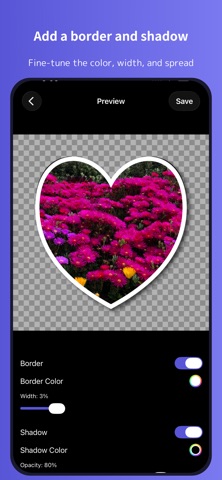
● Crop photos into a variety of shapes — hearts, stars, and more — then add a border and shadow.
● Customize the border's color and thickness.
● Save your frequently used resize settings as presets.
● Choose your output format.
● Send resized images by email or share them to social media without saving to your Camera Roll.
● Choose whether to keep the original image's metadata.
● Delete selected photos in bulk.
● View each image's metadata (Exif, TIFF, GPS, file size, file name, and more).
【Note】
BatchResizer3 requires access to your photos to work. A permission prompt appears the first time you launch the app. If you deny access and want to grant it later, open the Settings app and allow Photos access for "BatchResizer3."