

BeadShare is made and published by 旗 康. AppBrain is an independent app data site and isn't affiliated with 旗 康. The app name, icon, screenshots and description belong to 旗 康 and are shown as published on the App Store.
AppBrain's verdict
- Last updated
- April 13, 2026
- Size
- 59.3 MB
User feedback
Ratings and reviews on the App StoreComments on BeadShare for iOS
We don't have enough comments to show example comments. Please check back later.
Store listing
By 旗 康, from the App Store


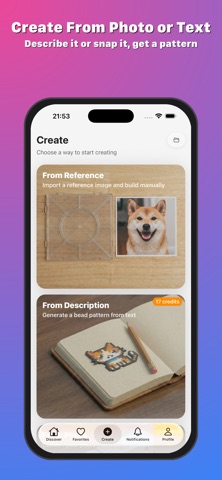


Screenshots by 旗 康, from the the App Store listing
Description by 旗 康 Written by the developer, not by AppBrain. Click to read.
BeadShare — Bead Pattern Creator & Building Guide
Make bead patterns, follow a color-by-color building guide, preview the ironed result, and share what you make.
10+ Powerful Editing Tools
- Auto remove backgrounds, auto crop, auto strip outlines, flip canvas, swap colors, auto remove colors, match reference images' colors. Undo goes back 50 steps.
Building Guide
- Pick a pattern, and the app walks you through it one color at a time. It tracks what you've placed, shows how many beads of each color you need, and tells you which board you're on. Closest thing to a recipe for bead art.
Ironing Preview
- Before you iron, check what the finished piece will look like. Switch between three styles: smooth side, towel side, and baking mat.
Bead Brand Color Matching
- Colors aren't generic hex codes. They map to real bead brand numbers, so you can buy exactly what you need.
Display Board & Charm Jar
Two ways to show your work on your profile:
- Display Board: pin patterns onto a felt board layout, drag them where you want
- Charm Jar: your patterns float around in a glass jar that reacts to tilting your phone. It's a toy and a portfolio at the same time.
Community
- Browse other people's patterns, sort by new or popular, save to collections, follow creators. Share any pattern with a short code.
Ways to Create
- Blank canvas for drawing
- Import a photo and convert it
- Trace over a reference image
- Type a description and generate one
Offline
Patterns, drafts, and building progress stay on your device. No connection needed.
Free
- All editing tools
- Pattern creation and reference import
- Building guide
- Ironing preview
- Community and sharing
- Display board and charm jar
Premium
- Photo and text-to-pattern generation
- Unlimited building sessions
- All generation models and styles
- 100 generations/month
Payment is charged to your Apple ID at confirmation of purchase. Subscriptions automatically renew unless cancelled at least 24 hours before the end of the current period. Manage or cancel anytime in your Apple ID account settings.
Terms of Use: https://www.apple.com/legal/internet-services/itunes/dev/stdeula/
Privacy Policy: https://zidaneymar.github.io/BeadShare/privacy.html
Make bead patterns, follow a color-by-color building guide, preview the ironed result, and share what you make.
10+ Powerful Editing Tools
- Auto remove backgrounds, auto crop, auto strip outlines, flip canvas, swap colors, auto remove colors, match reference images' colors. Undo goes back 50 steps.
Building Guide
- Pick a pattern, and the app walks you through it one color at a time. It tracks what you've placed, shows how many beads of each color you need, and tells you which board you're on. Closest thing to a recipe for bead art.
Ironing Preview
- Before you iron, check what the finished piece will look like. Switch between three styles: smooth side, towel side, and baking mat.
Bead Brand Color Matching
- Colors aren't generic hex codes. They map to real bead brand numbers, so you can buy exactly what you need.
Display Board & Charm Jar
Two ways to show your work on your profile:
- Display Board: pin patterns onto a felt board layout, drag them where you want
- Charm Jar: your patterns float around in a glass jar that reacts to tilting your phone. It's a toy and a portfolio at the same time.
Community
- Browse other people's patterns, sort by new or popular, save to collections, follow creators. Share any pattern with a short code.
Ways to Create
- Blank canvas for drawing
- Import a photo and convert it
- Trace over a reference image
- Type a description and generate one
Offline
Patterns, drafts, and building progress stay on your device. No connection needed.
Free
- All editing tools
- Pattern creation and reference import
- Building guide
- Ironing preview
- Community and sharing
- Display board and charm jar
Premium
- Photo and text-to-pattern generation
- Unlimited building sessions
- All generation models and styles
- 100 generations/month
Payment is charged to your Apple ID at confirmation of purchase. Subscriptions automatically renew unless cancelled at least 24 hours before the end of the current period. Manage or cancel anytime in your Apple ID account settings.
Terms of Use: https://www.apple.com/legal/internet-services/itunes/dev/stdeula/
Privacy Policy: https://zidaneymar.github.io/BeadShare/privacy.html
Safety and technology
Found in the app by AppBrain- Price
- Free
- App size
- 59.3 MB
- Content rating
- Everyone
Technologies used by BeadShare
Releases
Updates seen on the App Store- Version
- 1.3.2
- Launched
- March 2026
No changelog data
Alternatives
Similar apps and more from 旗 康Alternatives to BeadShare


More from 旗 康

Rankings
App Store top chartsApp Store Rankings for BeadShare
This app is not ranked
About the app and developer
About BeadShare
BeadShare is an entertainment app developed by 旗 康.
What is the rating of BeadShare?
BeadShare has no ratings yet.
Is BeadShare free?
BeadShare is free. The app size is 59.27 MB. The latest version available is 1.3.2. The last update was on April 13, 2026.
What are the requirements for BeadShare?
The app has a content rating of Everyone. The app has been available on the App Store since March 2026.
Developer information for 旗 康
Address: