

Bebop PRO is made and published by Michele Vagnetti. AppBrain is an independent app data site and isn't affiliated with Michele Vagnetti. The app name, icon, screenshots and description belong to Michele Vagnetti and are shown as published on the App Store.
AppBrain's verdict
Established- Rating on App Store
- 3.73
- 22 ratings
- Last updated
- February 10, 2018
It doesn't have enough ratings yet to judge what users think.
Rankings
App Store top chartsApp Store Rankings for Bebop PRO
Competitors
Similar apps and more from Michele VagnettiAlternatives to Bebop PRO



More from Michele Vagnetti




Releases
Updates seen on the App Store- Version
- 3.6.2
- Launched
- March 2016
No changelog data
User feedback
Ratings and reviews on the App StoreComments on Bebop PRO for iOS
We don't have enough comments to show example comments. Please check back later.
Technology
Found in the app by AppBrain- Price
- $4.99
- App size
- 64.6 MB
- Content rating
- Everyone
Technologies used by Bebop PRO
About the app and developer
About Bebop PRO
Bebop PRO is an utilities app developed by Michele Vagnetti.
User Ratings
Bebop PRO is rated 3.73 out of 5 stars. The rating is based on 22 ratings.
App Information
Bebop PRO costs $4.99. The app size is 64.64 MB. The latest version available is 3.6.2. The last update was on February 10, 2018.
Technical Requirements
The app has a content rating of Everyone. The app has been available on the App Store since March 2016.
Developer information for Michele Vagnetti
Address:
Frequently asked questions about Bebop PRO
Is Bebop PRO free?
No. Bebop PRO costs $4.99 on the App Store.
Is Bebop PRO still available?
Yes. Bebop PRO is on the App Store, and the last update we saw was on February 10, 2018.
How large is Bebop PRO?
Bebop PRO is 64.64 MB.
Is Bebop PRO suitable for children?
App Store rates the content of Bebop PRO as suitable for everyone.
How do people rate Bebop PRO?
Bebop PRO scores 3.73 out of 5 stars, from 22 ratings on the App Store.
Who made Bebop PRO?
Bebop PRO was developed by Michele Vagnetti. It is listed in the utilities category on the App Store.
What are the best alternatives to Bebop PRO?
People looking at Bebop PRO also look at these utilities apps: WiFi Check - speed tool, Orgro, Leaktronics App, Tools for Upland, DigiTrainsPro.
Store listing
By Michele Vagnetti, from the App Store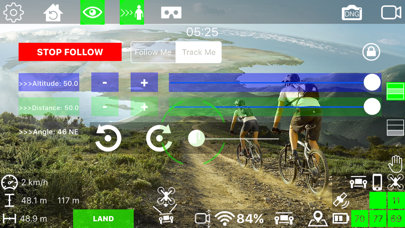
Description by Michele Vagnetti Written by the developer, not by AppBrain. Click to read.
Main Feature:
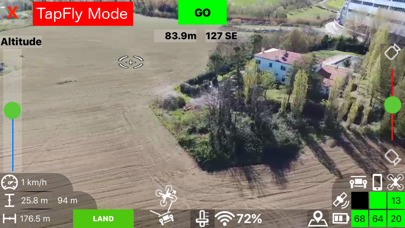
-TapFly Mode (read more down below)
-Map TapFly Mode (read more down below)
-AR Localizers (read more down below)
-Watch Me Mode (read more down below)
-Watch IT Mode (POI) (read more down below)
-Follow Me Mode (position,speed, and altitude tracking)
-Track Me Mode (follow me from any angle)
-Dynamic Track (the bebop orbit around you while follow you)
-Orbit
-Exclusive Headless Mode
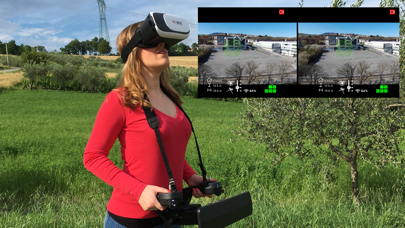
-VR Mode (read more down below)
-Fullscreen Mode
-Altitude Limit Override
-Hand Launch
-Beeper
-Configurable 4 positions rate selector on piloting screen
Tripod Mode
Filming 1 Mode
Filming 2 Mode
Sport Mode
-Piloting mode 1, 2, 3, 4
-work with:
Skycontroller
Skycontroller2
MFI bluetooth controller
FLYPAD controller
WIFI extender
-Return home
-Banked Turn
-Flight Limits
-Media Management
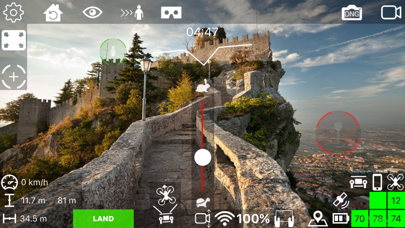
-On screen information:
-speed
-altitude
-altitude over sea level
-distance
-wifi signal strength
-bebop battery level
-device battery level
-skycontroller battery level
-bebop gps fix (with satellite number)
-device gps fix (color coded on the precision level)
-skycontroller gps fix
-dinamic viewfinder
-flight timer
-radar
-Virtual Exponential analog stick
-Videofeed from the bebop
-Map view
-Flat Trim
-Calibration
-Save last know Bebop Position
-Super handy shortcut to system wi-fi options
-Siri voice feedback
-Metric/Imperial unit
-exposure correction
-color saturation
-white balance
-video recoding Mb/s
-video recording frame rate
Localization:
- english
- italian
- spanish
-- TapFly Mode --
With this modality you can pilot your bebop just by tapping your destination on the videoFeed, it's work like Magic!
-- Map TapFly Mode --
In this modality you can tap on the Map your destination and the Bebop will automatically reach it
-- AR Localizers --
Floatting target on the videofeed that indicate you your position and the position of your POI
-- Watch Me Mode --
In this modality the camera of the bebop always point at you!!
You can still the control of the bebop move it around and take unmatched selfie video, no limit to your imagination!!
Or you can move around, the bebop will stay stationary hovering but always looking what you doing self rotating on the z axis and tilting the camera for keep you in frame!!
--Follow Me Mode--
As you expect in this mode the bebop will follow you!!
Just choose the distance and the elevation from which you what to be followed and enjoy the best follow algorithm out there!!
The movement of the bebop are precisely calculated considering speed,acceleration,direction,distance both of you and the bebop it self.
--Track / Dynamic Track Me Mode--
Not only follow you from behind, with the mode the bebop follow you from any angle, you can change angle altitude and distance on the fly! and more the angle can change dynamically so the bebop orbit around you!!
-- Watch IT Mode (POI) --
Choose a point on the map and the bebop will always look at your Point Of Interest!!
You can move the bebop around while it look at the place you choose!!
The best solution for shot your favorite monument, castle,lake...your target will be always in frame, with automatic yaw angular speed calculated base on the tangential speed of the bebop with you POI
-VR mode (Split view for VR headset - goggles)
include options for
headtracking for move the camera (optional)
pan headtracking looked on speed (optional)
on-screen arrow that indicate your position
AR localizer
adjustable FOV
works with skycontroller,skycontroller 2 and bluetooth MFI controller
This app is built with Parrot SDK 3.12
-This app works with both Bebop1 and Bebop2 but the update GPS module of the Bebop2 will guarantee better performance and precision in all position related operation
-Many of special function of the app require a GPS equipped device
-Altitude Tracking require a barometer equipped device