Bike Tracker: SpiderRoute is a navigation app developed by WOWCODED THINGS LTD.
User Ratings
The app has no ratings yet.
App Information
Bike Tracker: SpiderRoute is freely available from the App Store. The app size is 58.64 MB. The latest version available is 1.6. The last update was on October 26, 2026.
Technical Requirements
The app has a content rating of Everyone. The app has been available on the App Store since August 2026.
Description by WOWCODED THINGS LTD(from the App Store)
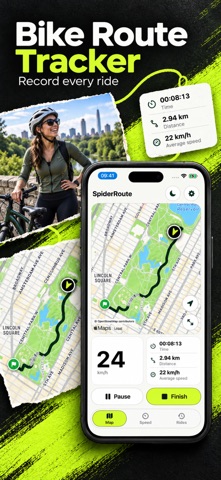
SpiderRoute records your bicycle and scooter rides, keeps your route on the map, and brings your speed, distance and ride history together.
Start with the map for a commute, scooter ride or weekend cycle. Expand it, follow your location and record your journey.
RECORD YOUR RIDE
Start recording before you set off. Follow your route as it grows, with distance, active time, average speed and current speed alongside it. Pause for a break, resume when ready, then finish to save the ride. Pauses remain separate route segments instead of drawing a straight line across the gap.
Recording can continue while you use another app or lock your phone. The active ride is saved incrementally on your device. If the app is interrupted, recover the confirmed recording on the next launch. GPS cannot keep recording after you force-quit the app; continuing starts a new segment without inventing the missing journey.
BRING A ROUTE WITH YOU
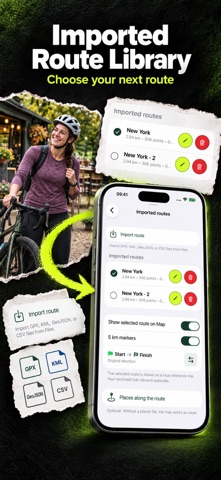
Import a GPX, KML, GeoJSON or CSV route from Files and display it beside your recording. Choose a route from your library, show its full shape, reverse its direction and use distance markers to understand your progress. Your reference route and recorded ride remain separate.
DOWNLOAD MAPS BEFORE YOU GO
With Plus, download OpenStreetMap areas for offline use. Choose countries or regions and manage stored maps in Settings. An active trial, subscription or Lifetime Access unlocks offline maps. When access ends, downloads pause and saved maps stay on the device.
EXPLORE PLACES ALONG THE WAY
Import GPX waypoints or a compatible route guide to see places on the map. Tap a mark for its description, included photos and source links. Hide marks for a quieter map. Guides come from imported files; SpiderRoute does not provide turn-by-turn directions or create routes for you.
SEE YOUR PACE
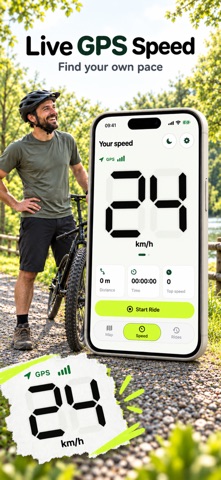
Switch to the Speed tab for a large number or a complete gauge. Choose km/h, mph, m/s or knots, adjust the gauge scale, and customize number colors for light and dark appearances. An audible warning can alert you at your chosen speed threshold. Enable the optional mirrored HUD in Settings.
KEEP AND SHARE YOUR RIDES
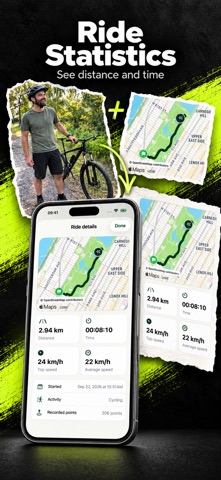
Browse saved rides with maps, timing, distance and speed statistics. Export GPX, KML, GeoJSON or CSV through Share or Save to Files. Existing saved rides stay exportable. Enable iCloud sync for ride history in your private iCloud Documents container, or keep it on your device.
Optional Remote Camera connects two nearby iPhones: one records video while the other controls it from the map. Pairing is local; videos stay on the recording phone.
Plus unlocks ride recording and offline maps. Live speed, warnings, online maps, imported routes, HUD, saved ride history, iCloud sync and export are available without Plus. No SpiderRoute account or analytics service is required. GPS accuracy varies with your surroundings. Stop safely before using the controls.
PURCHASE OPTIONS: - SpiderRoute Plus offers auto-renewable monthly and yearly subscriptions or Lifetime Access, a one-time non-consumable purchase with no subscription. - Eligible new yearly subscribers receive a 3-day introductory trial. Monthly and Lifetime have no trial. - After the trial, the subscription renews at the localized annual price shown before purchase unless auto-renew is turned off at least 24 hours before the end of the current period. - Payment will be charged to your Apple ID at confirmation of purchase. - Your subscription renews automatically unless auto-renew is turned off at least 24 hours before the end of the current period. - Your account will be charged for renewal within 24 hours before the end of the current period. - You can manage or cancel your subscription in Settings > Apple ID > Subscriptions after purchase. - Any unused portion of an introductory trial is forfeited when you purchase a subscription.
Terms of Use: https://www.apple.com/legal/internet-services/itunes/dev/stdeula/ Privacy: https://spiderroute.com/ios/privacy
Each subscription will automatically renew 3 days before the expiration date for
the same time period. Subscriptions can be cancelled at any time before the renewal.