

BimmerDash: OBD2 Gauge
BimmerDash: OBD2 Gauge is made and published by CHUN-YI LIN. AppBrain is an independent app data site and isn't affiliated with CHUN-YI LIN. The app name, icon, screenshots and description belong to CHUN-YI LIN and are shown as published on the App Store.
AppBrain's verdict
- Last updated
- October 12, 2026
- Size
- 20.7 MB
User feedback
Ratings and reviews on the App StoreComments on BimmerDash: OBD2 Gauge for iOS
We don't have enough comments to show example comments. Please check back later.
Store listing
By CHUN-YI LIN, from the App Store



Description by CHUN-YI LIN Written by the developer, not by AppBrain. Click to read.
【 Engine & ECU Optimized for F-Chassis & B-Series / N-Series 】
BimmerDash is deeply optimized for B48, B58, S55, N20, and N55 engine control units (ECU), ensuring high-precision data logging and rapid PID polling response.
【 Apple Intelligence On-Device AI Diagnostics 】
• 15-Minute Telemetry Backtest: Fully automatic analysis of boost curves, ignition timing advance, and knock retard events powered by the iPhone's local Apple Neural Engine (ANE).
• 100% On-Device Privacy: Zero dependencies on external cloud servers. Operates at full speed on tracks or remote roads without cellular signal.
【 Apple CarPlay & Live Activities 】
• CarPlay Multi-Layout Support: Strictly complies with Apple driving safety guidelines with 10-second interval peak and average metric calculations.
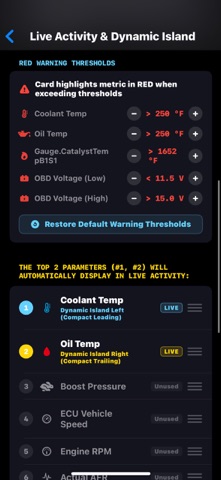
• Live Activities: Real-time telemetry monitoring on Lock Screen and Dynamic Island.
【 18 Core Performance Metrics 】
Track both engine health and track-focused metrics simultaneously, including:
• Engine Speed (RPM) & Live Vehicle Speed
• Turbo Boost Pressure
• Engine Oil Temp & Coolant Temp
• Throttle Position
• Battery Voltage
...and many other critical data points to help you manage thermal efficiency and power delivery.
【 Hardware & Connection Requirements 】
• This app requires a compatible aftermarket Bluetooth 4.0 (BLE / Bluetooth Low Energy) OBD-II adapter (e.g., vLinker BM+, OBDLink CX, or any standard BLE-compliant ELM327 / OBD2 adapter).
• Classic Bluetooth 2.0 / 3.0 (legacy non-BLE) and Wi-Fi-only OBD adapters are NOT supported by iOS and will not connect.
• Quick Tip: Do NOT pair the device in your iPhone’s iOS Bluetooth settings. Simply turn on Bluetooth, plug in your adapter, and connect seamlessly directly inside the app.
【 Racing Simulator Telemetry Support 】
• Currently supports the Forza series with a dedicated racing dashboard display.
【 Disclaimer & Safety Information 】
• Drive safely. Do NOT attempt to operate or configure this app while driving.
• Data displayed by this app is intended for performance monitoring and enthusiast reference only. It is not a substitute for professional factory diagnostic tools used for repair or mechanical troubleshooting.
• All vehicle platform codes, model names, and related terms are properties of their respective registered owners. This app is an independent third-party enthusiast monitoring tool.
Terms of Use (EULA): https://www.apple.com/legal/internet-services/itunes/dev/stdeula/
Safety and technology
Found in the app by AppBrain- Price
- Free
- App size
- 20.7 MB
- Content rating
- Everyone
Technologies used by BimmerDash: OBD2 Gauge
Releases
Updates seen on the App Store- Version
- 1.6.12
- Launched
- July 2026
No changelog data
Alternatives
Similar apps and more from CHUN-YI LINAlternatives to BimmerDash: OBD2 Gauge


Rankings
App Store top chartsApp Store Rankings for BimmerDash: OBD2 Gauge
About the app and developer
About BimmerDash: OBD2 Gauge
BimmerDash: OBD2 Gauge is an utilities app developed by CHUN-YI LIN.
User Ratings
The app has no ratings yet.
App Information
BimmerDash: OBD2 Gauge is freely available from the App Store. The app size is 20.67 MB. The latest version available is 1.6.12. The last update was on October 12, 2026.
Technical Requirements
The app has a content rating of Everyone. The app has been available on the App Store since July 2026.
Developer information for CHUN-YI LIN
Address: