

BLISS Glim: Daily Planner
BLISS Glim: Daily Planner is made and published by BLISS AI Inc. AppBrain is an independent app data site and isn't affiliated with BLISS AI Inc. The app name, icon, screenshots and description belong to BLISS AI Inc. and are shown as published on the App Store.
AppBrain's verdict
- Last updated
- September 19, 2026
Rankings
App Store top chartsApp Store Rankings for BLISS Glim: Daily Planner
Competitors
Similar apps and more from BLISS AI Inc.Alternatives to BLISS Glim: Daily Planner


More from BLISS AI Inc.


Releases
Updates seen on the App Store- Version
- 1.1.0
- Launched
- August 2026
No changelog data
User feedback
Ratings and reviews on the App StoreComments on BLISS Glim: Daily Planner for iOS
We don't have enough comments to show example comments. Please check back later.
Technology
Found in the app by AppBrain- Price
- Free
- App size
- 42.7 MB
- Content rating
- Everyone
Technologies used by BLISS Glim: Daily Planner
About the app and developer
About BLISS Glim: Daily Planner
BLISS Glim: Daily Planner is a productivity app developed by BLISS AI Inc.
User Ratings
The app has no ratings yet.
App Information
BLISS Glim: Daily Planner is freely available from the App Store. The app size is 42.73 MB. The latest version available is 1.1.0. The last update was on September 19, 2026.
Technical Requirements
The app has a content rating of Everyone. The app has been available on the App Store since August 2026.
Developer information for BLISS AI Inc.
Address:
Frequently asked questions about BLISS Glim: Daily Planner
Is BLISS Glim: Daily Planner free?
Yes. BLISS Glim: Daily Planner is free on the App Store.
Is BLISS Glim: Daily Planner still available?
Yes. BLISS Glim: Daily Planner is on the App Store, and the last update we saw was on September 19, 2026.
How large is BLISS Glim: Daily Planner?
BLISS Glim: Daily Planner is 42.73 MB.
Is BLISS Glim: Daily Planner suitable for children?
App Store rates the content of BLISS Glim: Daily Planner as suitable for everyone.
Who made BLISS Glim: Daily Planner?
BLISS Glim: Daily Planner was developed by BLISS AI Inc. It is listed in the productivity category on the App Store.
What are the best alternatives to BLISS Glim: Daily Planner?
People looking at BLISS Glim: Daily Planner also look at these productivity apps: GentleMe - Gentle Reminders, Sagely - Calm To-Dos, Feats: Calm To-Do List, Swipe Calendar, DailyDo: Fresh Start.
Store listing
By BLISS AI Inc., from the App Store


Description by BLISS AI Inc. Written by the developer, not by AppBrain. Click to read.
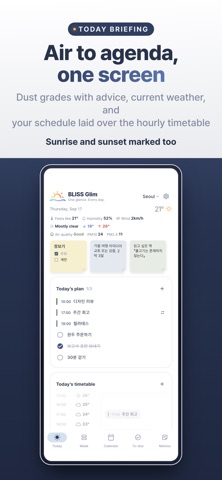
■ Today briefing
• PM10 / PM2.5 grades with advice for the day outside
• Current temperature, feels-like, humidity and wind
• Today's timetable — hourly weather and your schedule on one vertical time axis, sunrise and sunset included
• Today's schedule, to-dos and recent memos right below
■ Week briefing
• The next 7 days, one card per day — low/high temperature, rain probability, and that day's plans
• Add a schedule or to-do for that date straight from its card
• See the same week as a timetable — a vertical time axis showing where you are still free
■ Schedule
• A monthly calendar with soft color blocks
• Month and week views — pick a date and the calendar narrows to that week
• One-day events, multi-day events, and timed events
• Repeating events — daily, weekly, monthly, yearly, even lunar-calendar yearly, with custom intervals and end dates
• Long-press an event and drag it to another date
• Show your device calendar events alongside — you choose which calendars
• Save events you create into a device calendar too — per event, send it elsewhere or leave it out
■ To-dos
• A light checklist centered on today
• Unfinished to-dos carry over to today the next day
• Push one to another date with the calendar icon
■ Memos
• Plans without a date yet go on a sticky note first
• Five paper colors, checklist memos, drag to reorder
• Turn a memo into a schedule once its date is set
• Recent memos preview on the Today tab too
■ Anniversaries
• Register birthdays and anniversaries on the solar or the lunar calendar
• Lunar dates are recalculated every year — no more looking up what today's date is
• Anniversaries within the next two weeks show up early on the Today briefing, as "D-7 · August 11"
• Age and "5th year" appear on the day itself, not before
■ Region
• City presets and worldwide city search
• Or use your current location — location permission is asked only for this
• Dust grades follow the local standard — Korea MoE, US EPA, elsewhere the European EAQI
■ Home screen widgets
• Today's Air — temperature, weather icon and dust grades (small · medium)
• Today's Brief — weather plus today's schedule and to-dos; the large size adds this month's calendar (medium · large)
• Weather & Calendar — the current weather beside this month's calendar, a dot on days with plans (medium)
• Widgets refresh themselves periodically and follow your chosen city
■ Notifications
• Morning briefing — the day's schedule, to-dos and anniversaries, once, at the hour you set
• Anniversary reminders — 1, 3 or 7 days ahead
• Event reminders — 10 minutes, 30 minutes, 1 hour or 1 day before, set per event
• Air quality alert — one heads-up on days the air turns bad
• All off by default, and nothing is sent on a day with nothing on it
■ Make it yours
• Four color themes — Deep Navy · Sage · Dusty Rose · Warm Sand
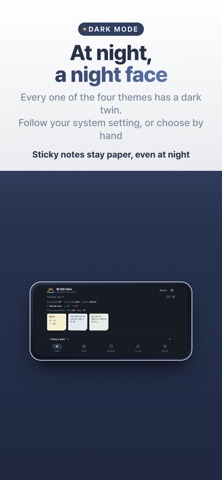
• Dark mode — every theme has a night side; follow the system or choose by hand
• Drag to reorder the bottom tabs
• Reorder or hide the Today screen blocks — memos, today's plan, anniversaries
• 한국어 · English · 日本語 · 简体中文 · 繁體中文
■ Light and undemanding
• No sign-up — you only sign in to your own cloud if you turn sync on
• Your schedule, to-dos and memos live on your device. Turn on sync with Glim Pro and they travel through your own iCloud or Google Drive — no server of ours in between
• Weather and air quality come from Open-Meteo
• There is one banner ad along the bottom. Glim Pro removes it — a one-time purchase, not a subscription
The calmest way to open your day — start with BLISS Glim.