

BLISS Note: Notes PDF Planner
BLISS Note: Notes PDF Planner is made and published by BLISS AI Inc. AppBrain is an independent app data site and isn't affiliated with BLISS AI Inc. The app name, icon, screenshots and description belong to BLISS AI Inc. and are shown as published on the App Store.
AppBrain's verdict
- Last updated
- October 31, 2026
- Size
- 179.8 MB
User feedback
Ratings and reviews on the App StoreComments on BLISS Note: Notes PDF Planner for iOS
We don't have enough comments to show example comments. Please check back later.
Store listing
By BLISS AI Inc., from the App Store




Description by BLISS AI Inc. Written by the developer, not by AppBrain. Click to read.
■ One pencil, every note
• The same pens, highlighter and tools on text notes, PDFs, drawings and sheets — ballpoint, fountain pen and more
• Write over your typed notes — ink stays on its page as you edit
• Free canvas, or A4, Letter, B5, square and slide paper, with lasso select & move
• Vector shapes and flowcharts with connectors, lock and group
• Handwriting to text, handwritten titles, and a zoom-write strip for small text
■ Bring in what you already have
• Word as a page note that keeps its layout, Excel and CSV as a sheet note, PowerPoint as editable slides to write on
• Google Docs, Sheets and Slides — from a link or your own Google Drive
• Notion pages and exports, and Markdown files — with sub-pages, databases and media
• Export to PDF, PPTX and Excel, or AirDrop a note as a .blissnote file
■ Slides & spreadsheets
• Slide paper with title and body layouts; present with pen and laser pointer
• Sheet notes — formulas that recalculate, sort & filter, find & replace, a fill handle, and ink on top
■ Write together, nearby
• Share a note live with devices on the same Wi-Fi. Guests can view, write on their own layer, or edit together
■ Planner, timetable & tasks
• Tasks, planner notes synced with your iCloud calendar, and a note for every event
• Project dashboard — progress, overdue tasks and next deadlines at a glance, with a period and status for each project
• Class timetable — tap a period to open its notes
• Recurring events, lunar anniversaries and D-day countdowns
■ Exam prep & memorization
• Question bank & wrong-answer notes — split an exam PDF into questions; missed ones return on a 1, 3, 7, 14 and 30-day schedule
• Vocabulary flashcards and a memorization sheet (red sheet)
■ Counseling notes
• For school counseling and HR one-on-ones — records, statistics, group sessions, reminders, PDF reports and a Face ID lock, kept only on your devices and your own cloud
■ Record, transcribe & translate
• Turn meetings and lectures into text, and translate on-device, even offline (59 languages)
• Tap ink you wrote while recording to play from that moment
■ Find & connect
• Search text and PDFs, plus your handwriting, recording transcripts and #tags
• Embed PDFs, drawings, videos and other notes inside a note; link notes and see what links back
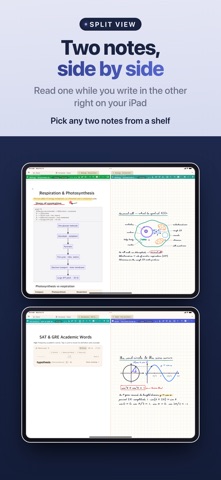
• Shelves, six view modes, a page grid, split view and YouTube playlists
• Headings, lists, tables, checklists, code blocks — and clean paste from AI answers
■ PDFs & the web
• Pen, highlighter and underline; note pages between PDF pages; Sepia, Dim and Night reading modes
• Automatic paper citations in APA, MLA, IEEE & BibTeX
• Annotate web pages with highlights, notes and pen — only your annotations are stored
■ Make it your own
• Covers and paper from your own images or Unsplash, stickers, washi tape you draw like a pen, and your drawing behind the Home screen
■ Free & Pro
• Free: every tool, for up to 10 notes and 5 PDFs
• Bliss Note Pro (monthly or yearly subscription): unlimited notes and PDFs, plus cloud and calendar sync
■ Privacy first
• No sign-up to start — your notes live on your device
• Pro sync goes only through your own iCloud, Google Drive or OneDrive
• Available in 24 languages
Terms of Service: https://blissnote.app/terms.html
Privacy Policy: https://blissnote.app/privacy.html
Terms of Use (EULA): https://www.apple.com/legal/internet-services/itunes/dev/stdeula/
Safety and technology
Found in the app by AppBrain- Price
- Free
- App size
- 179.8 MB
- Content rating
- Everyone
Technologies used by BLISS Note: Notes PDF Planner
Releases
Updates seen on the App Store- Version
- 1.8.0
- Launched
- June 2026
No changelog data
Alternatives
Similar apps and more from BLISS AI Inc.Alternatives to BLISS Note: Notes PDF Planner


More from BLISS AI Inc.


Rankings
App Store top chartsApp Store Rankings for BLISS Note: Notes PDF Planner
About the app and developer
About BLISS Note: Notes PDF Planner
BLISS Note: Notes PDF Planner is a productivity app developed by BLISS AI Inc.
User Ratings
The app has no ratings yet.
App Information
BLISS Note: Notes PDF Planner is freely available from the App Store. The app size is 179.82 MB. The latest version available is 1.8.0. The last update was on October 31, 2026.
Technical Requirements
The app has a content rating of Everyone. The app has been available on the App Store since June 2026.
Developer information for BLISS AI Inc.
Address: