

Papyrus - notes, PDF
Papyrus - notes, PDF is made and published by waraku kobayashi. AppBrain is an independent app data site and isn't affiliated with waraku kobayashi. The app name, icon, screenshots and description belong to waraku kobayashi and are shown as published on the App Store.
AppBrain's verdict
- Last updated
- August 20, 2026
- Size
- 11.3 MB
User feedback
Ratings and reviews on the App StoreComments on Papyrus - notes, PDF for iOS
We don't have enough comments to show example comments. Please check back later.
Store listing
By waraku kobayashi, from the App Store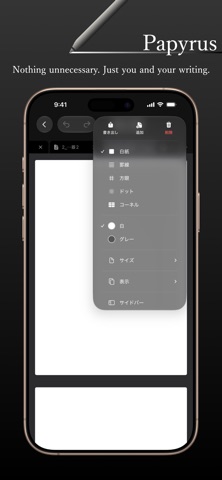

Description by waraku kobayashi Written by the developer, not by AppBrain. Click to read.
Meet a truly lightweight note app.
- It's free — with no stingy limit on the number of notes.
- Trimmed of every bit of bloat, yet complete with the features you actually need.
- Open as many notes as you like with no slowdown, and PDFs load blazingly fast.
- Import and edit notes from another popular note app.
- Import by the folder — the hierarchy is preserved.
[GoodNotes Import]
Import .goodnotes files.
Strokes, images, shapes, and masks are reproduced almost perfectly.
[Handwriting]
A custom vector drawing engine delivers extremely lightweight, high-precision ink.
Five tools are built in: Pen, Highlighter, Eraser, Lasso, and Mask.
Anything selected with the Lasso can be copied, moved, deleted, or duplicated.
Mask is a study aid — cover what you want to memorize with the pen, then tap to peek underneath.
Straight-line snapping and shape recognition (rectangles, circles, lines, and more) are also supported.
[PDF Import & Annotation]
Import a PDF and write directly on its pages.
Switch between four page layouts: continuous scroll, single page, horizontal, and two-page spread.
[File Organization]
Organize your notes with a Finder-like file browser, creating folders freely.
Switch between list and grid views, and move files and folders by drag and drop.
A Trash lets you restore notes you deleted by mistake.
[Tabs & Split View (iPad)]
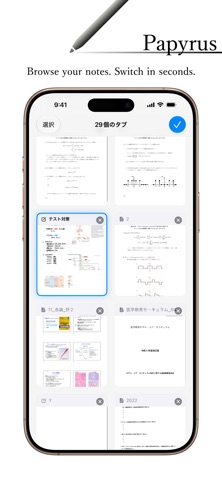
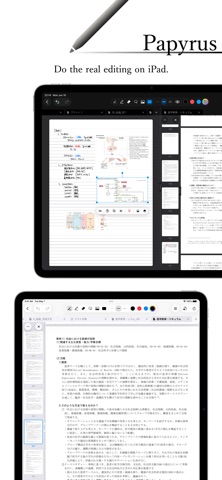
Open multiple notes at once in tabs.
On iPad, split the screen to view and edit two notes side by side (Split View).
[Page Sidebar]
Swipe in from the left edge to reveal page thumbnails.
Press and hold a thumbnail to reorder pages, and select multiple pages to delete, copy, and paste.
[Images]
Paste images from Photos, Files, or the clipboard.
[Export]
Export notes and PDFs as a "PDF for submission/printing," a "fast annotation PDF" (PDF annotations only), or a "Papyrus Archive" (.papyrus).
[Apple Pencil]
- iPad: draw with Apple Pencil only; pan and zoom with your finger.
- iPhone: draw with your finger while the compact ink palette is open; otherwise pan and zoom.
- With Apple Pencil Pro, use the squeeze gesture to bring up the hover palette.
About Papyrus Sync (Subscription)
iCloud sync and sharing are available through the "Papyrus Sync" subscription (monthly or yearly, auto-renewing). All core features — note-taking, PDF annotation, and more — are completely free.
- Payment will be charged to your Apple Account at confirmation of purchase.
- The subscription automatically renews unless auto-renew is turned off at least 24 hours before the end of the current period.
- Your account will be charged for renewal within 24 hours prior to the end of the current period.
- You can manage your subscription or turn off auto-renewal in your Apple Account settings after purchase.
- Prices are shown in the app and may vary by region.
Terms of Use (EULA): https://coremedica.jp/pages/legal/terms-of-use
Privacy Policy: https://coremedica.jp/pages/legal/privacy-policy
Safety and technology
Found in the app by AppBrain- Price
- Free
- App size
- 11.3 MB
- Content rating
- Everyone
Technologies used by Papyrus - notes, PDF
Releases
Updates seen on the App Store- Version
- 1.1.7
- Launched
- June 2026
No changelog data
Alternatives
Similar apps and more from waraku kobayashiAlternatives to Papyrus - notes, PDF


More from waraku kobayashi


Rankings
App Store top chartsApp Store Rankings for Papyrus - notes, PDF
About the app and developer
About Papyrus - notes, PDF
Papyrus - notes, PDF is a productivity app developed by waraku kobayashi.
User Ratings
The app has no ratings yet.
App Information
Papyrus - notes, PDF is freely available from the App Store. The app size is 11.25 MB. The latest version available is 1.1.7. The last update was on August 20, 2026.
Technical Requirements
The app has a content rating of Everyone. The app has been available on the App Store since June 2026.
Developer information for waraku kobayashi
Address:
Frequently asked questions about Papyrus - notes, PDF
Is Papyrus - notes, PDF free?
Yes. Papyrus - notes, PDF is free on the App Store.
Is Papyrus - notes, PDF still available?
Yes. Papyrus - notes, PDF is on the App Store, and the last update we saw was on August 20, 2026.
How large is Papyrus - notes, PDF?
Papyrus - notes, PDF is 11.25 MB.
Is Papyrus - notes, PDF suitable for children?
App Store rates the content of Papyrus - notes, PDF as suitable for everyone.
Who made Papyrus - notes, PDF?
Papyrus - notes, PDF was developed by waraku kobayashi. It is listed in the productivity category on the App Store.
What are the best alternatives to Papyrus - notes, PDF?
People looking at Papyrus - notes, PDF also look at these productivity apps: Amazing Notes: Lecture & PDF, Brenda's Note, Pronotes: Notes & PDF, Nib - Handwritten Diary, BLISS Note: Notes PDF Planner.