

BluLinc is made and published by Blulinc. AppBrain is an independent app data site and isn't affiliated with Blulinc. The app name, icon, screenshots and description belong to Blulinc and are shown as published on the App Store.
AppBrain's verdict
- Rating on App Store
- 1.00
- 1 ratings
- Last updated
- October 15, 2026
It doesn't have enough ratings yet to judge what users think.
Rankings
App Store top chartsApp Store Rankings for BluLinc
Competitors
Similar apps and more from BlulincAlternatives to BluLinc


Releases
Updates seen on the App Store- Version
- 3.259.0
- Launched
- November 2021
No changelog data
User feedback
Ratings and reviews on the App StoreComments on BluLinc for iOS
We don't have enough comments to show example comments. Please check back later.
Technology
Found in the app by AppBrain- Price
- Free
- App size
- 133.2 MB
- Content rating
- Everyone
Technologies used by BluLinc
About the app and developer
About BluLinc
BluLinc is a travel app developed by Blulinc.
What is the rating of BluLinc?
BluLinc is rated 1.00 out of 5 stars, based on one rating ratings.
Is BluLinc free?
BluLinc is free. The app size is 133.19 MB. The latest version available is 3.259.0. The last update was on October 15, 2026.
What are the requirements for BluLinc?
The app has a content rating of Everyone. The app has been available on the App Store since November 2021.
Developer information for Blulinc
Address:
Frequently asked questions about BluLinc
Is BluLinc free?
Yes. BluLinc is free on the App Store.
Is BluLinc still available?
Yes. BluLinc is on the App Store, and the last update we saw was on October 15, 2026.
How large is BluLinc?
BluLinc is 133.19 MB.
Is BluLinc suitable for children?
App Store rates the content of BluLinc as suitable for everyone.
How do people rate BluLinc?
BluLinc has one rating of 1.00 stars on the App Store.
Who made BluLinc?
BluLinc was developed by Blulinc. It is listed in the travel category on the App Store.
What are the best alternatives to BluLinc?
People looking at BluLinc also look at these travel apps: Mobiflow: mobility in 1 app, Spectra Moon, Powerland, HappyCharge, Scala EV סקאלה.
Store listing
By Blulinc, from the App Store

Description by Blulinc Written by the developer, not by AppBrain. Click to read.
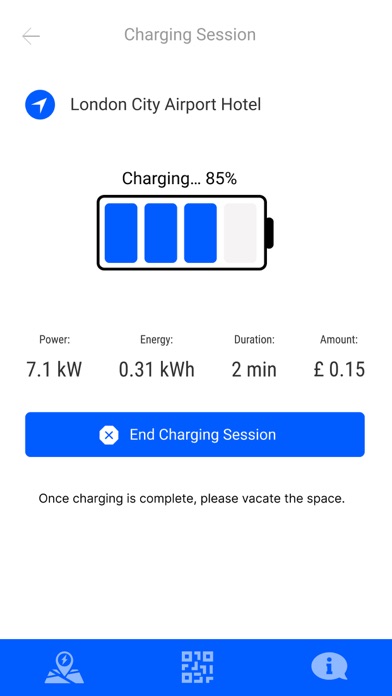
With just a tap on your phone start charging at the station of your choice and, get real-time notifications and updates about your charging status.
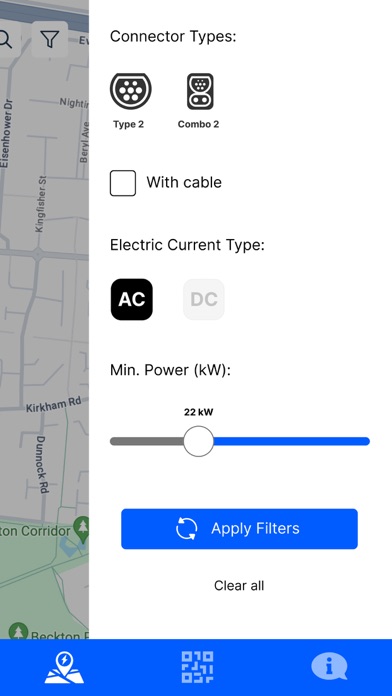
Can't find the charger you need? Don't worry, you can easily filter, so you only see stations that work with your car.
Locate over 200,000 electric car charging stations across major networks including:
- ChargePoint
- Allego
- Innogy
- Blue Corner
- New Motion
- Chargemap
- Plugsurfing
- EV Point
- Tesla Destination
- EVBox
- Greenlots
- EV Connect
- Endesa
- Volta
- ChargeNet
- Webasto
- Ionity
- And many more…
Filter the EV map by plug type including: Level 1, Level 2 and DC Fast Chargers like, CHAdeMO and SAE/CCS.
This is a must-have app for EV or hybrid drivers who want to find charging stations for electric vehicle
BluLinc lets EV drivers...
- Find public charging stations compatible with your EV (or EVs if you have multiple electric vehicles)
- Use BluLinc with Apple CarPlay to browse nearby charging locations, bookmarked locations, and trips you've planned from the built-in display of CarPlay compatible vehicles.
- Locate Tesla Superchargers, DC Fast Chargers and other chargers matching amenity selections.
- Add new charging stations as you discover them.
- Links to your favorite navigation app to quickly get you to the stations you're looking for.
- Set up easy-to-use smart filters that let you see only the stations you really care about. Like the ones that are compatible with your EV. Or stations from your favorite network. Or specific station types (like fast chargers or level 2 stations). Or stations by power level around the globe.
- Check ahead to see if the station you want is open for use (where available).
- Pay for charging right in the app with Pay with BluLinc (at participating locations).
- Find all the stations along a road trip route using google maps.
- Monitor payments with BluLinc charging sessions from within the app.
- New features added all the time.