

Blur and pixelate editor app
Blur and pixelate editor app is made and published by Sara Fernandez de Cordoba. AppBrain is an independent app data site and isn't affiliated with Sara Fernandez de Cordoba. The app name, icon, screenshots and description belong to Sara Fernandez de Cordoba and are shown as published on the App Store.
AppBrain's verdict
- Rating on App Store
- 5.00
- 2 ratings
- Last updated
- January 17, 2026
It doesn't have enough ratings yet to judge what users think.
Rankings
App Store top chartsApp Store Rankings for Blur and pixelate editor app
Competitors
Similar apps and more from Sara Fernandez de CordobaAlternatives to Blur and pixelate editor app




More from Sara Fernandez de Cordoba


Releases
Updates seen on the App Store- Version
- 1.2
- Launched
- July 2025
No changelog data
User feedback
Ratings and reviews on the App StoreComments on Blur and pixelate editor app for iOS
We don't have enough comments to show example comments. Please check back later.
Technology
Found in the app by AppBrain- Price
- Free
- App size
- 35.3 MB
- Content rating
- Everyone
Technologies used by Blur and pixelate editor app
About the app and developer
About Blur and pixelate editor app
Blur and pixelate editor app is a photo & video app developed by Sara Fernandez de Cordoba.
User Ratings
Blur and pixelate editor app is rated 5.00 out of 5 stars. The rating is based on 2 ratings.
App Information
Blur and pixelate editor app is freely available from the App Store. The app size is 35.29 MB. The latest version available is 1.2. The last update was on January 17, 2026.
Technical Requirements
The app has a content rating of Everyone. The app has been available on the App Store since July 2025.
Developer information for Sara Fernandez de Cordoba
Address:
Store listing
By Sara Fernandez de Cordoba, from the App Store


Description by Sara Fernandez de Cordoba Written by the developer, not by AppBrain. Click to read.
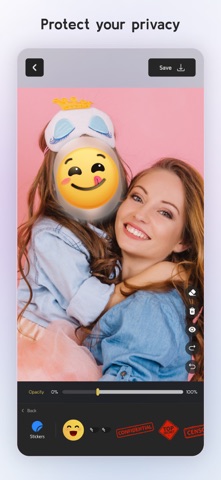
Need to blur part of a photo or apply a fun effect with precision? This intuitive editor lets you paint effects directly onto the image with your finger. Zoom in for fine detail and control exactly where the effect goes — whether it’s a face, object, or background.
Main Features:
• Apply effects by drawing directly on the photo: blur, pixelate, or crystallize specific areas.
• Zoom in to paint with precision.
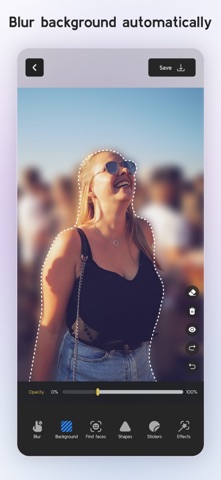
• Automatically detect the background and apply effects to it with one tap.
• Face detection lets you choose which faces to apply the effect to — or skip them entirely.
• Add customizable shapes that apply effects only inside them.
• Place fun stickers anywhere on your image.
• Works with photos from your camera or gallery.
• Fast, free, and optimized for iOS.
Blur, pixelate, or stylize your photos exactly how you want — whether for privacy, creativity, or just for fun.
The utility app to blur faces and hide anything you need in your pictures.
https://www.apple.com/legal/internet-services/itunes/dev/stdeula/