

Blur Photo: Face Pixelate
Blur Photo: Face Pixelate is made and published by Phuc Pham. AppBrain is an independent app data site and isn't affiliated with Phuc Pham. The app name, icon, screenshots and description belong to Phuc Pham and are shown as published on the App Store.
AppBrain's verdict
- Last updated
- August 19, 2026
Rankings
App Store top chartsApp Store Rankings for Blur Photo: Face Pixelate
Competitors
Similar apps and more from Phuc PhamAlternatives to Blur Photo: Face Pixelate


More from Phuc Pham


Releases
Updates seen on the App Store- Version
- 1.1.1
- Launched
- June 2026
No changelog data
User feedback
Ratings and reviews on the App StoreComments on Blur Photo: Face Pixelate for iOS
We don't have enough comments to show example comments. Please check back later.
Technology
Found in the app by AppBrain- Price
- Free
- App size
- 5.29 MB
- Content rating
- Everyone
Technologies used by Blur Photo: Face Pixelate
About the app and developer
About Blur Photo: Face Pixelate
Blur Photo: Face Pixelate is a photo & video app developed by Phuc Pham.
User Ratings
The app has no ratings yet.
App Information
Blur Photo: Face Pixelate is freely available from the App Store. The app size is 5.29 MB. The latest version available is 1.1.1. The last update was on August 19, 2026.
Technical Requirements
The app has a content rating of Everyone. The app has been available on the App Store since June 2026.
Developer information for Phuc Pham
Address:
Frequently asked questions about Blur Photo: Face Pixelate
Is Blur Photo: Face Pixelate free?
Yes. Blur Photo: Face Pixelate is free on the App Store.
Is Blur Photo: Face Pixelate still available?
Yes. Blur Photo: Face Pixelate is on the App Store, and the last update we saw was on August 19, 2026.
How large is Blur Photo: Face Pixelate?
Blur Photo: Face Pixelate is 5.29 MB.
Is Blur Photo: Face Pixelate suitable for children?
App Store rates the content of Blur Photo: Face Pixelate as suitable for everyone.
Who made Blur Photo: Face Pixelate?
Blur Photo: Face Pixelate was developed by Phuc Pham. It is listed in the photo & video category on the App Store.
What are the best alternatives to Blur Photo: Face Pixelate?
People looking at Blur Photo: Face Pixelate also look at these photo & video apps: Limba: AI Photo & Video Studio, Hook Caption, NoFace: Anonymous Camera, Cosmetics AI: Try On Face, Blur Face - Photo Privacy.
Store listing
By Phuc Pham, from the App Store




Description by Phuc Pham Written by the developer, not by AppBrain. Click to read.
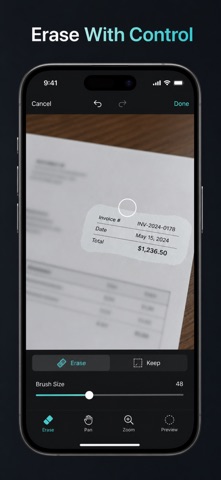
Point Blur paints the effect exactly where the cursor goes, and a visible cursor ring tracks your fingertip so you can see what you are covering while you cover it. Size the brush for a whole background or a single line of text, dial the strength with an intensity slider, then flip to Background mode to blur everything EXCEPT the subject you painted. Erase, undo, redo, and pinch to zoom up to 6x when the detail is tiny.
WHAT YOU GET
- Faces, plates, and private text hidden in seconds instead of minutes
- One-tap Auto Face Blur that finds every face in the shot for you
- Ten censor and tone effects: blur, pixelate, voxel, spot blur, hexagon, sepia, mono, invert, vignette, exposure
- Background mode that blurs everything except the subject you painted
- Full-resolution exports where hidden pixels are permanently replaced, not layered over
- A Saved gallery on your device holding every image you exported
PERFECT FOR
- Parents posting photos with other people's kids in the frame
- Anyone sharing a screenshot that shows names, balances, or addresses
- Sellers hiding a plate, house number, or ID card before listing
- Teachers, journalists, and moderators who must anonymize before publishing
WHY NOT JUST DRAW A BLACK BOX WITH MARKUP?
A solid box or an emoji sticker sits on top of the picture and announces that something is hidden there. Point Blur flattens the effect into the pixels at native resolution, so the exported file carries no original underneath and the result still reads as a photo instead of a redaction.
PRIVACY
Every photo is processed on your device. Face detection runs locally with Apple Vision. There is no account, no upload, and no server - the app makes no network calls at all. The exported image is the only thing that ever leaves the app, and only when you choose to save or share it.
FULL ACCESS
Blur is free forever, and free exports carry a small corner watermark. Full Access removes that watermark and unlocks every other effect (pixelate, voxel, spot blur, hexagon, sepia, mono, invert, vignette, exposure) plus one-tap Auto Face Blur. Pick what fits: weekly, yearly, or a one-time lifetime purchase. Subscriptions renew automatically until cancelled in your Apple account settings; lifetime is a single payment.
Open your next screenshot and drag the cursor across the part you would rather nobody saw.
Terms of Use (EULA): https://web-levi.web.app/terms
Privacy Policy: https://web-levi.web.app/privacy-policy
Questions? tphuc.work@gmail.com