BoardView Reader is an utilities app developed by intergoldex llc.
What is the rating of BoardView Reader?
BoardView Reader has no ratings yet.
Is BoardView Reader free?
BoardView Reader is free. The app size is 6.80 MB. The latest version available is 2.2. The last update was on November 5, 2026.
What are the requirements for BoardView Reader?
The app has a content rating of Everyone. The app has been available on the App Store since October 2026.
BoardView Reader is made and published by
intergoldex llc.
AppBrain is an independent app data site and isn't affiliated with intergoldex llc.
The app name, icon, screenshots and description belong to intergoldex llc and are shown as published on the App Store.
Description by intergoldex llc(from the App Store)
BoardView Reader answers the two questions every motherboard repair tech asks: where do I measure this power rail, and which part do I replace? Open the board's boardview and schematic, locate the rail in one tap, test it with your multimeter and find the reference and value of the component to change — on your phone, tablet and computer.
LOCATE A POWER RAIL • Search a rail (PPBUS_G3H, PP3V3_S5, VCC_MAIN…) or a component in a single field • Every point on the same net lights up on the board, top and bottom • Spot the most accessible capacitor or test point to place your probe • Flip the board, rotate 90°, show one side or both, just like on the bench
TEST FOR SHORTS • Measure the rail in diode mode and log the reading in one tap • Compared with a known-good board, it is judged at once: matches, slight difference, large difference, likely short, open line • Your reference values apply to every board with the same number; share them as CSV
FIND THE PART TO REPLACE • Tap a component: its reference, value, voltage, tolerance and package, read from the schematic • Side, pin count and the net of each pin in the inspector
TAKE IT FROM A DONOR BOARD • "Find in other boards" looks for the same component in your donor boards, or in any folder you choose • Same part number, same value or same designator: results ranked from most to least certain • Tap a result: the donor board opens on the component
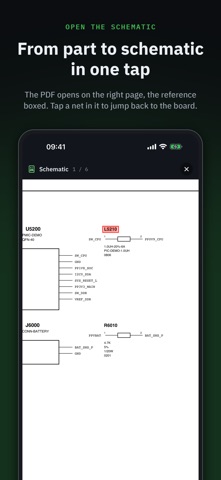
THE SCHEMATIC IN THE RIGHT PLACE • Import the board and its PDF schematic with the same name: they are paired automatically • Tap a component: the schematic opens on the right page, the reference boxed • Tap a net or a reference in the schematic: "Show on board" takes you back
AN ORGANISED SHOP • Sort boards into folders: in repair, donors, customers… • Import a board's folder: its boardview and schematic are linked under the folder's name • Each board keeps its schematic and its readings • On a computer: hover info with the mouse and customisable keyboard shortcuts
FORMATS: BRD (Test_Link, including encoded), BRD2, BDV, BVR and BVR3, CST, GenCAD (.cad), PCB (XZZ), on their own, in a folder or in a ZIP or RAR archive. Encrypted FZ files are not supported yet. Bring your own files: the app does not include a boardview library. A file won't open? Send it to us from the app, we add the most requested formats.
A demo board and schematic are included so you can try everything right away.
FREE TO READ — Opening and reading boards is free. The linked schematic, diode-mode readings and the unlimited library are part of Pro: a one-time purchase, no subscription, with a full 48-hour free trial for 2 boards.
No ads, no account, no ad tracking, works offline. Available in English, French, German, Italian, Spanish and Portuguese.
Each subscription will automatically renew 3 days before the expiration date for
the same time period. Subscriptions can be cancelled at any time before the renewal.