

Booklet Maker: PDF Imposer
Booklet Maker: PDF Imposer is made and published by MOBILE ALCHEMY LTD. AppBrain is an independent app data site and isn't affiliated with MOBILE ALCHEMY LTD. The app name, icon, screenshots and description belong to MOBILE ALCHEMY LTD and are shown as published on the App Store.
AppBrain's verdict
- Rating on App Store
- 3.50
- 2 ratings
- Last updated
- October 22, 2026
- Size
- 39.6 MB
It doesn't have enough ratings yet to judge what users think.
User feedback
Ratings and reviews on the App StoreComments on Booklet Maker: PDF Imposer for iOS
We don't have enough comments to show example comments. Please check back later.
Store listing
By MOBILE ALCHEMY LTD, from the App Store




Description by MOBILE ALCHEMY LTD Written by the developer, not by AppBrain. Click to read.
COMMON QUESTIONS
How do I make an invitation, card or bulletin? Open Templates, pick a design, tap any text, photo or shape to change it, then print or save.
How do I print a PDF as a booklet? Open the PDF, choose a preset, then print or save. Page order, rotation and duplex flipping are automatic, with a guided mode for printers without duplex.
What is PDF imposition? Arranging pages so folded sheets read in the right order. BookletMaker does saddle-stitched booklets, mini-booklets, n-up grids, signature folding and creep compensation.
Does BookletMaker upload my files? No. Every page is processed on your device, and your documents and photos never leave it. Templates are plain files the app downloads; nothing about your documents is sent.
What does Pro add? Signature folding, creep, fold margin, hole punch, watermarks, letterhead, batch tools, Pro templates, My Templates and My Presets. Anyone who bought the app before 2.0 keeps everything unlocked.
KEY FEATURES
• Templates: 40+ fully editable designs for bulletins, programs, invitations, cards, zines, menus and photo books. Every text, photo and shape can be changed; add text, photo frames and shapes, rotate, group and ungroup, reorder layers, recolor art, change the page background, undo and redo.
• A floating bar over your selection and an editing panel with tabs for text, style, font, color, photo and arrange.
• My Templates: save your own designs and start from them again (Pro). They stay on your device.
• My Presets: save your own print settings, plus ready-made presets for booklets, zines, cards and handouts (Pro).
• Imposition: saddle-stitched booklets, mini-booklets, 2-up, 4-up or any custom n-up grid, with page order and rotation handled for you.
• Signature folding up to 32 pages, and creep compensation that keeps the trim straight.
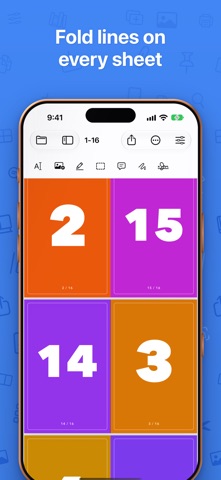
• Fold lines, staple marks and cut guides, with solid, dashed or dotted lines.
• Made for iPhone Duo: open the fold like a book, with the preview on one side and Settings on the other.
• Cleanup: crop margins, remove blank pages, split landscape spreads, rasterize corrupted PDFs.
• Page numbers: position, size, color, format, starting offset, skip-first for covers.
• Hole punch margins with visual guides, plus a fold margin for cutting sheets in half.
• Watermark and letterhead overlays.
• Grayscale and lightened content for draft prints.
• Find & Replace, highlights, redaction, sticky notes, ink and signature stamps.
• OCR: Apple Vision makes scanned PDFs searchable; export recognized text.
• Output: save the imposed PDF, flatten annotations, password-protect, export pages as images, or print via AirPrint.
• Booklet Factory: batch-impose whole folders with your saved presets.
BOOKLETMAKER PRO
The core of BookletMaker stays available to everyone. Pro unlocks the advanced print shop: booklet signatures, creep, fold margin, hole punch, watermarks, letterhead, batch processing, Pro templates, My Templates and My Presets. Pro comes as a yearly or monthly subscription, or as a one-time lifetime purchase. Bought BookletMaker before 2.0? Everything stays unlocked for you.
Subscriptions renew automatically unless cancelled at least 24 hours before the period ends; manage or cancel in your App Store account settings.
Terms of Use: https://www.apple.com/legal/internet-services/itunes/dev/stdeula/
Privacy Policy: https://bookletmaker.app/privacy
PRIVATE BY DESIGN
BookletMaker runs on your device and your documents are never uploaded. Anonymous usage statistics can be switched off in Settings.
Safety and technology
Found in the app by AppBrain- Price
- Free
- App size
- 39.6 MB
- Content rating
- Everyone
Technologies used by Booklet Maker: PDF Imposer
Releases
Updates seen on the App Store- Version
- 2.6.2
- Launched
- May 2026
No changelog data
Alternatives
Similar apps and more from MOBILE ALCHEMY LTDMore from MOBILE ALCHEMY LTD







Rankings
App Store top chartsApp Store Rankings for Booklet Maker: PDF Imposer
About the app and developer
About Booklet Maker: PDF Imposer
Booklet Maker: PDF Imposer is a productivity app developed by MOBILE ALCHEMY LTD.
User Ratings
Booklet Maker: PDF Imposer is rated 3.50 out of 5 stars. The rating is based on 2 ratings.
App Information
Booklet Maker: PDF Imposer is freely available from the App Store. The app size is 39.64 MB. The latest version available is 2.6.2. The last update was on October 22, 2026.
Technical Requirements
The app has a content rating of Everyone. The app has been available on the App Store since May 2026.
Developer information for MOBILE ALCHEMY LTD
Address:
Frequently asked questions about Booklet Maker: PDF Imposer
Is Booklet Maker: PDF Imposer free?
Yes. Booklet Maker: PDF Imposer is free on the App Store.
Is Booklet Maker: PDF Imposer still available?
Yes. Booklet Maker: PDF Imposer is on the App Store, and the last update we saw was on October 22, 2026.
How large is Booklet Maker: PDF Imposer?
Booklet Maker: PDF Imposer is 39.64 MB.
Is Booklet Maker: PDF Imposer suitable for children?
App Store rates the content of Booklet Maker: PDF Imposer as suitable for everyone.
How do people rate Booklet Maker: PDF Imposer?
Booklet Maker: PDF Imposer scores 3.50 out of 5 stars, from 2 ratings on the App Store.
Who made Booklet Maker: PDF Imposer?
Booklet Maker: PDF Imposer was developed by MOBILE ALCHEMY LTD. It is listed in the productivity category on the App Store.