

Bookslot: Books & Reading
Bookslot: Books & Reading is made and published by Gianluca Zompa. AppBrain is an independent app data site and isn't affiliated with Gianluca Zompa. The app name, icon, screenshots and description belong to Gianluca Zompa and are shown as published on the App Store.
AppBrain's verdict
- Best rank
- #86
- Top Paid, Italy
- Last updated
- January 24, 2026
Rankings
App Store top charts- Highest rank
- #86
- Chart
- Top Paid
- Books
- Country
- Italy
App Store Rankings for Bookslot: Books & Reading
Top rankings
| Rank | Country | Category | List |
|---|---|---|---|
| 86 | Italy | Books | Top Paid |
Ranking history in Italy
Competitors
Similar apps and more from Gianluca ZompaMore from Gianluca Zompa


Releases
Updates seen on the App Store- Version
- 3.1.1
- Launched
- April 2024
No changelog data
User feedback
Ratings and reviews on the App StoreComments on Bookslot: Books & Reading for iOS
We don't have enough comments to show example comments. Please check back later.
Technology
Found in the app by AppBrain- Price
- $3.99
- App size
- 3.26 MB
- Content rating
- Everyone
Technologies used by Bookslot: Books & Reading
About the app and developer
About Bookslot: Books & Reading
Bookslot: Books & Reading is a books app developed by Gianluca Zompa.
User Ratings
The app has no ratings yet.
App Information
Bookslot: Books & Reading costs $3.99. The app size is 3.26 MB. The latest version available is 3.1.1. The last update was on January 24, 2026.
Technical Requirements
The app has a content rating of Everyone. The app has been available on the App Store since April 2024.
Developer information for Gianluca Zompa
Address:
Store listing
By Gianluca Zompa, from the App Store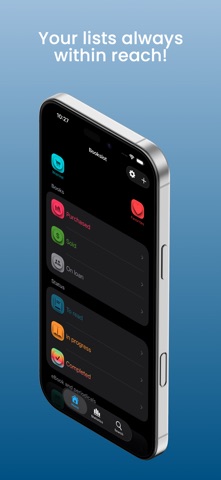



Description by Gianluca Zompa Written by the developer, not by AppBrain. Click to read.
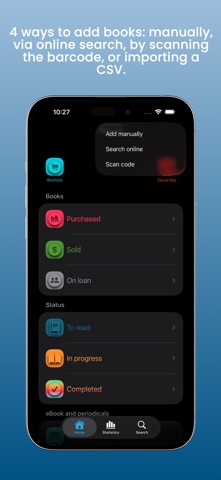
ADDING BOOKS
You have 4 options to choose from:
• Manual
• Online search (by title, author, or ISBN)
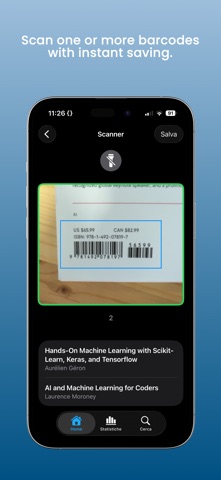
• Barcode scanning
• Importing a CSV list
BOOK MANAGEMENT
Organize your books with 10 smart lists:
• Wishlist
• Favorites
• Purchased
• Sold
• On loan
• To Read
• In Progress
• Completed
• eBooks
• Periodicals
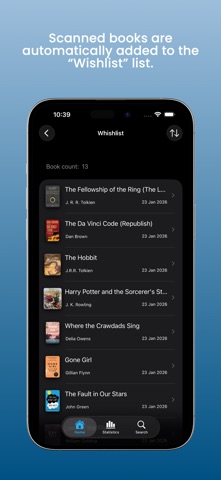
Each book is automatically assigned to the correct list. For example, if you add a book without marking it as “Purchased,” it will go to the Wishlist. Once purchased, just click “Purchased” to move it to the correct list. You can also save information such as purchase date, price, and store.
DYNAMIC VIEW
The app adapts to you! Only relevant information is displayed. For example, if a book hasn’t been purchased, sections related to purchase or reading progress won’t appear. Likewise, the sales section is visible only for books marked as sold. This principle applies to all information related to ownership and/or reading status, providing a smooth, intuitive, and natural experience.
TRACKING PROGRESS
Reading a new book? Set it to “In Progress,” start the timer, and enjoy your reading. When finished, stop the timer and update the number of pages read to always stay on track.
QUOTES
For each book, you can save your favorite quotes, including the text and page number. To share a quote, just long-press it and select “Share”: Bookslot will automatically create a ready-to-send image containing the book title, the quote, its page number, and the sharing date. A quick way to save and share the words that touched you most.
BOOK SHARING
Share information about your books easily and contextually. Long-press the desired book and click “Share”: an image will be created, adapting the information to the list you are in. For example, if you share a book from the Purchased list, the image will include the cover, title, author, and main book details. If you share a book from the In Progress list, it will also show reading status information, such as pages read and time spent.
This way, every book becomes an opportunity to exchange thoughts with others.
READING STATISTICS
Curious about how much you read? Select a time period, check the chart, and see how many books you completed, how much time you spent reading, and how many pages you read.
TRACK YOUR PURCHASES
Monitor your expenses and the stores where you bought your books. You can view all purchases or filter by period. Want details from a specific store? Click and get the list of titles purchased there.
LOCAL SEARCH
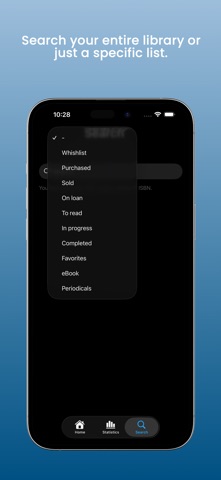
Find any book in your library! Search by title, author, series, or ISBN. The icons next to the details show at a glance which list the book is in. You can also choose to search everywhere or within a specific list.
OTHER FEATURES
• Export: save your list in a CSV file to use it anywhere.
• Reading reminders: set a reminder to never forget to read.
3 Helpful Tips:
1. When creating a new book, click the “Save” button at the top right of the navigation bar to store it.
2. If you need to make multiple changes, make them all and then click “Save.”
3. If the “Save” button is not active, don’t worry, it means there are no changes to save or that saving has already happened automatically.