

Brightroom
Brightroom is made and published by Greg Anderson. AppBrain is an independent app data site and isn't affiliated with Greg Anderson. The app name, icon, screenshots and description belong to Greg Anderson and are shown as published on the App Store.
AppBrain's verdict
- Rating on App Store
- 5.00
- 1 ratings
- Last updated
- August 7, 2026
- Size
- 3.16 MB
It doesn't have enough ratings yet to judge what users think.
User feedback
Ratings and reviews on the App StoreComments on Brightroom for iOS
We don't have enough comments to show example comments. Please check back later.
Store listing
By Greg Anderson, from the App Store
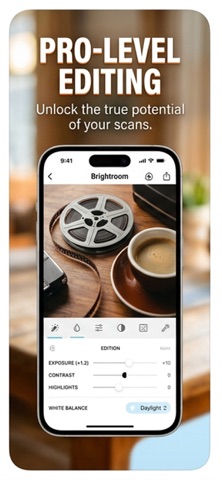
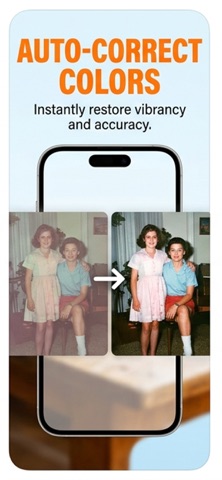
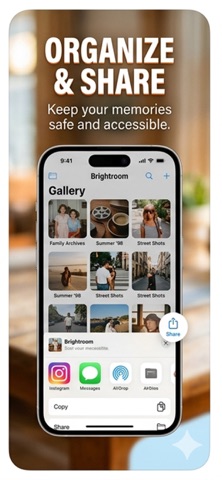
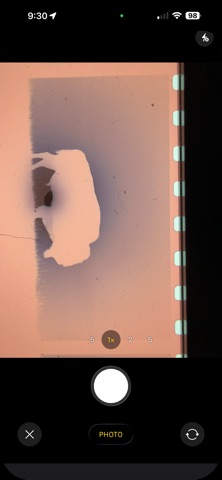


Description by Greg Anderson Written by the developer, not by AppBrain. Click to read.
FILM CONVERSION
• Color Negative (C-41) — removes the orange film base cast with per-channel auto-levels and white balance correction, plus an S-curve for shadow richness and highlight pop
• Black & White Negative — desaturates before inversion with a classic film contrast curve
• Slide / Positive (E-6) — gentle levels correction preserving the film's inherent color balance
ADJUSTMENTS
• 10 live controls in a scrollable toolbar: Crop, Exposure, Contrast, Highlights, Shadows, Black Point, Saturation, Vibrance, Warmth, Sharpen, Vignette
• Every slider updates the image instantly as you drag — no tap to apply
• Changed controls highlighted in orange; one-tap reset per control
IMAGE QUALITY
• Supports DNG and Apple ProRAW imports alongside JPEG and HEIC
• Single-pass Core Image pipeline — no intermediate resampling steps, maximum sharpness at full sensor resolution
• Captures full pixel density from both 1x and 2x lenses
CROP & SAVE
• Manual crop with corner handles and rule-of-thirds grid
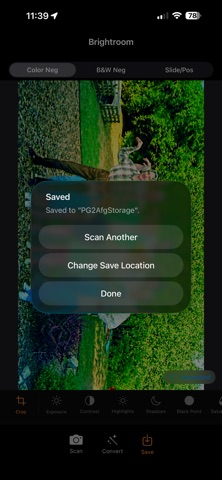
• Save to Photos Library or directly to any Files location — iCloud Drive, network shares, NAS, cloud services
• Save location remembered: pick a folder once, Brightroom saves there automatically
• Save with optional 90° rotation — corrects sideways negatives at save time
CAPTION
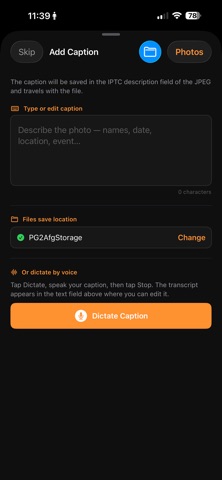
• Type or dictate an IPTC caption before saving — embedded permanently in the JPEG, readable in Lightroom, Photos, and any IPTC-aware app
• Voice dictation uses on-device speech recognition — nothing leaves your iPhone
WORKFLOW
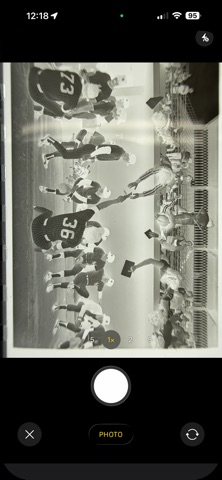
• Scan → camera direct; Convert → camera or library (supports DNG/RAW)
• After saving, immediately prompts for the next negative — no extra navigation between frames
• Before/after toggle: tap Converted badge to compare with the original capture
• Full-resolution JPEG output with EXIF orientation and IPTC metadata embedded
Safety and technology
Found in the app by AppBrain- Price
- $0.99
- App size
- 3.16 MB
- Content rating
- Everyone
Technologies used by Brightroom
Releases
Updates seen on the App Store- Version
- 1.4.1
- Launched
- April 2026
No changelog data
Alternatives
Similar apps and more from Greg AndersonMore from Greg Anderson


Rankings
App Store top chartsApp Store Rankings for Brightroom
About the app and developer
About Brightroom
Brightroom is a photo & video app developed by Greg Anderson.
User Ratings
Brightroom is rated 5.00 out of 5 stars. The rating is based on one rating ratings.
App Information
Brightroom costs $0.99. The app size is 3.16 MB. The latest version available is 1.4.1. The last update was on August 7, 2026.
Technical Requirements
The app has a content rating of Everyone. The app has been available on the App Store since April 2026.
Developer information for Greg Anderson
Address:
Frequently asked questions about Brightroom
Is Brightroom free?
No. Brightroom costs $0.99 on the App Store.
Is Brightroom still available?
Yes. Brightroom is on the App Store, and the last update we saw was on August 7, 2026.
How large is Brightroom?
Brightroom is 3.16 MB.
Is Brightroom suitable for children?
App Store rates the content of Brightroom as suitable for everyone.
How do people rate Brightroom?
Brightroom has one rating of 5.00 stars on the App Store.
Who made Brightroom?
Brightroom was developed by Greg Anderson. It is listed in the photo & video category on the App Store.