

Buck-It: S3 Client
Buck-It: S3 Client is made and published by Kaan Ozgen. AppBrain is an independent app data site and isn't affiliated with Kaan Ozgen. The app name, icon, screenshots and description belong to Kaan Ozgen and are shown as published on the App Store.
AppBrain's verdict
- Last updated
- April 6, 2026
Rankings
App Store top chartsApp Store Rankings for Buck-It: S3 Client
Competitors
Similar apps and more from Kaan OzgenAlternatives to Buck-It: S3 Client


Releases
Updates seen on the App Store- Version
- 1.0.4
- Launched
- April 2026
No changelog data
User feedback
Ratings and reviews on the App StoreComments on Buck-It: S3 Client for iOS
We don't have enough comments to show example comments. Please check back later.
Technology
Found in the app by AppBrain- Price
- Free
- App size
- 50.4 MB
- Content rating
- Medium
Technologies used by Buck-It: S3 Client
About the app and developer
About Buck-It: S3 Client
Buck-It: S3 Client is a productivity app developed by Kaan Ozgen.
What is the rating of Buck-It: S3 Client?
Buck-It: S3 Client has no ratings yet.
Is Buck-It: S3 Client free?
Buck-It: S3 Client is free. The app size is 50.44 MB. The latest version available is 1.0.4. The last update was on April 6, 2026.
What are the requirements for Buck-It: S3 Client?
The app has a content rating of Medium Maturity. The app has been available on the App Store since April 2026.
Developer information for Kaan Ozgen
Address:
Store listing
By Kaan Ozgen, from the App Store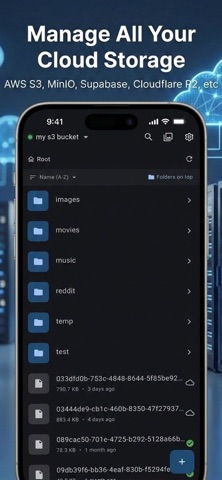

Description by Kaan Ozgen Written by the developer, not by AppBrain. Click to read.
Buck-It is a powerful, beautifully designed mobile client for S3-compatible cloud storage.
Whether you use AWS S3, MinIO, Cloudflare R2, Supabase, Wasabi, Backblaze, or any S3-compatible endpoint. Buck-It gives you full control from your iPhone.
BROWSE & MANAGE
• Browse folders and files with a fast, intuitive file browser
• Create folders, rename, delete, and organize your cloud storage
• Search across your entire bucket instantly
• View image details including EXIF data, dimensions, and camera info
UPLOAD & DOWNLOAD
• Upload files and photos directly from your device
• Download files for offline access
• Reliable background transfers that continue even when the app is closed
• Track all active and completed transfers in one place
GALLERY VIEW
• View your photos and videos in a beautiful gallery layout
• Built-in image viewer with zoom and pan
• Integrated video player for seamless media playback
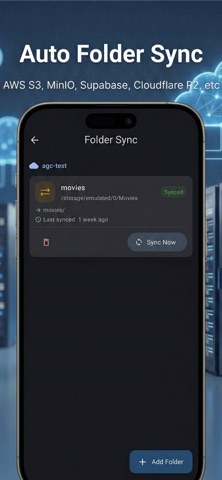
FOLDER SYNC
• Set up automatic two-way sync between local folders and S3
• Upload-only, download-only, or bidirectional sync modes
• Schedule sync intervals and restrict to Wi-Fi only
• Background sync keeps everything up to date automatically
SHARE SECURELY
• Share files directly or generate temporary pre-signed download links
• Choose link expiry from 1 hour up to 7 days
SECURITY FIRST
• Credentials stored in the secure enclave — never in plain text
• Biometric lock with Face ID or Touch ID
Take control of your cloud storage. Download Buck-It today.
Terms of use : https://www.apple.com/legal/internet-services/itunes/dev/stdeula/