

Business Card Maker·
Business Card Maker· is made and published by Le Giang Nam. AppBrain is an independent app data site and isn't affiliated with Le Giang Nam. The app name, icon, screenshots and description belong to Le Giang Nam and are shown as published on the App Store.
AppBrain's verdict
Loved by users- Rating on App Store
- 4.79
- 126 ratings
- Last updated
- February 10, 2026
- Size
- 182.3 MB
Users love it: 4.8 stars from 126 ratings.
User feedback
Ratings and reviews on the App StoreComments on Business Card Maker· for iOS
We don't have enough comments to show example comments. Please check back later.
Store listing
By Le Giang Nam, from the App Store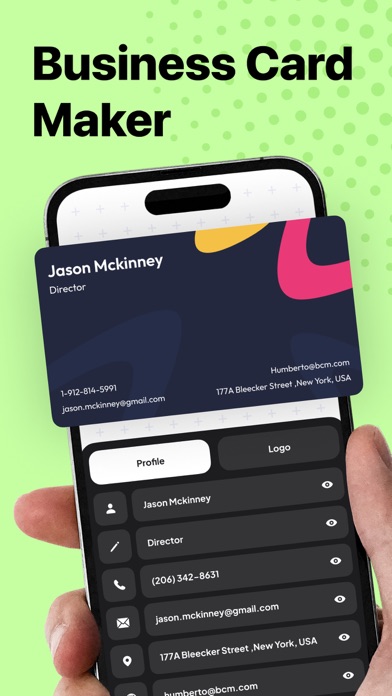


Description by Le Giang Nam Written by the developer, not by AppBrain. Click to read.
Key Features
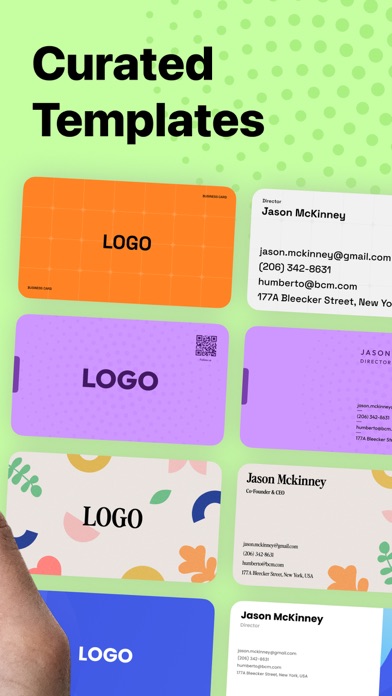
- Access to a diverse range of professionally designed card templates
- 6 color variants for every template
- Fully customize text, logos, and layouts with intuitive editing tools
- Scan physical business cards to automatically extract and save contact information
- Create cards using existing contacts or scanned contact data
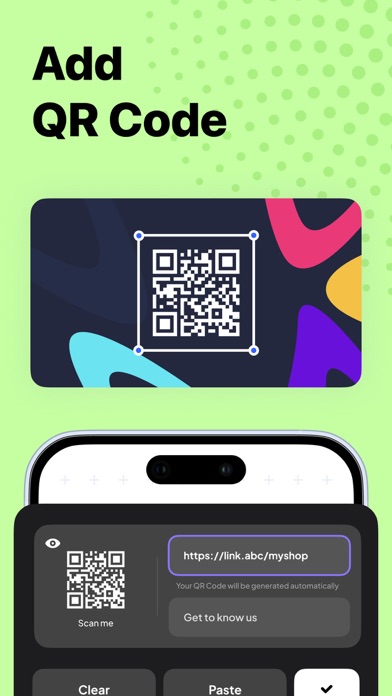
- Seamlessly create and add QR codes to your cards for enhanced interactivity
- Share your digital cards via QR code, URL, AirDrop, Email, SMS, and more
- Organize and manage cards easily with tags
- Export your business card designs as high-quality JPG or PDF files for digital sharing or printing
Business Card Maker also makes networking effortless. Scan a physical business card and instantly convert it into a digital contact, or create a new card using your existing contact information. Sharing your card is just as easy, send it digitally or display a QR code for quick access.
Whether you're a freelance graphic designer, a real estate agent, or a tech entrepreneur, we have a template that suits your style and profession. Our collection ensures that your business card reflects your unique personality and brand identity.
In case you want to personalize your own card, we also give you the tools to make your card truly your own. Customize text and logos with ease using our intuitive editing tools. Whether you're updating contact information, adding a new job title, or refreshing your company logo, our user-friendly interface makes the process seamless.
This Business Card Maker also allow you to create and add QR codes to your cards effortlessly. Whether you want to direct potential clients to your portfolio, LinkedIn profile, or company website, QR codes add an interactive element to your card, making it easier for others to connect with you. Simply generate the QR code within the app and watch as your business card comes to life with a touch of innovation.
With just a few taps, you can export your business card as a high-quality JPG or PDF file, ready for digital sharing or printing. You can send your card via email, sharing it on social media, or printing it out for in-person networking events. With the Business Card Maker, there are no limits to how you can share your brand with the world
Safety and technology
Found in the app by AppBrain- Price
- $2.99
- App size
- 182.3 MB
- Content rating
- Everyone
Technologies used by Business Card Maker·
Releases
Updates seen on the App Store- Version
- 2.0.1
- Launched
- May 2024
No changelog data
Alternatives
Similar apps and more from Le Giang NamMore from Le Giang Nam




Rankings
App Store top chartsApp Store Rankings for Business Card Maker·
About the app and developer
About Business Card Maker·
Business Card Maker· is a graphics & design app developed by Le Giang Nam.
User Ratings
Business Card Maker· is rated 4.79 out of 5 stars. The rating is based on 130 ratings.
App Information
Business Card Maker· costs $2.99. The app size is 182.26 MB. The latest version available is 2.0.1. The last update was on February 10, 2026.
Technical Requirements
The app has a content rating of Everyone. The app has been available on the App Store since May 2024.
Developer information for Le Giang Nam
Address:
Frequently asked questions about Business Card Maker·
Is Business Card Maker· free?
No. Business Card Maker· costs $2.99 on the App Store.
Is Business Card Maker· still available?
Yes. Business Card Maker· is on the App Store, and the last update we saw was on February 10, 2026.
How large is Business Card Maker·?
Business Card Maker· is 182.26 MB.
Is Business Card Maker· suitable for children?
App Store rates the content of Business Card Maker· as suitable for everyone.
How do people rate Business Card Maker·?
Business Card Maker· scores 4.79 out of 5 stars, from 126 ratings on the App Store.
Who made Business Card Maker·?
Business Card Maker· was developed by Le Giang Nam. It is listed in the graphics & design category on the App Store.