Download Android Apps and Games
AppBrain
  • Apps
  • Apps being viewed right now Trending apps today Most popular apps All-time most downloaded apps Top rated apps
  • Intelligence ▾
    Intelligence overview → Track any Android app or your whole market
    Track & analyze
    Keyword Tracker & OptimizerTrack & improve Play rankings App Performance ReportOne-off PDF for any app StatisticsFree Android & Play market stats
    Promote your app
    Featured Apps App Links
  • Intelligence
  • Pricing
  • Dashboard
  • Sign up
  • Log in
Last updated on: 2026-08-20
App Store Apps > Business > CAD 3D Modeling - Wuweido
CAD 3D Modeling - Wuweido icon

CAD 3D Modeling - Wuweido

2.2.80
Mozongsoft Co. Ltd.
3.36
33 reviews
Free

CAD 3D Modeling - Wuweido Screenshot 1 of 9
CAD 3D Modeling - Wuweido Screenshot 2 of 9
CAD 3D Modeling - Wuweido Screenshot 3 of 9
CAD 3D Modeling - Wuweido Screenshot 4 of 9
CAD 3D Modeling - Wuweido Screenshot 5 of 9
CAD 3D Modeling - Wuweido Screenshot 6 of 9
CAD 3D Modeling - Wuweido Screenshot 7 of 9
CAD 3D Modeling - Wuweido Screenshot 8 of 9
CAD 3D Modeling - Wuweido Screenshot 9 of 9
3.36 · 33 reviews
Download from the App Store Android version

About CAD 3D Modeling - Wuweido

CAD 3D Modeling - Wuweido is an overall app developed by Mozongsoft Co. Ltd..

Download Statistics

User Ratings

CAD 3D Modeling - Wuweido is rated 3.36 out of 5 stars. The rating is based on 33 ratings.

App Information

CAD 3D Modeling - Wuweido is FREE to download. The APK download size is 57.63 MB. The latest version available is 2.2.80. The last update was on February 8, 2021.

Technical Requirements

The app has a content rating of Everyone. The app has been available on Google Play July 2019.

Description
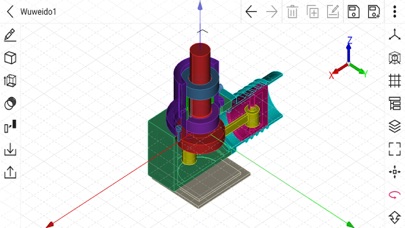
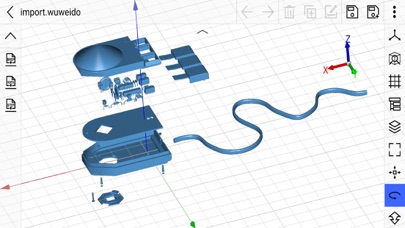
Wuweido is a professional 3D modeling CAD on mobile, enable you do real CAD work on mobile.

More than just a 3D model viewer, dozens of 3D modeling tools are provided to create and modify 3D models.

Optimized CAD touch experiences, easy to build complex 3D geometry models with fingers touch gestures.

Running on local device offline for working with drawings.

The drawing models are persisted on local storage and your data is yours.

Exchange data with famous CAD systems, such as CATIA®, Autodesk® Inventor®, SolidWorks®, Creo™ Parametric, NX™, AutoCAD®, Solid Edge®, Rhino3D® and OPEN CASCADE®, etc.

Suitable for 3D printing, art design, conception design, jewelry design, architectural design, mechanical design, manufacturing, engineering and education.


Highlight Features:

New, open, save and close drawings of 3d model.

Draw and edit geometry shapes using object snap and keypad input.

Input absolute or relative coordinates in cartesian, cylindrical or spherical coordinate systems.

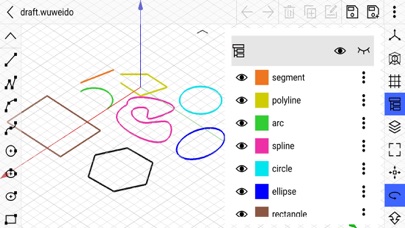
Sketching tools such as line segment, polyline, arc, circle, ellipse, rectangle, polygon, etc.

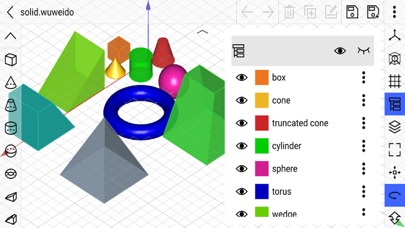
Basic solid modeling tools such as box, sphere, cylinder, cone, truncated cone, torus, wedge, truncated wedge, pyramid, and truncated pyramid, etc.

Basic surface modeling tools such as cover planar wire to form face.

Text modeling tool to support both 2d and 3d text modeling.

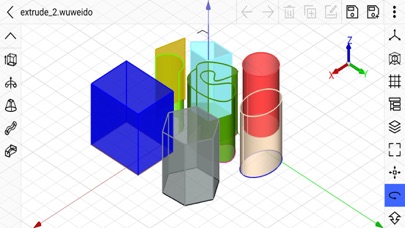
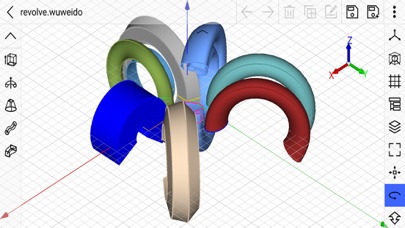
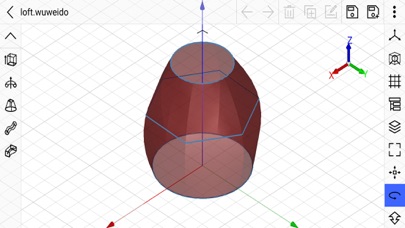
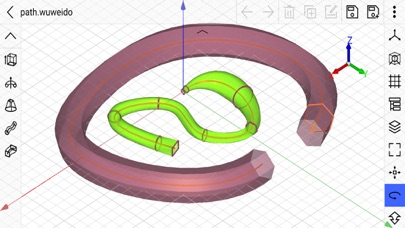
Advanced modeling tools such as extrude, revolve, loft, pipe, shelling, offset, chamfer, fillet, etc.

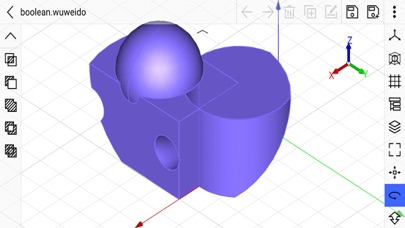
Boolean tools to do geometry shape boolean intersect, boolean subtract, boolean union, boolean section and boolean xor, etc.

Transform tools to move, rotate, scale and mirror geometry shapes.

Array tools to create linear array, polar array, etc.

Edit tools such as select, delete, duplicate, rename, show, hide, undo and redo, etc.

Layer management tools to group geometry shapes as in traditional CAD system.

Visulization property editor to mamage shape's color, material, transparency, display mode and line width.

Grid visulization and snapping with dynamic and static density.

Smart object snapping tool to capture geometry shape's vertex, edge, edge center, edge quadrant and face center.

Support DWG, DXF, OBJ, VRML, STL and glTF formats. STL is de-facto standard in 3D printing.

Import and export 3D parts and assemblies in STEP, IGES, and BREP CAD formats.

Multitouch operator to pan, orbit and zoom view in the most natural way.

The design philosophy is similar to Rhino3D™. It's easy to learn but still powerful.

Powered by OPEN CASCADE. OPEN CASCADE is a geometry kernel provider. See more at https://www.opencascade.com

Inspired by CAD Assistant developed by OPEN CASCADE. CAD Assistant is a 3d modeling viewer and converter. See more at https://www.opencascade.com/content/cad-assistant
Show more Show less

More data about CAD 3D Modeling - Wuweido

Price Free to download
Rating 3.36 based on 33 ratings
Ranking Not ranked
Version 2.2.80
App download size 57.6 MB
Suitable for Everyone

Alternative downloads for the CAD 3D Modeling - Wuweido app

Sketch 3D icon Sketch 3D
Victor Ng
2.9
$2.99
443 ratings
Onshape 3D CAD icon Onshape 3D CAD
PTC Inc.
3.5
Free
408 ratings
STL Simple Viewer icon STL Simple Viewer
Victor Bovio
4.3
Free
871 ratings
Autodesk Fusion icon Autodesk Fusion
Autodesk Inc.
4.5
Free
4.1K ratings
CAD HD icon CAD HD
JIN HWAN KIM
2.4
Free
5 ratings
3D Model Viewer - AR View icon 3D Model Viewer - AR View
健 钟
4.2
Free
327 ratings
SOLIDWORKS Education icon SOLIDWORKS Education
DASSAULT SYSTEMES
2.2
Free
13 ratings
CAD.Tsridiopen-3D&2D view&edit icon CAD.Tsridiopen-3D&2D view&edit
Hangzhou NewDimension Systems Co., Ltd.
3.1
Free
15 ratings

More from Mozongsoft Co. Ltd.

UVCAD-CAD 2D Drawing Drafting icon UVCAD-CAD 2D Drawing Drafting
Mozongsoft Co. Ltd.
2.9
Free
7 ratings

Changelog of CAD 3D Modeling - Wuweido

No changelog data

Developer information for Mozongsoft Co. Ltd.

Mozongsoft Co. Ltd.

Address:

Share CAD 3D Modeling - Wuweido

Comments on CAD 3D Modeling - Wuweido for iOS

We don't have enough comments to show example comments. Please check back later.

App Store Rankings for CAD 3D Modeling - Wuweido

This app is not ranked

Technologies used by CAD 3D Modeling - Wuweido

Sketch 3D icon Sketch 3D
Onshape 3D CAD icon Onshape 3D CAD
STL Simple Viewer icon STL Simple Viewer
Autodesk Fusion icon Autodesk Fusion
CAD HD icon CAD HD
3D Model Viewer - AR View icon 3D Model Viewer - AR View
SOLIDWORKS Education icon SOLIDWORKS Education
CAD.Tsridiopen-3D&2D view&edit icon CAD.Tsridiopen-3D&2D view&edit

Back to top
AppBrain Intelligence premium content

Subscribe now to get full and unlimited access to AppBrain Intelligence. You'll have access to:

  • App Intelligence dashboard (performance timeline, competitor comparison, country rankings, insight cards)
  • Detailed ranking data per app
  • Full timeline per developer
  • Device market shares data per country
  • Unlimited keyword tracking
1 Month

$75/mo
(billed every month)

SAVE 0%
Subscribe
3 Months

$65/mo
($195 billed every 3 months)

SAVE 13%
Subscribe
1 Year

$57.50/mo
($690 billed every year)

SAVE 23%
Subscribe
Each subscription will automatically renew 3 days before the expiration date for the same time period. Subscriptions can be cancelled at any time before the renewal.

AppBrain is a directory focused on discovering great apps and games. We give statistics, rankings and search options that Google Play and the App Store don't have. All trademarks are owned by their respective owners. AppBrain doesn't offer APKs or binaries, and always lets users install the official version from Google Play or the App Store.

More apps

  • Top Android apps being viewed
  • Gifford State Bank for Android
  • King James Bible On Audio Bibi
  • MacroDroid - Device Automation

Android Statistics

  • Android statistics
  • Google Play Developer stats
  • Trending Android Apps
  • Top popular Apps
  • Buy the best Android phone

About AppBrain

  • Contact
  • Privacy
  • Documentation
  • DMCA takedowns
  • Articles
  • Blog
  • Top Free Games Apps for your iPhone or iPad
© 2010-2026 - AppBrain