

Calendar - 2026
Calendar - 2026 is made and published by NeonApps. AppBrain is an independent app data site and isn't affiliated with NeonApps. The app name, icon, screenshots and description belong to NeonApps and are shown as published on the App Store.
AppBrain's verdict
- Rating on App Store
- 2.67
- 9 ratings
- Last updated
- August 28, 2026
- Size
- 65.6 MB
It doesn't have enough ratings yet to judge what users think.
User feedback
Ratings and reviews on the App StoreComments on Calendar - 2026 for iOS
We don't have enough comments to show example comments. Please check back later.
Store listing
By NeonApps, from the App Store




Description by NeonApps Written by the developer, not by AppBrain. Click to read.
Calendar App Features:
◆ Daily To Do List – Create a to do list and tick off the check list when tasks are completed.
◆ Simple Calendar – See your schedule planner as a 3-day view, week view, month view, and year view
◆ Week agenda view – See your weekly planner clearly in calendly.
◆ Find My location – Select a location on a map and add it to your Digital Calendar
◆ Notification Reminders – Set a reminder to your free calender and receive a notification. You decide when the notification is sent.
◆ Simple Notes – Write additional details on your calendar notes.
◆ Appointment Reminder – Schedule one-time or regular reminders. You can choose how regularly they recur.
◆ Artful Agenda look – Select light or dark themes and even change the calendar color.
◆ Holiday Today Calendar – Select which countries you would like to add national holidays from in national calendar app.
Whether you need a personal calendar, a family calendar, or a work calendar, you can get everything in Calendar App.
Calendar 2026 lets you sync events, create and edit events, share calendar, invite people, set reminders, customize calendar, and backup and restore your data with themes and widgets.
The calendar planner allows you to switch the planner between different calendar app views as well as create task lists, reminders, and also a weekly schedule planner to give you a clear overview of your agenda and shared calendar.
What makes Calendars great:
◆ Day calendario - The agenda planner will help you to organize your day.
◆ Weekly planner - Staying ahead of your busy weekly schedule has never been easier Monthly Calendar.
◆ Family calendar - Manage your life with Family and shared family calendar.
◆ Appointment scheduler - Organize and maintain your agenda with ease.
◆ Agenda Planner - Easy to use personal event, appointment reminder, and schedule planner free.
◆ My Calendar - Free calendars organize your monthly calendar Fiscal, kalendae appointment scheduler, monthly planner.
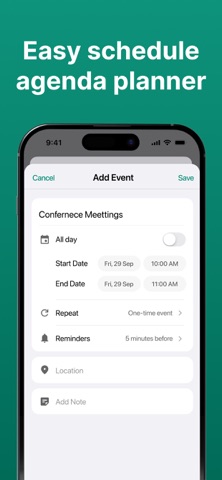
To make a new calendar 2026 entry or update your schedule planner, the interface is very simple. Just tap on your chosen day and add an event along with start and finish times. You can then include a location and a category tag. By selecting more options, you can then also add a recurrence to the calendar entry plus additional calendar notes.
Subscription Details: -
- Payment will be charged to iTunes Account at confirmation of purchase.
- Subscription automatically renews unless auto-renew is turned off at least 24 hours before the end of the current period.
- Account will be charged for renewal within 24 hours prior to the end of the current period, and identify the cost of the renewal.
- No cancellation of the current subscription is allowed during the active subscription period.
- Any unused portion of a free trial period, if offered, will be forfeited when the user purchases a subscription to that publication, where applicable
For Further Information:
Privacy Policy = https://privacypolicycenter.com/new/view/id6464369174
Terms of Use = https://privacypolicycenter.com/new/terms/id6464369174
ELUA = https://privacypolicycenter.com/new/eula/id6464369174
Safety and technology
Found in the app by AppBrain- Price
- Free
- App size
- 65.6 MB
- Content rating
- High
Technologies used by Calendar - 2026
Releases
Updates seen on the App Store- Version
- 2.1
- Launched
- January 2024
No changelog data
Alternatives
Similar apps and more from NeonAppsMore from NeonApps


Rankings
App Store top chartsApp Store Rankings for Calendar - 2026
About the app and developer
About Calendar - 2026
Calendar - 2026 is a productivity app developed by NeonApps.
What is the rating of Calendar - 2026?
Calendar - 2026 is rated 2.67 out of 5 stars, based on 9 ratings.
Is Calendar - 2026 free?
Calendar - 2026 is free. The app size is 65.61 MB. The latest version available is 2.1. The last update was on August 28, 2026.
What are the requirements for Calendar - 2026?
The app has a content rating of High Maturity. The app has been available on the App Store since January 2024.
Developer information for NeonApps
Address: