

Word Documents - Office Reader
Word Documents - Office Reader is made and published by NeonApps. AppBrain is an independent app data site and isn't affiliated with NeonApps. The app name, icon, screenshots and description belong to NeonApps and are shown as published on the App Store.
AppBrain's verdict
Well rated- Rating on App Store
- 4.34
- 148 ratings
- Last updated
- August 20, 2026
- Size
- 116.2 MB
Users rate it well: 4.3 stars from 148 ratings.
User feedback
Ratings and reviews on the App StoreComments on Word Documents - Office Reader for iOS
We don't have enough comments to show example comments. Please check back later.
Store listing
By NeonApps, from the App Store
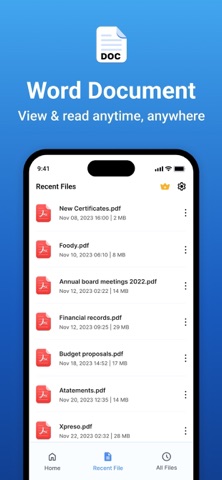

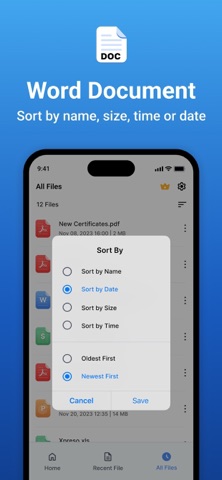
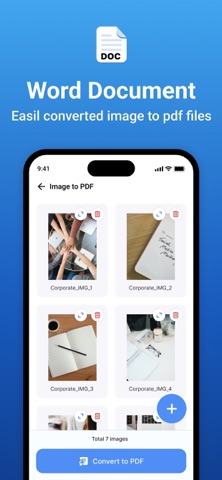
Description by NeonApps Written by the developer, not by AppBrain. Click to read.
Features:
1. Word Document Editing & Creation:
• New Word Document Creation – Easily create new Word documents.
• Text Formatting:
- Apply bold, italic, underline, and strikethrough styles.
- Choose from a variety of fonts and adjust text size.
- Set text alignment (left, center, right, justify).
- Customise text color to enhance readability.
• Undo & Redo Options – Quickly reverse or repeat actions.
2. Image Handling:
• Insert Images – Add images from the camera or gallery into Word files.
• Multiple Image Support – Insert multiple images seamlessly within a document.
3. PDF Conversion & File Management:
• Word to PDF Conversion – Convert Word documents into high-quality PDFs.
• Image to PDF Creation & Sharing – Convert images to PDFs and share instantly.
• Excel to PDF Conversion – Convert Excel files to PDF.
• PPT to PDF Conversion – Convert PowerPoint presentations to PDF.
4. Smart Document Search:
• Search & Find Word Documents – Locate documents easily using a keyword search.
5. Recent Files & Quick Access:
• Recent File List – View and open your recently used documents instantly.
• Manage Recent Documents:
• Rename files
• Share documents
• Delete unwanted files
6. File Sorting & Organisation:
• Sort files by:
• Name
• Date
• Size
• Ascending Order
• Descending Order
Subscription Details: -
- Payment will be charged to iTunes Account at confirmation of purchase.
- Subscription automatically renews unless auto-renew is turned off at least 24 hours before the end of the current period.
- Account will be charged for renewal within 24 hours prior to the end of the current period, and identify the cost of the renewal.
- No cancellation of the current subscription is allowed during the active subscription period.
- Any unused portion of a free trial period, if offered, will be forfeited when the user purchases a subscription to that publication, where applicable.
For Further Information:
Privacy Policy = https://privacypolicycenter.com/new/view/id6468196482
Terms of Use = https://privacypolicycenter.com/new/terms/id6468196482
Eula = https://privacypolicycenter.com/new/eula/id6468196482
Safety and technology
Found in the app by AppBrain- Price
- Free
- App size
- 116.2 MB
- Content rating
- Medium
Technologies used by Word Documents - Office Reader
Releases
Updates seen on the App Store- Version
- 1.3
- Launched
- February 2025
No changelog data
Alternatives
Similar apps and more from NeonAppsAlternatives to Word Documents - Office Reader



More from NeonApps


Rankings
App Store top chartsApp Store Rankings for Word Documents - Office Reader
About the app and developer
About Word Documents - Office Reader
Word Documents - Office Reader is a productivity app developed by NeonApps.
What is the rating of Word Documents - Office Reader?
Word Documents - Office Reader is rated 4.34 out of 5 stars, based on 150 ratings.
Is Word Documents - Office Reader free?
Word Documents - Office Reader is free. The app size is 116.25 MB. The latest version available is 1.3. The last update was on August 20, 2026.
What are the requirements for Word Documents - Office Reader?
The app has a content rating of Medium Maturity. The app has been available on the App Store since February 2025.
Developer information for NeonApps
Address: