

Calendar & Focus - Modo
Calendar & Focus - Modo is made and published by Ruslan Trischenkov. AppBrain is an independent app data site and isn't affiliated with Ruslan Trischenkov. The app name, icon, screenshots and description belong to Ruslan Trischenkov and are shown as published on the App Store.
AppBrain's verdict
- Rating on App Store
- 4.00
- 2 ratings
- Last updated
- September 11, 2026
- Size
- 105.0 MB
It doesn't have enough ratings yet to judge what users think.
User feedback
Ratings and reviews on the App StoreComments on Calendar & Focus - Modo for iOS
We don't have enough comments to show example comments. Please check back later.
Store listing
By Ruslan Trischenkov, from the App Store

Description by Ruslan Trischenkov Written by the developer, not by AppBrain. Click to read.
Most productivity apps force you to choose between a task list and a calendar.
You capture tasks in one place, schedule them somewhere else, and spend your day constantly switching between tools.
Modo brings tasks and calendar together in a single workspace.
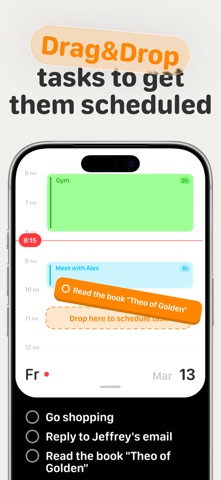
A resizable calendar lives at the top. Your tasks stay below. When you're ready to plan your day, simply drag a task onto your calendar and instantly turn it into a scheduled event.
No copy-pasting.
No duplicate planning.
No switching between apps.
Whether you're managing work projects, planning your weekly schedule, keeping up with classes and homework, building habits, or staying on top of appointments, Modo keeps everything in one clear plan.
WHY PEOPLE USE MODO
• Plan your day faster
• Turn tasks into calendar events instantly
• Stay focused on your priorities
• Keep tasks and schedule in one place
• Build a realistic plan you can actually follow
• Reduce overwhelm and decision fatigue
ONE PLAN FOR WORK, SCHOOL, AND LIFE
Plan the things that compete for your time in one place.
• Work shifts and project tasks
• Classes, homework, and study sessions
• Events, appointments, and personal routines
• Your own calendar and shared calendars
DRAG-AND-DROP SCHEDULING
Scheduling should be simple.
Drag any task directly onto your calendar to create a time block in seconds. Move plans around as priorities change and keep your schedule flexible throughout the day.
• Drag tasks onto your calendar
• Create time blocks instantly
• Reschedule with simple gestures
• Keep tasks and events connected
GOOGLE & APPLE CALENDAR SYNC
Modo works with the calendars you already use.
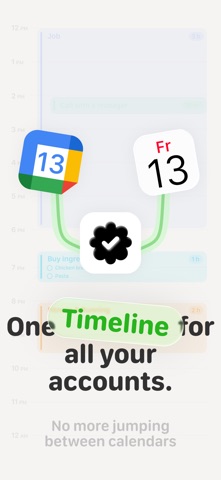
Connect Google Calendar or Apple Calendar to see your own and shared calendars alongside your tasks. Everything stays in sync as your plans change.
• Two-way Google Calendar sync
• Two-way Apple Calendar sync
• Real-time updates
• Automatic event import
• Recurring events
• Custom reminders
• Google Meet support
• Participants and locations
TASKS BUILT FOR REAL PLANNING
Tasks are more than simple checklists.
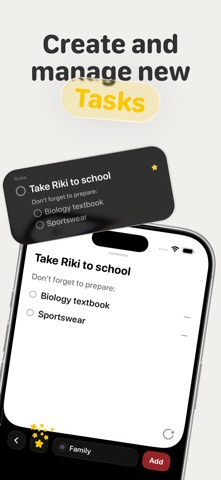
Every task can include subtasks, a scheduled date and time, estimated duration, priority status, and project assignment.
• Subtasks
• Due dates and scheduled times
• Estimated duration
• Priority stars
• Project organization
PROJECTS THAT MATCH HOW YOU THINK
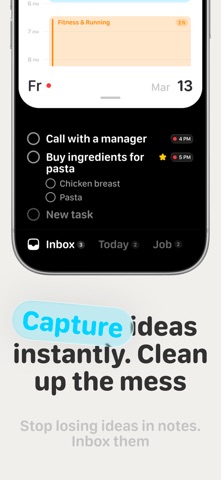
Capture ideas quickly and organize them later.
Modo includes two smart default projects:
Inbox — for collecting tasks and ideas quickly.
Today — for everything scheduled or due today.
You can also create your own projects, customize colors, choose sorting options, and organize them however you like.
DESIGNED FOR SPEED
Modo is built around gestures and fast interactions.
Less tapping.
Less friction.
More planning.
• Drag to schedule
• Swipe to organize
• Fast navigation
• Clean and focused interface
STOP MANAGING TASKS AND CALENDARS SEPARATELY
Download Modo and plan your day the way it actually works.
Terms of Use: https://modoplanner.com//terms
Safety and technology
Found in the app by AppBrain- Price
- Free
- App size
- 105.0 MB
- Content rating
- Everyone
Technologies used by Calendar & Focus - Modo
Releases
Updates seen on the App Store- Version
- 1.2.0
- Launched
- May 2026
No changelog data
Alternatives
Similar apps and more from Ruslan TrischenkovAlternatives to Calendar & Focus - Modo




Rankings
App Store top chartsApp Store Rankings for Calendar & Focus - Modo
About the app and developer
About Calendar & Focus - Modo
Calendar & Focus - Modo is a productivity app developed by Ruslan Trischenkov.
User Ratings
Calendar & Focus - Modo is rated 4.00 out of 5 stars. The rating is based on 2 ratings.
App Information
Calendar & Focus - Modo is freely available from the App Store. The app size is 105.04 MB. The latest version available is 1.2.0. The last update was on September 11, 2026.
Technical Requirements
The app has a content rating of Everyone. The app has been available on the App Store since May 2026.
Developer information for Ruslan Trischenkov
Address: