AppBrain
AppBrain
  • Apps
  • Apps being viewed right now Trending apps today Most popular apps All-time most installed apps Top rated apps iPhone and iPad apps
  • Intelligence ▾
    Intelligence overview → Track any Android app or your whole market
    Track & analyze
    Keyword Tracker & OptimizerTrack & improve Play rankings App Performance ReportOne-off PDF for any app StatisticsFree Android & Play market stats
    Promote your app
    Featured Apps App Links
  • Intelligence
  • Pricing
  • Dashboard
  • Sign up
  • Log in
App Store Apps > Productivity > CalendarNotes: Daily Planner
App profile & analytics · Productivity · Data updated 2026-10-15
CalendarNotes: Daily Planner icon

CalendarNotes: Daily Planner

by wada shuri · Free · Version 1.8
Availability On the App Store since August 2026 ↗
Rating on App Store
–
Rating
–
0 reviews
Best rank
–
not in the top lists
Last updated
October 4, 2026
1.8

CalendarNotes: Daily Planner is made and published by wada shuri. AppBrain is an independent app data site and isn't affiliated with wada shuri. The app name, icon, screenshots and description belong to wada shuri and are shown as published on the App Store.

About CalendarNotes: Daily Planner

CalendarNotes: Daily Planner is a productivity app developed by wada shuri.

What is the rating of CalendarNotes: Daily Planner?

CalendarNotes: Daily Planner has no ratings yet.

Is CalendarNotes: Daily Planner free?

CalendarNotes: Daily Planner is free. The app size is 37.51 MB. The latest version available is 1.8. The last update was on October 4, 2026.

What are the requirements for CalendarNotes: Daily Planner?

The app has a content rating of Everyone. The app has been available on the App Store since August 2026.

Description by wada shuri (from the App Store)
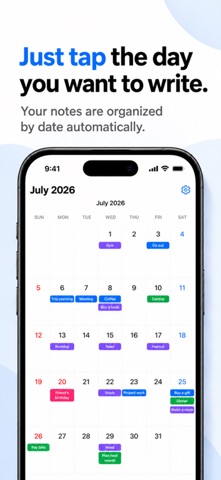
Tap a date on your calendar, and just start writing.
That's the whole app — a simple notes app built right into your calendar.

Bold text, bullet lists, checklists, quotes, and links are all supported, from a quick one-line journal entry to a full trip itinerary.
It all fits inside a single calendar.

No sign-up required.
Everything you write stays only on your device.

■ Who it's for
・Anyone who wants to keep solid notes alongside their schedule, tied to the day
・Anyone who wants to keep a packing list or itinerary linked to a specific date
・Anyone who wants to jot down a shopping list or wish list the moment it comes to mind
・Anyone keeping a diary or health log somewhere private
・Anyone tired of cloud sync and account sign-ups

■ Write as much as you need
Tap a date and that day's notes open right away. Headings, bold text, bullet lists, and checklists let you write anything from a quick note to a long entry. Everything saves automatically as soon as you stop typing — there's no save button.

■ Doubles as a planner
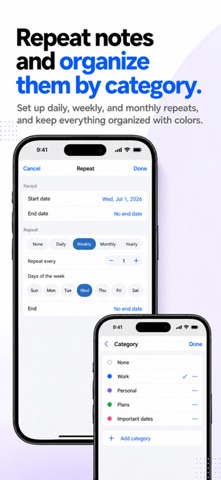
Add as many notes as you like to a single day. Notes can span multiple days, and repeat daily, weekly, monthly, or yearly — weekly repeats even let you pick the day of the week. All date-related settings live together in Advanced Settings, so day to day you can just focus on writing.

■ Color-coded at a glance
Add a category to a note and a colored dot shows up on the calendar. Categories can be freely added, renamed, and recolored — split work from personal, organize by family member, or however suits you.

■ Your notes never leave your device
No account needed. What you write is never sent off your device — it's stored only on your phone, where no one, not even the developer, can see it.
* The app connects to the network only to show the banner ad at the bottom of the screen. Your notes have nothing to do with the ads.

■ Take it with you
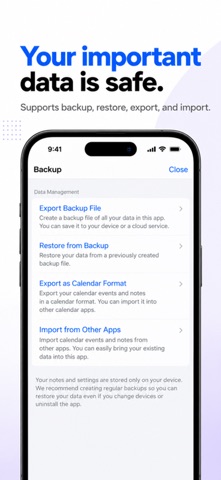
Before switching phones or reinstalling, export a backup from the Settings screen — formatting and categories come back exactly as they were. The app also supports .ics import/export to exchange data with other calendar apps.
* Notes don't sync across devices. When you switch phones, use backup export/import instead.

■ About pricing
The app is free with no feature limits. A banner ad appears at the bottom of the screen.
A one-time in-app purchase, "Remove Ads," removes this ad for good. It's not a subscription — pay once and you're done.
Show more Show less

More data about CalendarNotes: Daily Planner

Price Free
Rating No ratings
Ranking Not ranked
Version 1.8
App size 37.5 MB
Suitable for Everyone

Screenshots

CalendarNotes: Daily Planner Screenshot 1 of 5
CalendarNotes: Daily Planner Screenshot 2 of 5
CalendarNotes: Daily Planner Screenshot 3 of 5
CalendarNotes: Daily Planner Screenshot 4 of 5
CalendarNotes: Daily Planner Screenshot 5 of 5
Screenshots by wada shuri, from the the App Store listing
Official page on the App Store

Alternatives to CalendarNotes: Daily Planner

見やすいカレンダー icon 見やすいカレンダー
takuya oku
0.0
Free
PulseList icon PulseList
DAVID SEDACCA
5.0
Free
1 ratings
Memon for Mobile icon Memon for Mobile
Yusuke Fukasawa
0.0
Free
HyoMemo: Table Checklist icon HyoMemo: Table Checklist
Tatsuki Izumi
0.0
Free
MieruPlan 見える予定表 icon MieruPlan 見える予定表
HIDEKI YAMADA
0.0
Free
Meno - Calendar, To-Do & Notes icon Meno - Calendar, To-Do & Notes
MISAKI OKAGAKI
0.0
Free
Monthly Calendar & Agenda icon Monthly Calendar & Agenda
SEIGOU MITSUTAKE
0.0
Free
NoshiWrite: Noshi Envelope icon NoshiWrite: Noshi Envelope
Jhomar Maravillas
0.0
Free

More from wada shuri

断捨離カメラ - 思い出の記録 icon 断捨離カメラ - 思い出の記録
wada shuri
0.0
Free

Changelog of CalendarNotes: Daily Planner

No changelog data

Developer information for wada shuri

wada shuri

Address:

Share CalendarNotes: Daily Planner

Comments on CalendarNotes: Daily Planner for iOS

We don't have enough comments to show example comments. Please check back later.

App Store Rankings for CalendarNotes: Daily Planner

This app is not ranked

Technologies used by CalendarNotes: Daily Planner

Top new apps Price drops on Google Play Popular Productivity Apps Today's trending apps Apps other people are watching
見やすいカレンダー icon 見やすいカレンダー
PulseList icon PulseList
Memon for Mobile icon Memon for Mobile
HyoMemo: Table Checklist icon HyoMemo: Table Checklist
MieruPlan 見える予定表 icon MieruPlan 見える予定表
Meno - Calendar, To-Do & Notes icon Meno - Calendar, To-Do & Notes
Monthly Calendar & Agenda icon Monthly Calendar & Agenda
NoshiWrite: Noshi Envelope icon NoshiWrite: Noshi Envelope
Overview Alternatives Reviews Rankings Technology
AppBrain Intelligence premium content

Subscribe now to get full and unlimited access to AppBrain Intelligence. You'll have access to:

  • App Intelligence dashboard (performance timeline, competitor comparison, country rankings, insight cards)
  • Detailed ranking data per app
  • Full timeline per developer
  • Device market shares data per country
  • Unlimited keyword tracking
1 Month

$75/mo
(billed every month)

SAVE 0%
Subscribe
3 Months

$65/mo
($195 billed every 3 months)

SAVE 13%
Subscribe
1 Year

$57.50/mo
($690 billed every year)

SAVE 23%
Subscribe
Each subscription will automatically renew 3 days before the expiration date for the same time period. Subscriptions can be cancelled at any time before the renewal.

AppBrain is an app data site, we track rankings, ratings, installs for all apps and games on Google Play and the App Store. AppBrain doesn't host app files or APKs, all install links go directly to the official store. All trademarks are owned by their respective owners.

More apps

  • Top Android apps being viewed
  • Empower You
  • Simple Mirror: Zoom Fullscreen
  • SSDV Decoder Encoder

App statistics

  • Android statistics
  • Google Play Developer stats
  • Trending Android Apps
  • Trending iOS apps
  • Top popular Apps
  • Buy the best Android phone
  • Buy & sell app businesses

About AppBrain

  • Contact
  • Privacy
  • Documentation
  • DMCA takedowns
  • Articles
  • Blog
  • Top Free Games Apps for your iPhone or iPad
© 2010-2026 - AppBrain