

CalenGoo Calendar
CalenGoo Calendar is made and published by Dominique Andr Gunia. AppBrain is an independent app data site and isn't affiliated with Dominique Andr Gunia. The app name, icon, screenshots and description belong to Dominique Andr Gunia and are shown as published on the App Store.
AppBrain's verdict
EstablishedLoved by usersTop 10- Best rank
- #10
- Top Paid, Switzerland
- Rating on App Store
- 4.57
- 301 ratings
- Last updated
- April 21, 2026
Users love it: 4.6 stars from 301 ratings. Its best ranking is #10 in Top Paid, Productivity in Switzerland.
Rankings
App Store top charts- Highest rank
- #10
- Chart
- Top Paid
- Productivity
- Country
- Switzerland
App Store Rankings for CalenGoo Calendar
Top rankings
| Rank | Country | Category | List |
|---|---|---|---|
| 17 | France | Productivity | Top Paid |
| 10 | Switzerland | Productivity | Top Paid |
| 22 | Canada | Productivity | Top Paid |
| 20 | Austria | Productivity | Top Paid |
| 61 | United States | Productivity | Top Paid |
| 28 | Belgium | Productivity | Top Paid |
| 29 | Finland | Productivity | Top Paid |
| 33 | Denmark | Productivity | Top Paid |
| 34 | Portugal | Productivity | Top Paid |
| 36 | Sweden | Productivity | Top Paid |
Ranking history in France
Competitors
Similar apps and more from Dominique Andr GuniaAlternatives to CalenGoo Calendar


More from Dominique Andr Gunia



Releases
Updates seen on the App Store- Version
- 1.5.105
- Launched
- before 2010
No changelog data
User feedback
Ratings and reviews on the App StoreComments on CalenGoo Calendar for iOS
We don't have enough comments to show example comments. Please check back later.
Technology
Found in the app by AppBrain- Price
- $6.99
- App size
- 30.0 MB
- Content rating
- Everyone
Technologies used by CalenGoo Calendar
About the app and developer
About CalenGoo Calendar
CalenGoo Calendar is a productivity app developed by Dominique Andr Gunia.
User Ratings
CalenGoo Calendar is rated 4.57 out of 5 stars. The rating is based on 300 ratings.
App Information
CalenGoo Calendar costs $6.99. The app size is 29.95 MB. The latest version available is 1.5.105. The last update was on April 21, 2026.
Technical Requirements
The app has a content rating of Everyone. The app has been available on the App Store since before 2010.
Developer information for Dominique Andr Gunia
Address:
Frequently asked questions about CalenGoo Calendar
Is CalenGoo Calendar free?
No. CalenGoo Calendar costs $6.99 on the App Store.
Is CalenGoo Calendar still available?
Yes. CalenGoo Calendar is on the App Store, and the last update we saw was on April 21, 2026.
How large is CalenGoo Calendar?
CalenGoo Calendar is 29.95 MB.
Is CalenGoo Calendar suitable for children?
App Store rates the content of CalenGoo Calendar as suitable for everyone.
How do people rate CalenGoo Calendar?
CalenGoo Calendar scores 4.57 out of 5 stars, from 301 ratings on the App Store.
Who made CalenGoo Calendar?
CalenGoo Calendar was developed by Dominique Andr Gunia. It is listed in the productivity category on the App Store.
What are the best alternatives to CalenGoo Calendar?
People looking at CalenGoo Calendar also look at these productivity apps: BusyCal: Calendar & Tasks, Calendars 5 by Readdle, Calendar 366: Events & Tasks, Awesome Calendar, miCal - The missing Calendar.
Store listing
By Dominique Andr Gunia, from the App Store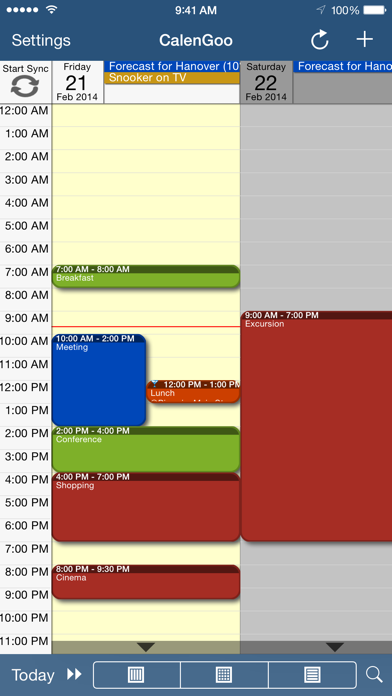
Description by Dominique Andr Gunia Written by the developer, not by AppBrain. Click to read.
The calendar view is similar to the web view of Google Calendar. Events are displayed using the same calendar colors that you use in your Google Calendar, even Google's event colors are supported (please see http://www.calengoo.com/cc ). It also recognizes which calendars are visible and which are hidden. So the view should match the view of your Google Calendar as much as possible.
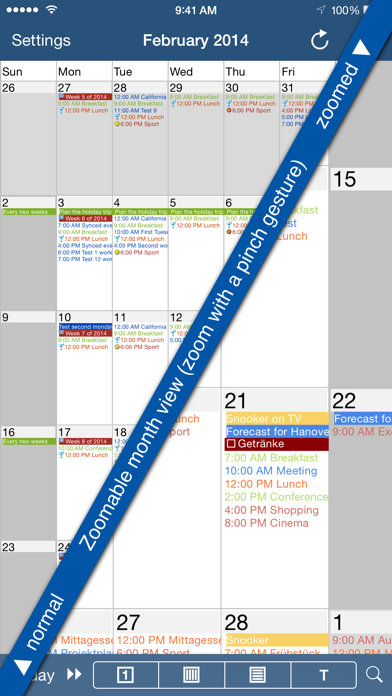
CalenGoo also has a month view similar to that of Google Calendar. It can be zoomed and panned to quickly get an overview over the events of a month. Zooming the month is done by using the two-finger-zoom gesture that you know from Safari and the photo application. A double tap opens the tapped day.
It also supports the same kinds of recurrence rules as Google Calendar and displays recurring events correctly even when you are offline or scroll far into the future.
You can also use Google Calendar's feature to invite people to events and see their status (accepted, declined, maybe, no answer). They will get an invitation email with links to e.g. accept or decline the invitation.
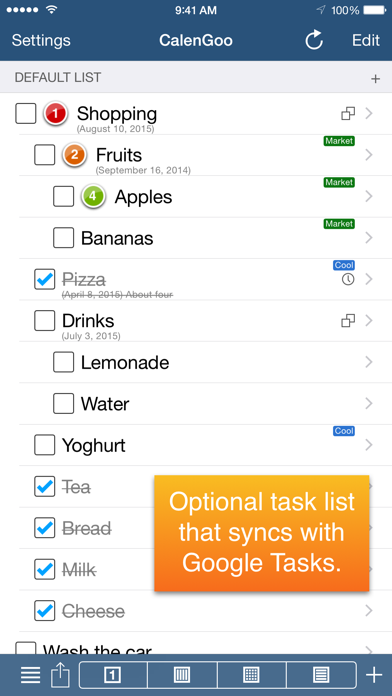
Google Calendar has an integrated task list, called Google Tasks. Tasks with a due date are displayed on the corresponding days of the calendar. CalenGoo can do the same, it can sync this list, display your tasks in the calendar views and in a list view and it even makes your tasks available offline. You can edit and add tasks and the changes will be synced with Google Tasks.
You either need a (free) Google Calendar account to use this app or you can use it with your iOS calendars. However using it with Google Calendar has a few advantages.
To get more information, screenshots and a tutorial, please go to http://www.calengoo.com
If you have any problems or suggestions, please send an email to calengoo@dgunia.de or take a look at CalenGoo's support website to get help.
If you think the font is too small and hard to read, you can increase the font size of all calendar views in the settings under "Settings", "Display and Use".
Features ( http://www.calengoo.com ):
- Drag&drop to quickly copy and move events
- Templates to quickly create similar events again. They can even be combined, e.g. one template for the location of an event and another for the attendees
- Print/PDF function to print the day, week, month or agenda view via AirPrint or to email it as a PDF file
- Supports the same recurrence rules as Google Calendar
- Supports Google Calendar's event colors when syncing via OAuth2
- Icons can be assigned to Google Calendar events
- Date/time can be entered using the iOS wheels or by using a keypad
- Fast search function
- Show/edit iOS calendars in addition to Google calendars (or instead of Google calendars)
- Sync with Google Tasks and iOS Reminders
- Reminders can be snoozed and they can be (optionally) repeated every minute
- Birthdays and anniversaries of your contacts can be displayed
- Zoomable month view, which can be configured to scroll horizontally (month by month) or vertically (week by week)
- Events can be linked to contacts
- Floating events and completable events
- Photos and PDF files can be created and attached to events (via Google Drive)
- Calendar selection bar to quickly show and hide single calendars
- The location of an event can be opened with Apple Maps, Google Maps, Navigon, TomTom, Skobbler, Sygic, iGo or Waze
- View/edit calendars that are shared with others via Google Calendar
- Many configuration options to change the way the app looks and works