

CalibratedNotes
CalibratedNotes is made and published by AIDEN JASON SEXTON. AppBrain is an independent app data site and isn't affiliated with AIDEN JASON SEXTON. The app name, icon, screenshots and description belong to AIDEN JASON SEXTON and are shown as published on the App Store.
AppBrain's verdict
- Last updated
- August 10, 2026
- Size
- 50.0 MB
User feedback
Ratings and reviews on the App StoreComments on CalibratedNotes for iOS
We don't have enough comments to show example comments. Please check back later.
Store listing
By AIDEN JASON SEXTON, from the App Store


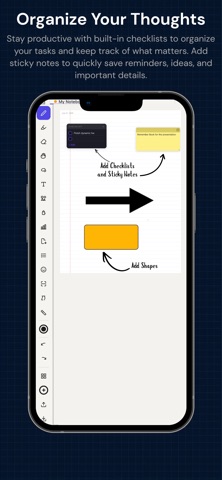
Description by AIDEN JASON SEXTON Written by the developer, not by AppBrain. Click to read.
Capture ideas, solve problems, and organize everything in one powerful digital notebook.
CalibratedNotes combines the freedom of handwriting with intuitive organization to help you take better notes. Whether you're recording lecture notes, solving mathematical equations, sketching engineering concepts, or planning projects, CalibratedNotes provides a clean, distraction-free workspace designed to keep you focused.
Create notebooks for school, work, or personal use, customize your pages, and keep everything organized exactly the way you want.
Write Naturally
Enjoy a responsive handwriting experience with adjustable pen sizes, multiple ink colors, a highlighter, and an eraser. Every tool is designed to make writing feel comfortable, whether you're taking quick notes or filling pages with detailed calculations and sketches.
Stay Organized
Create unlimited notebooks, organize them into folders, customize notebook colors, and quickly switch between subjects or projects. As your collection grows, finding your notes remains simple and efficient.
Custom Page Templates
Choose the page layout that fits your work.
Select from blank, lined, dotted, graph, and grid paper for everything from lecture notes to engineering drawings, mathematical calculations, bullet journals, and project planning.
Handwriting & Text
Combine handwritten notes with movable text boxes to create organized, professional-looking pages. Easily add mathematical and scientific symbols whenever you need them.
Draw and Sketch
Create engineering diagrams, graphs, charts, flowcharts, geometric figures, scientific illustrations, and technical sketches directly within your notebooks. Keep drawings and written notes together for a more organized workflow.
Built for STEM
CalibratedNotes makes it easy to organize engineering calculations, mathematical equations, scientific notes, laboratory observations, and technical diagrams in one place.
Perfect for documenting complex ideas while keeping everything neat and easy to review.
Flexible Pages
Add, duplicate, and delete pages whenever you need. Whether you're writing a single page or an entire semester's worth of notes, your notebooks grow with your ideas.
Customize Your Workspace
Personalize notebook colors, organize folders your way, and choose page templates that match your workflow. CalibratedNotes adapts to your style instead of forcing you into a fixed layout.
Features
Writing
Smooth handwriting
Adjustable pen sizes
Multiple pen colors
Highlighter tool
Eraser tool
Organization
Unlimited notebooks
Unlimited pages
Folder organization
Custom notebook colors
Fast notebook navigation
Page Templates
Blank paper
Lined paper
Dotted paper
Graph paper
Grid paper
Productivity
Movable text boxes
Mathematical symbols
Scientific symbols
Duplicate pages
Delete pages
Drawing
Engineering diagrams
Graphs and charts
Flowcharts
Technical sketches
Scientific illustrations
Geometric drawings
Whether you're taking notes in class, solving equations, sketching ideas, planning projects, or organizing your daily tasks, CalibratedNotes provides a flexible workspace designed to help you write naturally and keep everything in one place.
Download CalibratedNotes today and experience a smarter way to write, organize, and create.
Terms of Use: https://www.apple.com/legal/internet-services/itunes/dev/stdeula/
Safety and technology
Found in the app by AppBrain- Price
- Free
- App size
- 50.0 MB
- Content rating
- Everyone
Technologies used by CalibratedNotes
Releases
Updates seen on the App Store- Version
- 1.0.1
- Launched
- August 2026
No changelog data
Alternatives
Similar apps and more from AIDEN JASON SEXTONAlternatives to CalibratedNotes


Rankings
App Store top chartsApp Store Rankings for CalibratedNotes
About the app and developer
About CalibratedNotes
CalibratedNotes is a productivity app developed by AIDEN JASON SEXTON.
User Ratings
The app has no ratings yet.
App Information
CalibratedNotes is freely available from the App Store. The app size is 50.04 MB. The latest version available is 1.0.1. The last update was on August 10, 2026.
Technical Requirements
The app has a content rating of Everyone. The app has been available on the App Store since August 2026.
Developer information for AIDEN JASON SEXTON
Address:
Frequently asked questions about CalibratedNotes
Is CalibratedNotes free?
Yes. CalibratedNotes is free on the App Store.
Is CalibratedNotes still available?
Yes. CalibratedNotes is on the App Store, and the last update we saw was on August 10, 2026.
How large is CalibratedNotes?
CalibratedNotes is 50.04 MB.
Is CalibratedNotes suitable for children?
App Store rates the content of CalibratedNotes as suitable for everyone.
Who made CalibratedNotes?
CalibratedNotes was developed by AIDEN JASON SEXTON. It is listed in the productivity category on the App Store.
What are the best alternatives to CalibratedNotes?
People looking at CalibratedNotes also look at these productivity apps: BUNKO Notes, Nocturnum: Markdown Notes, HiMemo, Paper Maker: Note Templates, PinNote – Lock Screen Notes.