

Calmgate: Screen Time Blocker
Calmgate: Screen Time Blocker is made and published by Polash Chandra Das. AppBrain is an independent app data site and isn't affiliated with Polash Chandra Das. The app name, icon, screenshots and description belong to Polash Chandra Das and are shown as published on the App Store.
AppBrain's verdict
- Last updated
- July 9, 2026
Rankings
App Store top chartsApp Store Rankings for Calmgate: Screen Time Blocker
Competitors
Similar apps and more from Polash Chandra DasAlternatives to Calmgate: Screen Time Blocker


More from Polash Chandra Das

Releases
Updates seen on the App Store- Version
- 1.0.2
- Launched
- July 2026
No changelog data
User feedback
Ratings and reviews on the App StoreComments on Calmgate: Screen Time Blocker for iOS
We don't have enough comments to show example comments. Please check back later.
Technology
Found in the app by AppBrain- Price
- Free
- App size
- 18.0 MB
- Content rating
- Everyone
Technologies used by Calmgate: Screen Time Blocker
About the app and developer
About Calmgate: Screen Time Blocker
Calmgate: Screen Time Blocker is a productivity app developed by Polash Chandra Das.
What is the rating of Calmgate: Screen Time Blocker?
Calmgate: Screen Time Blocker has no ratings yet.
Is Calmgate: Screen Time Blocker free?
Calmgate: Screen Time Blocker is free. The app size is 17.98 MB. The latest version available is 1.0.2. The last update was on July 9, 2026.
What are the requirements for Calmgate: Screen Time Blocker?
The app has a content rating of Everyone. The app has been available on the App Store since July 2026.
Developer information for Polash Chandra Das
Address:
Frequently asked questions about Calmgate: Screen Time Blocker
Is Calmgate: Screen Time Blocker free?
Yes. Calmgate: Screen Time Blocker is free on the App Store.
Is Calmgate: Screen Time Blocker still available?
Yes. Calmgate: Screen Time Blocker is on the App Store, and the last update we saw was on July 9, 2026.
How large is Calmgate: Screen Time Blocker?
Calmgate: Screen Time Blocker is 17.98 MB.
Is Calmgate: Screen Time Blocker suitable for children?
App Store rates the content of Calmgate: Screen Time Blocker as suitable for everyone.
Who made Calmgate: Screen Time Blocker?
Calmgate: Screen Time Blocker was developed by Polash Chandra Das. It is listed in the productivity category on the App Store.
What are the best alternatives to Calmgate: Screen Time Blocker?
People looking at Calmgate: Screen Time Blocker also look at these productivity apps: LingoLock: Earn Screen Time, Pupmeter : Screen Time Control, Sqroll: Screen Time Control, Screen Time Control: OceanMode, Lexi AI: Legal & Law Assistant.
Store listing
By Polash Chandra Das, from the App Store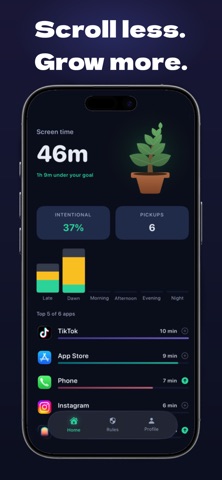



Description by Polash Chandra Das Written by the developer, not by AppBrain. Click to read.
Mindful Pauses to Break the Autopilot Loop Before you are permitted to access your most distracting applications, Calmgate intervenes with a mandatory, guided breathing exercise lasting between 10 and 60 seconds. This engineered psychological friction intercepts the immediate dopamine-seeking impulse, providing a critical window of mindfulness. This brief pause breaks the autopilot scrolling loop and allows you to consciously evaluate whether opening the application aligns with your current goals.
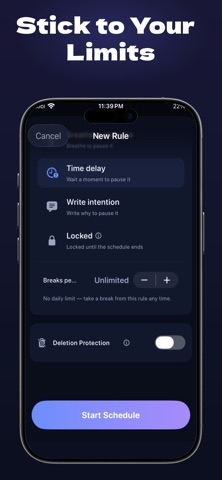
Strict Mode and Unbreakable Deletion Protection For moments of severely depleted willpower, personal accountability must be outsourced to unyielding software. Calmgate utilizes advanced restriction architecture to enforce a true digital lockdown. When Strict Mode is activated, active block sessions cannot be bypassed, and Deletion Protection actively prevents the uninstallation of the application until your scheduled focus period is entirely complete. Emergency unlocks are strictly guarded and only granted after submitting a written declaration of intent, forcing cognitive engagement over impulsive overrides.
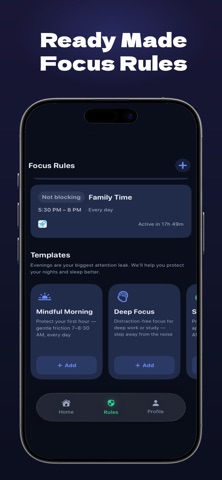
Targeted Scheduling and the Sleep Shield Structure your day proactively with highly dynamic scheduling parameters. Activate the Morning Block routine to prevent the habit of waking up to overwhelming social media feeds, utilize Monk Mode for intense, distraction-free study sessions, or engage the Sleep Shield to automatically restrict access to stimulating applications between 10 PM and 7 AM, promoting vastly improved sleep hygiene.
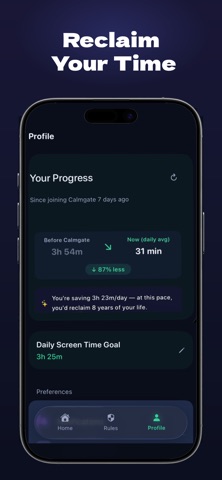
Behavioral Tracking and Dynamic Focus Scores Sustainable behavioral transformation requires accurate measurement. Calmgate calculates a dynamic daily Focus Score by analyzing the ratio of your intentional, productive application usage against the time lost to digital distractions. Monitor your behavioral patterns over time, identify your most common distraction triggers, and celebrate tangible, data-driven improvements in your daily attention span.
Strictly On-Device Privacy Architecture Your behavioral data is fundamentally personal and must remain entirely under your control. Calmgate operates with a strict, zero-transmission privacy architecture. All application processing, usage tracking, and local limits are executed entirely on your device utilizing secure local storage frameworks. Absolutely no analytics are transmitted off-device, ensuring complete confidentiality for your digital habits and routines.
— Terms of Use (EULA): https://www.apple.com/legal/internet-services/itunes/dev/stdeula/