

CamCarDer Lite
CamCarDer Lite is made and published by OXiGENATOR LLC. AppBrain is an independent app data site and isn't affiliated with OXiGENATOR LLC. The app name, icon, screenshots and description belong to OXiGENATOR LLC and are shown as published on the App Store.
AppBrain's verdict
EstablishedWell rated- Rating on App Store
- 4.43
- 160 ratings
- Last updated
- June 2, 2025
Users rate it well: 4.4 stars from 160 ratings.
Rankings
App Store top chartsApp Store Rankings for CamCarDer Lite
Competitors
Similar apps and more from OXiGENATOR LLCAlternatives to CamCarDer Lite







More from OXiGENATOR LLC








Releases
Updates seen on the App Store- Version
- 4.2
- Launched
- September 2015
No changelog data
User feedback
Ratings and reviews on the App StoreComments on CamCarDer Lite for iOS
We don't have enough comments to show example comments. Please check back later.
Technology
Found in the app by AppBrain- Price
- Free
- App size
- 12.0 MB
- Content rating
- Everyone
Technologies used by CamCarDer Lite
About the app and developer
About CamCarDer Lite
CamCarDer Lite is a navigation app developed by OXiGENATOR LLC.
What is the rating of CamCarDer Lite?
CamCarDer Lite is rated 4.43 out of 5 stars, based on 160 ratings.
Is CamCarDer Lite free?
CamCarDer Lite is free. The app size is 12.00 MB. The latest version available is 4.2. The last update was on June 2, 2025.
What are the requirements for CamCarDer Lite?
The app has a content rating of Everyone. The app has been available on the App Store since September 2015.
Developer information for OXiGENATOR LLC
Address:
Frequently asked questions about CamCarDer Lite
Is CamCarDer Lite free?
Yes. CamCarDer Lite is free on the App Store.
Is CamCarDer Lite still available?
Yes. CamCarDer Lite is on the App Store, and the last update we saw was on June 2, 2025.
How large is CamCarDer Lite?
CamCarDer Lite is 12.00 MB.
Is CamCarDer Lite suitable for children?
App Store rates the content of CamCarDer Lite as suitable for everyone.
How do people rate CamCarDer Lite?
CamCarDer Lite scores 4.43 out of 5 stars, from 160 ratings on the App Store.
Who made CamCarDer Lite?
CamCarDer Lite was developed by OXiGENATOR LLC. It is listed in the navigation category on the App Store.
What are the best alternatives to CamCarDer Lite?
People looking at CamCarDer Lite also look at these navigation apps: Car Camera DVR-Dashcam, Dashcam - Car Crash Recorder, Car Camera DVR. HD dash cam, Safety Drive Recorder, AI Dashcam.
Store listing
By OXiGENATOR LLC, from the App Store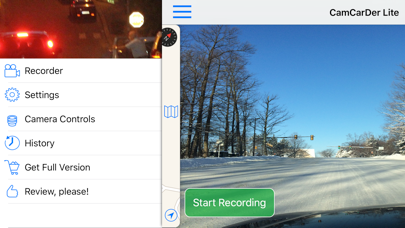
Description by OXiGENATOR LLC Written by the developer, not by AppBrain. Click to read.
Features:
* Capture video in 3 resolutions (Low, Medium, High) with option to include audio and perform image stabilization
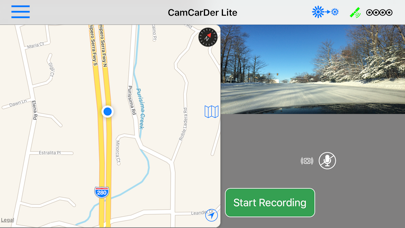
* Turn-by-turn navigation assistance while recording video
* Record GPS location and speed along with video frames
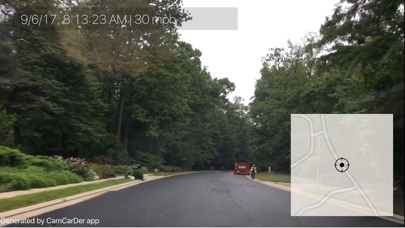
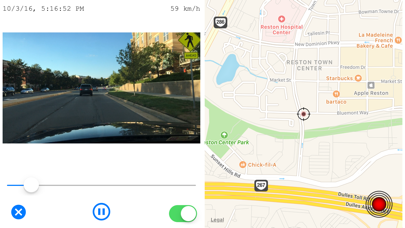
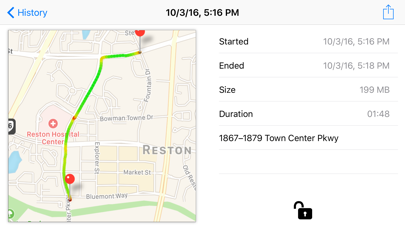
* Play back video with showing marker on a map and timestamp / speed of a moment
* Export video to album for sharing or storage (see limitations below)
* Take photo snapshots while recording video
* Imprints date/time, speed stamp into exporting video as well as actual map with dynamic marker
* Keep recorded clips as a history; view History as a List (by Date) or on an interactive Map (by Location)
* Show path for particular clip on a map with speed indicated by color
* Option to start recording when open the app (or 3D Touch)
* G-Force sensor to record acceleration and braking
* Show/hide map on main screen for easy navigation
* Dim screen to reduce heating and power consumption
* Detect speed limit signs and optionally notify if exceeding
NOTE: Continued use of GPS running in the background can dramatically decrease battery life. Please see details on our website at http://oxigenator.com/products/camcarder/. We suggest that you connect your iPhone to a power, rather than using it on a battery.
History feature allow you to keep up to 3 recorded clips (you can delete some to record others). Clips can be viewed in chronological order or by their locations on interactive map. When export clips to Camera Roll, only first 30 seconds are visible in a Lite version.
If your phone receives an incoming call or you want to switch to another app, CamCarDer will save current clip and stop recording.