AppBrain
AppBrain
  • Apps
  • Apps being viewed right now Trending apps today Most popular apps All-time most installed apps Top rated apps iPhone and iPad apps
  • Intelligence ▾
    Intelligence overview → Track any Android app or your whole market
    Track & analyze
    Keyword Tracker & OptimizerTrack & improve Play rankings App Performance ReportOne-off PDF for any app StatisticsFree Android & Play market stats
    Promote your app
    Featured Apps App Links
  • Intelligence
  • Pricing
  • Dashboard
  • Sign up
  • Log in
App Store Apps > Photo & Video > Camera Metadata Border
Camera Metadata Border icon

Camera Metadata Border

1.0.2
Victor Alfonso Martinez Alvarez
5.00
4 reviews
Free

Camera Metadata Border Screenshot 1 of 9
Camera Metadata Border Screenshot 2 of 9
Camera Metadata Border Screenshot 3 of 9
Camera Metadata Border Screenshot 4 of 9
Camera Metadata Border Screenshot 5 of 9
Camera Metadata Border Screenshot 6 of 9
Camera Metadata Border Screenshot 7 of 9
Camera Metadata Border Screenshot 8 of 9
Camera Metadata Border Screenshot 9 of 9
Screenshots by Victor Alfonso Martinez Alvarez, from the the App Store listing
View on the App Store

About Camera Metadata Border

Camera Metadata Border is a photo & video app developed by Victor Alfonso Martinez Alvarez.

User Ratings

Camera Metadata Border is rated 5.00 out of 5 stars. The rating is based on 4 ratings.

App Information

Camera Metadata Border is freely available from the App Store. The app size is 60.56 MB. The latest version available is 1.0.2. The last update was on June 9, 2026.

Technical Requirements

The app has a content rating of Everyone. The app has been available on the App Store since May 2026.

Description by Victor Alfonso Martinez Alvarez (from the App Store)
Camera Metadata Border turns hidden EXIF data into clean photo frames for photographers who want camera settings to stay visible in the final image.

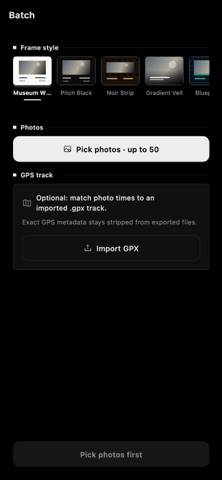
Pick a photo from your library, choose a frame style, and export a polished image with metadata such as camera model, lens, aperture, shutter speed, ISO, focal length, capture date, and optional location handling. Everything is rendered on your device, so your photos do not need to be uploaded to a server or tied to an account.

WHY PHOTOGRAPHERS USE IT
- Share the settings behind a favorite shot
- Create clean camera-setting borders for social posts, portfolios, prints, and photo challenges
- Keep lens, exposure, and date information attached to exported images
- Build a consistent look across a set of photos
- Preserve privacy by removing exact GPS data by default

EXIF AND CAMERA METADATA
The app reads common photo metadata and formats it into a readable border instead of leaving it buried in a file inspector. Use it as an EXIF viewer when you want to check the details, then turn those details into a finished frame.

FRAME STYLES
Start with Museum White for a classic gallery-style mat. Pro unlocks additional looks including Pitch Black, Minimal Center, Gradient Veil, Noir Strip, and Blueprint. Each style is designed to make camera information legible without overwhelming the photo.

BATCH EXPORT
Export up to 50 framed photos at once with a consistent metadata layout. Useful for shoots, travel sets, client selects, and social posts where every image should carry the same clean camera-notes style.

MANUAL METADATA EDITING
Some photos, scans, shared files, or edited exports have incomplete EXIF data. Fill in or correct missing fields before you export so the final frame still includes the right camera story.

CAMERA PROFILES
Save reusable camera metadata presets for manual lenses, vintage cameras, film scans, screenshots, or edited files. Profiles make it faster to apply consistent information across multiple exports.

PRIVACY FIRST
Your photo library stays on your device. The app does not require an account and does not upload your images to a cloud service. Exact GPS location is stripped from exports by default, with controls to remove, approximate, or keep location metadata when needed.

PRO FEATURES
Upgrade to Pro to remove ads, unlock five extra frame styles, and enable batch export.

Terms of Use: https://camerametadata.com/terms.html
Privacy Policy: https://camerametadata.com/privacy.html
Show more Show less

Alternatives to Camera Metadata Border

Campera - Point & Shoot Camera icon Campera - Point & Shoot Camera
ALEX RICHARD CAMP
4.9
Free
19 ratings
Lumencam | Pocket Camera icon Lumencam | Pocket Camera
Nikita Pishchugin
4.7
Free
3 ratings
Film(ish) photo video editing icon Film(ish) photo video editing
Catalin Bridinel
4.2
Free
24 ratings
Reframe – Photo Layout Editor icon Reframe – Photo Layout Editor
Douglas Neish
5.0
Free
4 ratings
Koloristika • The Camera icon Koloristika • The Camera
THE BRIM - FZCO
5.0
Free
4 ratings
DualCamRec icon DualCamRec
Eugenio Keller Puente
0.0
Free
IIWII icon IIWII
Joshua Johannes Hoffmann
4.6
$1.99
16 ratings
Lumeni: Photo Editor icon Lumeni: Photo Editor
Artur Kulik
4.6
Free
51 ratings

More from Victor Alfonso Martinez Alvarez

Music Binaural Radio 08 icon Music Binaural Radio 08
Victor Alfonso Martinez Alvarez
5.0
Free
10 ratings
Photo Edits 08 - RAW Filters icon Photo Edits 08 - RAW Filters
Victor Alfonso Martinez Alvarez
5.0
Free
4 ratings
Aprende Inglés para Trabajar icon Aprende Inglés para Trabajar
Victor Alfonso Martinez Alvarez
5.0
Free
1 ratings
US Citizenship Prep 2026 icon US Citizenship Prep 2026
Victor Alfonso Martinez Alvarez
5.0
Free
1 ratings
Quinceanera Photo Planner icon Quinceanera Photo Planner
Victor Alfonso Martinez Alvarez
0.0
Free
Play Guitar Chords & Scales icon Play Guitar Chords & Scales
Victor Alfonso Martinez Alvarez
0.0
Free
Puppy Name Finder: Dog Names icon Puppy Name Finder: Dog Names
Victor Alfonso Martinez Alvarez
0.0
Free

Changelog of Camera Metadata Border

No changelog data

Developer information for Victor Alfonso Martinez Alvarez

Victor Alfonso Martinez Alvarez

Address:

Share Camera Metadata Border

Comments on Camera Metadata Border for iOS

We don't have enough comments to show example comments. Please check back later.

App Store Rankings for Camera Metadata Border

This app is not ranked

Technologies used by Camera Metadata Border

Frequently asked questions about Camera Metadata Border

Is Camera Metadata Border free?

Yes. Camera Metadata Border is free on the App Store.

Is Camera Metadata Border still available?

Yes. Camera Metadata Border is on the App Store, and the last update we saw was on June 9, 2026.

How large is Camera Metadata Border?

Camera Metadata Border is 60.56 MB.

Is Camera Metadata Border suitable for children?

App Store rates the content of Camera Metadata Border as suitable for everyone.

How do people rate Camera Metadata Border?

Camera Metadata Border scores 5.00 out of 5 stars, from 4 ratings on the App Store.

Who made Camera Metadata Border?

Camera Metadata Border was developed by Victor Alfonso Martinez Alvarez. It is listed in the photo & video category on the App Store.

What are the best alternatives to Camera Metadata Border?

People looking at Camera Metadata Border also look at these photo & video apps: Campera - Point & Shoot Camera, Lumencam | Pocket Camera, Film(ish) photo video editing, Reframe – Photo Layout Editor, Koloristika • The Camera.

Popular Photo & Video Apps Top new apps Apps other people are watching Price drops on Google Play Today's trending apps
Campera - Point & Shoot Camera icon Campera - Point & Shoot Camera
Lumencam | Pocket Camera icon Lumencam | Pocket Camera
Film(ish) photo video editing icon Film(ish) photo video editing
Reframe – Photo Layout Editor icon Reframe – Photo Layout Editor
Koloristika • The Camera icon Koloristika • The Camera
DualCamRec icon DualCamRec
IIWII icon IIWII
Lumeni: Photo Editor icon Lumeni: Photo Editor
AppBrain Intelligence premium content

Subscribe now to get full and unlimited access to AppBrain Intelligence. You'll have access to:

  • App Intelligence dashboard (performance timeline, competitor comparison, country rankings, insight cards)
  • Detailed ranking data per app
  • Full timeline per developer
  • Device market shares data per country
  • Unlimited keyword tracking
1 Month

$75/mo
(billed every month)

SAVE 0%
Subscribe
3 Months

$65/mo
($195 billed every 3 months)

SAVE 13%
Subscribe
1 Year

$57.50/mo
($690 billed every year)

SAVE 23%
Subscribe
Each subscription will automatically renew 3 days before the expiration date for the same time period. Subscriptions can be cancelled at any time before the renewal.

AppBrain is an app data site, we track rankings, ratings, installs for all apps and games on Google Play and the App Store. AppBrain doesn't host app files or APKs, all install links go directly to the official store. All trademarks are owned by their respective owners.

More apps

  • Top Android apps being viewed
  • View Super Dark Deception
  • Skip The Paywall
  • WhizDrama - Watch Short Dramas

App statistics

  • Android statistics
  • Google Play Developer stats
  • Trending Android Apps
  • Trending iOS apps
  • Top popular Apps
  • Buy the best Android phone
  • Buy & sell app businesses

About AppBrain

  • Contact
  • Privacy
  • Documentation
  • DMCA takedowns
  • Blog
  • Tips to improve your Android promotional campaign
© 2010-2026 - AppBrain