

CapScribe: Auto Captions
CapScribe: Auto Captions is made and published by 正平 孙. AppBrain is an independent app data site and isn't affiliated with 正平 孙. The app name, icon, screenshots and description belong to 正平 孙 and are shown as published on the App Store.
AppBrain's verdict
New- Rating on App Store
- 5.00
- 1 ratings
- Last updated
- October 30, 2026
- Size
- 7.22 MB
CapScribe: Auto Captions came out 78 days ago. It doesn't have enough ratings yet to judge what users think.
User feedback
Ratings and reviews on the App StoreComments on CapScribe: Auto Captions for iOS
We don't have enough comments to show example comments. Please check back later.
Store listing
By 正平 孙, from the App Store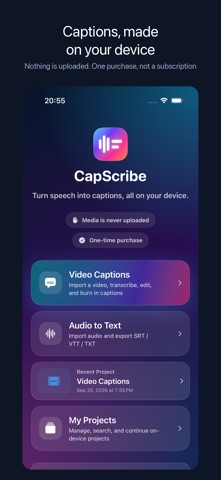



Description by 正平 孙 Written by the developer, not by AppBrain. Click to read.
Import a video or audio file, transcribe it on device, fix words and timing, pick a style, and export. Already have captions? Pair a video with an SRT or VTT file and skip transcription. Batch up to 10 videos at once.
Because everything runs locally, there is no upload queue and no waiting for a server. After the language pack is downloaded, transcription works in airplane mode.
CREATE AND EDIT
• Transcribe imported video and audio on your device
• Keep multiple local video and audio projects, then search, rename, duplicate, reopen, or delete them
• Burn styled captions into the exported video
• Choose from eight presets or customize font design, alignment, colors, outline, background, corners, and shadow
• Add a clean Pop or Rise entrance to captions, or keep motion off
• Reframe output for the original ratio, 9:16, 4:5, 1:1, or 16:9
• Preview at 0.5×–2× speed and loop the current caption while editing
• Enter exact timecodes, smart-split a caption, or safely fix empty and overlong captions in one step
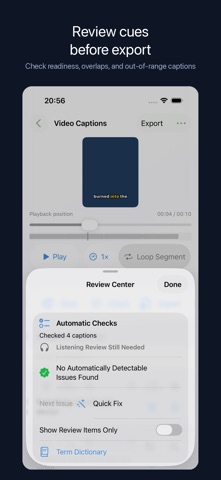
• Review low-confidence, fast, overlong, and empty captions in one place
• Use on-device Automatic Checks to find detectable caption and timing issues, then listen and review names, numbers, original text, and translations before publishing
• Reuse an on-device term dictionary for names and commonly misheard words
• Undo and redo edits, or find and replace across original text and translations
TRANSLATE AND EXPORT
• Translate captions with Apple's system Translation framework
• Switch between original, translated, and bilingual captions
• Batch-caption up to 10 videos at a time
• Export original, translated, or bilingual SRT, VTT, and TXT files separately or as one package
• Preview the finished video, compare source-to-output resolution, and check expected duration, frame rate, audio, and file size before sharing
FREE PREVIEW AND FULL VERSION
Try the complete workflow at no charge. For longer media, the free preview processes the first 90 seconds of each video or the first 10 minutes of audio. A one-time, non-consumable in-app purchase removes those free preview limits. There is no subscription or watermark; actual processing capacity depends on your device and media.
PRIVACY
CapScribe processes your media and transcripts on your iPhone or iPad and does not upload them to the developer. Projects stay in the app's local storage. iOS may download Apple speech or translation language resources when first needed. Purchases are handled by Apple through the App Store.
REQUIREMENTS
iPhone with iOS 26 or later.
Safety and technology
Found in the app by AppBrain- Price
- Free
- App size
- 7.22 MB
- Content rating
- Everyone
Technologies used by CapScribe: Auto Captions
Releases
Updates seen on the App Store- Version
- 2.8.3
- Launched
- August 2026
No changelog data
Alternatives
Similar apps and more from 正平 孙Alternatives to CapScribe: Auto Captions


More from 正平 孙


Rankings
App Store top chartsApp Store Rankings for CapScribe: Auto Captions
About the app and developer
About CapScribe: Auto Captions
CapScribe: Auto Captions is a photo & video app developed by 正平 孙.
What is the rating of CapScribe: Auto Captions?
CapScribe: Auto Captions is rated 5.00 out of 5 stars, based on one rating ratings.
Is CapScribe: Auto Captions free?
CapScribe: Auto Captions is free. The app size is 7.22 MB. The latest version available is 2.8.3. The last update was on October 30, 2026.
What are the requirements for CapScribe: Auto Captions?
The app has a content rating of Everyone. The app has been available on the App Store since August 2026.
Developer information for 正平 孙
Address:
Frequently asked questions about CapScribe: Auto Captions
Is CapScribe: Auto Captions free?
Yes. CapScribe: Auto Captions is free on the App Store.
Is CapScribe: Auto Captions still available?
Yes. CapScribe: Auto Captions is on the App Store, and the last update we saw was on October 30, 2026.
How large is CapScribe: Auto Captions?
CapScribe: Auto Captions is 7.22 MB.
Is CapScribe: Auto Captions suitable for children?
App Store rates the content of CapScribe: Auto Captions as suitable for everyone.
How do people rate CapScribe: Auto Captions?
CapScribe: Auto Captions has one rating of 5.00 stars on the App Store.
Who made CapScribe: Auto Captions?
CapScribe: Auto Captions was developed by 正平 孙. It is listed in the photo & video category on the App Store.
What are the best alternatives to CapScribe: Auto Captions?
People looking at CapScribe: Auto Captions also look at these photo & video apps: Captionry: Auto Captions, Auto Captions - Video Subtitle, Caption Hero: Auto Captions, Handcut: Captions & Subtitles, Subfast: Subtitle & Captions.