Captr・Screenshot Organizer is an overall app developed by Aza IQ, Inc..
Download Statistics
User Ratings
Captr・Screenshot Organizer is rated 4.78 out of 5 stars. The rating is based on 51 ratings.
App Information
Captr・Screenshot Organizer is FREE to download. The APK download size is 142.58 MB. The latest version available is 3.0.17. The last update was on September 4, 2026.
Technical Requirements
The app has a content rating of Medium Maturity. The app has been available on Google Play June 2025.
Description
Captr — Screenshot Organizer
Not another gallery you have to dig through
Other screenshot apps sort things into a tidy gallery you still have to open, scroll, and remember to check. Captr understands why you took the screenshot in the first place — and turns it into something you actually do.
How does it work?
You screenshot a jacket on Instagram, a restaurant a friend recommended, and a recipe you want to try. The next morning, Captr shows them as today's list with the jacket ready to buy, the restaurant ready to navigate to, and the recipe saved for later. The things you meant to do stop dying in your camera roll.
Core features:
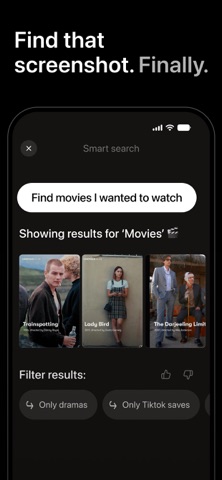
Zero manual work ・AI reads every screenshot the moment it's taken and understands what's in it: product, place, recipe, article, or event ・Extracts the details automatically and files it into the right list without tagging and folders to manage ・Nothing to organize yourself, ever
Your daily list ・Replaces a folder you have to remember to open with a list that comes to you ・Swipe through each morning to triage what's new — dismiss it, snooze it, or act on it ・Captr proposes how things should be grouped; you don't have to browse or file anything to make it useful
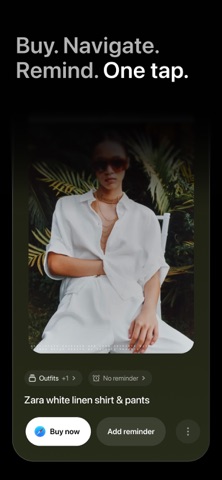
Smart Actions ・Add to your calendar or set a reminder, straight from the screenshot ・Jump back to the original post on Instagram or wherever you saved it from ・Buy the product or get directions to the place, when that's what the screenshot was for
Reminders that stick ・The screenshots that become a reminder or calendar event are the ones that actually get followed through on ・Once something has a date attached, Captr won't let it get buried again ・This is the difference between saving something and actually doing it
Screenshot cleanup ・Detects duplicate and near-duplicate screenshots automatically ・Review and clear clutter with a simple swipe ・Frees up storage on your phone once screenshots are safely synced to Captr
Outfit and style finder ・Recognizes clothing and style across your saved screenshots ・Find the exact look again without scrolling back through everything ・Keeps fashion inspiration and the things you meant to buy in one place
Shopping wishlist ・Turns scattered product and sale screenshots into one running wishlist ・Keeps shopping intentions from getting lost between apps ・Everything you meant to buy, in one list that updates itself
Private by design ・Everything you save stays in Captr — never sold, never shared ・Delete anything, anytime
Use cases:
・Planning a trip — flights, hotels, and places to see pulled into one Travel list instead of scattered screenshots. ・Cooking something new — recipes from Instagram, TikTok, and the web, sorted and ready when you're deciding what to make. ・Shopping for something specific — product and sale screenshots turned into a list you can act on before the deal is gone. ・Renovating or furnishing a space — furniture and inspiration screenshots grouped into one place instead of scattered across your camera roll. ・Tracking an outfit or style you liked — clothing screenshots organized so you can find and shop the look later. ・Remembering time-sensitive things — bookings, events, and deadlines buried in screenshots, surfaced as reminders before you miss them.
Frequently asked questions:
Does Captr work with screenshots from Instagram, TikTok, or other apps? Yes. From anywhere, with a tap back to the original post anytime.
Is my data private with Captr? Yes. Never sold, never shared, and deletable anytime. Loved by people drowning in screenshots
Captr holds a 4.9 rating on the App Store. Users say it finally makes sense of a messy camera roll — remembering why a screenshot was taken, and helping them follow through on it.
Download Captr and turn your screenshots into action.
Subscribe to see full ranking history in this country
AppBrain offers valuable information about your app and those of your competitors. Join AppBrain for free and claim this app to view more ranking data, view history etc.
Each subscription will automatically renew 3 days before the expiration date for
the same time period. Subscriptions can be cancelled at any time before the renewal.