AppBrain
AppBrain
  • Apps
  • Apps being viewed right now Trending apps today Most popular apps All-time most installed apps Top rated apps iPhone and iPad apps
  • Intelligence ▾
    Intelligence overview → Track any Android app or your whole market
    Track & analyze
    Keyword Tracker & OptimizerTrack & improve Play rankings App Performance ReportOne-off PDF for any app StatisticsFree Android & Play market stats
    Promote your app
    Featured Apps App Links
  • Intelligence
  • Pricing
  • Dashboard
  • Sign up
  • Log in
App Store Apps > Utilities > Cast to TV*: Screen Mirroring
Cast to TV*: Screen Mirroring icon

Cast to TV*: Screen Mirroring

1.0.7
Jigar Vaghasiya
0.00
0 reviews
Free

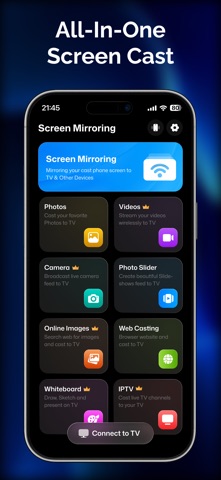
Cast to TV*: Screen Mirroring Screenshot 1 of 7
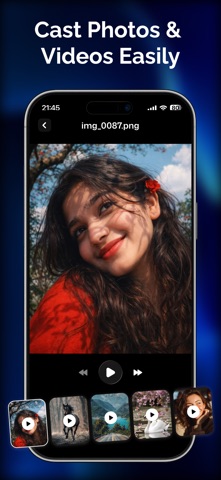
Cast to TV*: Screen Mirroring Screenshot 2 of 7
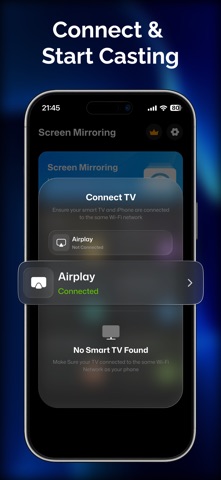
Cast to TV*: Screen Mirroring Screenshot 3 of 7
Cast to TV*: Screen Mirroring Screenshot 4 of 7
Cast to TV*: Screen Mirroring Screenshot 5 of 7
Cast to TV*: Screen Mirroring Screenshot 6 of 7
Cast to TV*: Screen Mirroring Screenshot 7 of 7
Screenshots by Jigar Vaghasiya, from the the App Store listing
View on the App Store Also on Google Play

AppBrain's verdict

Last updated
October 31, 2026
Size
170.3 MB
Official page on the App Store

User feedback

Ratings and reviews on the App Store

Comments on Cast to TV*: Screen Mirroring for iOS

We don't have enough comments to show example comments. Please check back later.

Store listing

By Jigar Vaghasiya, from the App Store
Description by Jigar Vaghasiya Written by the developer, not by AppBrain. Click to read.
Cast to TV: Screen Mirroring is the ultimate, easy-to-use utility for sharing your device screen and streaming local media directly to any Smart TV or monitor. Designed for seamless performance over your local Wi-Fi network, our app lets you enjoy photos, videos, web streams, and live camera feeds on the big screen with minimal latency.

Whether you are sharing family memories, streaming your favorite web videos, conducting a business presentation, or viewing photos from your gallery, Cast to TV delivers a smooth, high-quality casting experience without complex hardware or cables.

KEY FEATURES

• Real-Time Screen Mirroring:
Mirror your screen directly to your Smart TV with high-definition clarity. Enjoy low-latency display sharing perfect for apps, presentations, and games.

• Local Photo & Video Casting:
Easily browse your device gallery and cast your favorite videos and high-resolution photos to your TV screen for a cinematic viewing experience.

• Web Video Streamer:
Use the built-in web browser to find and cast online videos directly to your TV. Stream web content seamlessly without interrupting other tasks.

• Live Camera Cast:
Turn your device into a live streaming monitor. Broadcast your live camera feed straight to the TV screen in real time.

• Universal DLNA & UPnP Support:
Built with support for DLNA, UPnP, and local wireless protocols to ensure reliable connections with most modern Smart TVs and casting receivers.

• Fast, Clean & Secure:
Operates directly over your local Wi-Fi network. Your local media is never uploaded to external servers, ensuring complete privacy and fast local streaming.


HOW IT WORKS

1. Connect your phone/tablet and your Smart TV to the same Wi-Fi network.
2. Open the app and allow local network discovery.
3. Select your TV from the detected device list.
4. Choose screen mirroring, local media, or web casting to start streaming instantly.

Note: Screen mirroring and media casting require both devices to be connected to the same local Wi-Fi network. Protected content with digital rights management (DRM) from specific third-party apps may restrict mirroring due to copyright protections.


Terms of Use (EULA) : https://www.apple.com/legal/internet-services/itunes/dev/stdeula/

Safety and technology

Found in the app by AppBrain
Price
Free
App size
170.3 MB
Content rating
Everyone

Technologies used by Cast to TV*: Screen Mirroring

Releases

Updates seen on the App Store
Version
1.0.7
Launched
September 2026

No changelog data

Alternatives

Similar apps and more from Jigar Vaghasiya

Alternatives to Cast to TV*: Screen Mirroring

console.mobi: Web DevTools icon console.mobi: Web DevTools
NOS K.K.
0.0
Free
Tether - File sharing icon Tether - File sharing
Lucien Kerssens
0.0
Free
Amateur Digital icon Amateur Digital
ANDREW MORRISON
3.0
Free
1 ratings
My Steinway Lyngdorf icon My Steinway Lyngdorf
Steinway Lyngdorf
0.0
Free
Quick Share File Transfer icon Quick Share File Transfer
江鹏 董
5.0
Free
8 ratings
CliniPool – Pool & Spa Care icon CliniPool – Pool & Spa Care
KISSAI
0.0
Free
File Manager - Files Explorer icon File Manager - Files Explorer
Darshan Mavani
4.9
Free
7 ratings
AnyDLNA - Any Cast/Chromecast icon AnyDLNA - Any Cast/Chromecast
Yuan-Yi Chang
4.2
Free
4 ratings

More from Jigar Vaghasiya

AI Cleaner & CleanUp Storage icon AI Cleaner & CleanUp Storage
Jigar Vaghasiya
0.0
Free
Universal TV Remote* Control icon Universal TV Remote* Control
Jigar Vaghasiya
0.0
Free

Also available on Google Play

Cast to TV: Screen Mirroring icon Cast to TV: Screen Mirroring
S2SOFT INFOTECH LLP
0.0
Free
1,000+

Rankings

App Store top charts

App Store Rankings for Cast to TV*: Screen Mirroring

This app is not ranked

About the app and developer

About Cast to TV*: Screen Mirroring

Cast to TV*: Screen Mirroring is an utilities app developed by Jigar Vaghasiya.

User Ratings

The app has no ratings yet.

App Information

Cast to TV*: Screen Mirroring is freely available from the App Store. The app size is 170.29 MB. The latest version available is 1.0.7. The last update was on October 31, 2026.

Technical Requirements

The app has a content rating of Everyone. The app has been available on the App Store since September 2026.

Cast to TV*: Screen Mirroring is made and published by Jigar Vaghasiya. AppBrain is an independent app data site and isn't affiliated with Jigar Vaghasiya. The app name, icon, screenshots and description belong to Jigar Vaghasiya and are shown as published on the App Store.

Developer information for Jigar Vaghasiya

Jigar Vaghasiya

Address:

Frequently asked questions about Cast to TV*: Screen Mirroring

Is Cast to TV*: Screen Mirroring free?

Yes. Cast to TV*: Screen Mirroring is free on the App Store.

Is Cast to TV*: Screen Mirroring still available?

Yes. Cast to TV*: Screen Mirroring is on the App Store, and the last update we saw was on October 31, 2026.

How large is Cast to TV*: Screen Mirroring?

Cast to TV*: Screen Mirroring is 170.29 MB.

Is Cast to TV*: Screen Mirroring suitable for children?

App Store rates the content of Cast to TV*: Screen Mirroring as suitable for everyone.

Who made Cast to TV*: Screen Mirroring?

Cast to TV*: Screen Mirroring was developed by Jigar Vaghasiya. It is listed in the utilities category on the App Store.

What are the best alternatives to Cast to TV*: Screen Mirroring?

People looking at Cast to TV*: Screen Mirroring also look at these utilities apps: console.mobi: Web DevTools, Tether - File sharing, Amateur Digital, My Steinway Lyngdorf, Quick Share File Transfer.

Share Cast to TV*: Screen Mirroring

Price drops on Google Play Top new apps Apps other people are watching Popular Utilities Apps Today's trending apps
console.mobi: Web DevTools icon console.mobi: Web DevTools
Tether - File sharing icon Tether - File sharing
Amateur Digital icon Amateur Digital
My Steinway Lyngdorf icon My Steinway Lyngdorf
Quick Share File Transfer icon Quick Share File Transfer
CliniPool – Pool & Spa Care icon CliniPool – Pool & Spa Care
File Manager - Files Explorer icon File Manager - Files Explorer
AnyDLNA - Any Cast/Chromecast icon AnyDLNA - Any Cast/Chromecast
Overview Alternatives Reviews Rankings Technology
AppBrain Intelligence premium content

Subscribe now to get full and unlimited access to AppBrain Intelligence. You'll have access to:

  • App Intelligence dashboard (performance timeline, competitor comparison, country rankings, insight cards)
  • Detailed ranking data per app
  • Full timeline per developer
  • Device market shares data per country
  • Unlimited keyword tracking
  • AI assistant access via MCP (Claude, Cursor or any MCP client)
1 Month

$75/mo
(billed every month)

SAVE 0%
Subscribe
3 Months

$65/mo
($195 billed every 3 months)

SAVE 13%
Subscribe
1 Year

$57.50/mo
($690 billed every year)

SAVE 23%
Subscribe
Each subscription will automatically renew 3 days before the expiration date for the same time period. Subscriptions can be cancelled at any time before the renewal.

AppBrain is an app data site, we track rankings, ratings, installs for all apps and games on Google Play and the App Store. AppBrain doesn't host app files or APKs, all install links go directly to the official store. All trademarks are owned by their respective owners.

More apps

  • Top Android apps being viewed
  • ICONIQ - Change Icons for Android
  • MiMi Live - Live Stream & Chat
  • Video to Audio MP3 Converter

App statistics

  • Android statistics
  • Google Play Developer stats
  • Trending Android Apps
  • Trending iOS apps
  • Top popular Apps
  • Buy the best Android phone
  • Buy & sell app businesses

About AppBrain

  • Contact
  • Privacy
  • Documentation
  • DMCA takedowns
  • Blog
  • How to improve the earnings of your ad units
© 2010-2026 - AppBrain