



AppBrain's verdict
- Last updated
- October 28, 2026
- Size
- 76.9 MB
User feedback
Ratings and reviews on the App StoreComments on Universal TV Remote* Control for iOS
We don't have enough comments to show example comments. Please check back later.
Store listing
By Jigar Vaghasiya, from the App StoreDescription by Jigar Vaghasiya Written by the developer, not by AppBrain. Click to read.
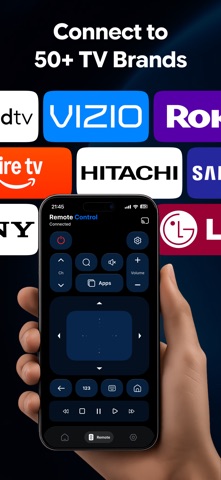
Never worry about lost remotes or dead batteries again. Universal TV Remote Control transforms your device into a fast, responsive, and easy-to-use controller for your Smart TV over your local Wi-Fi network.
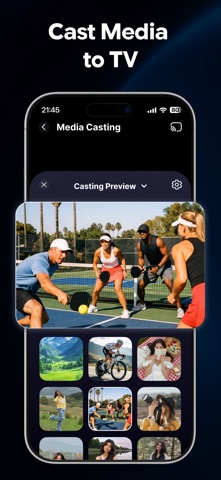
Whether you need to adjust the volume, enter channels, navigate complex menus with a touchpad, type search terms on a full keyboard, or cast family photos and videos to the big screen, this app gives you full control in a clean, modern interface.
KEY FEATURES
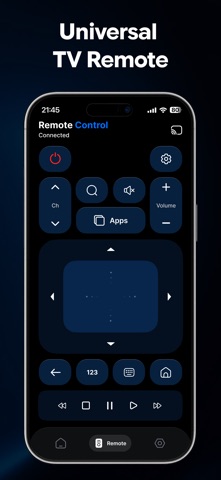
• Universal Smart TV Control: Manage essential functions effortlessly—Power On/Off, Volume Up/Down, Mute, Channel Up/Down, Input Source switching, and Menu navigation.
• Precision Touchpad Navigation: Glide through streaming interfaces, menus, and browser pages with smooth swipe gestures and instant feedback.
• Full Numeric Keypad: Dedicated number pad (0–9) for rapid, direct TV channel selection.
• Built-in Keyboard Input: Stop clicking letter-by-letter on your TV screen. Type movie titles, usernames, and passwords directly using your mobile keyboard.
• Quick App Launcher: Open your favorite installed streaming channels and video apps directly from your phone with a single tap.
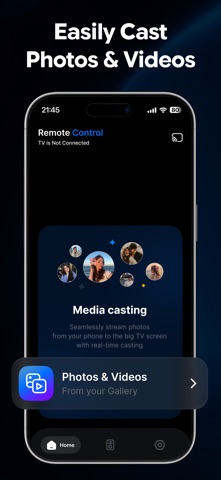
• Local Media Casting: Stream your personal photos and videos directly from your phone's gallery to your Smart TV in high quality.
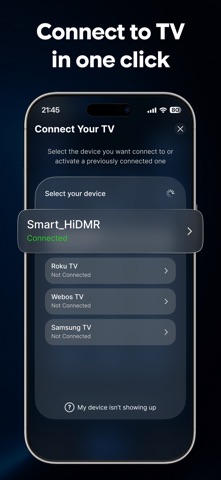
• Automatic Wi-Fi Discovery: Instantly scan and detect compatible Smart TVs connected to your local network for quick pairing.
HOW TO CONNECT IN 3 SIMPLE STEPS
1. Connect your phone and your Smart TV to the same Wi-Fi network.
2. Open Universal TV Remote Control and select your TV from the list of discovered devices.
3. Enter the pairing PIN displayed on your TV screen if prompted.
(Tip: Please disable any active VPN on your mobile device to allow smooth local network discovery.)
WHY CHOOSE UNIVERSAL TV REMOTE CONTROL?
• Fast & Reliable: Direct local Wi-Fi communication ensures low latency and immediate button response.
• Sleek Dark Theme: Ergonomically designed dark UI that is easy on your eyes during nighttime TV viewing.
• Privacy-First Design: All remote commands and media casting happen directly on your local network. No personal photos or media files are uploaded to external servers.
DISCLAIMER
This application is an independent third-party utility and is not affiliated with, endorsed by, or sponsored by any television manufacturer or trademark.
Both your mobile device and Smart TV must be connected to the same operational local Wi-Fi network for discovery and remote control functionality.
Terms of Use (EULA) : https://www.apple.com/legal/internet-services/itunes/dev/stdeula/
Safety and technology
Found in the app by AppBrain- Price
- Free
- App size
- 76.9 MB
- Content rating
- Everyone
Technologies used by Universal TV Remote* Control
Releases
Updates seen on the App Store- Version
- 1.0.8
- Launched
- September 2026
No changelog data
Alternatives
Similar apps and more from Jigar VaghasiyaAlternatives to Universal TV Remote* Control





More from Jigar Vaghasiya


Also available on Google Play

Rankings
App Store top chartsApp Store Rankings for Universal TV Remote* Control
About the app and developer
About Universal TV Remote* Control
Universal TV Remote* Control is an utilities app developed by Jigar Vaghasiya.
User Ratings
The app has no ratings yet.
App Information
Universal TV Remote* Control is freely available from the App Store. The app size is 76.90 MB. The latest version available is 1.0.8. The last update was on October 28, 2026.
Technical Requirements
The app has a content rating of Everyone. The app has been available on the App Store since September 2026.
Universal TV Remote* Control is made and published by Jigar Vaghasiya. AppBrain is an independent app data site and isn't affiliated with Jigar Vaghasiya. The app name, icon, screenshots and description belong to Jigar Vaghasiya and are shown as published on the App Store.
Developer information for Jigar Vaghasiya
Address:
Frequently asked questions about Universal TV Remote* Control
Is Universal TV Remote* Control free?
Yes. Universal TV Remote* Control is free on the App Store.
Is Universal TV Remote* Control still available?
Yes. Universal TV Remote* Control is on the App Store, and the last update we saw was on October 28, 2026.
How large is Universal TV Remote* Control?
Universal TV Remote* Control is 76.90 MB.
Is Universal TV Remote* Control suitable for children?
App Store rates the content of Universal TV Remote* Control as suitable for everyone.
Who made Universal TV Remote* Control?
Universal TV Remote* Control was developed by Jigar Vaghasiya. It is listed in the utilities category on the App Store.
What are the best alternatives to Universal TV Remote* Control?
People looking at Universal TV Remote* Control also look at these utilities apps: Tether - File sharing, Quick Share File Transfer, File Manager - Files Explorer, Remote TV - Remote Control, File Sharing - InShare Files.