




Chaos Control™: GTD Task List
Chaos Control™: GTD Task List is made and published by Tarasov Mobile. AppBrain is an independent app data site and isn't affiliated with Tarasov Mobile. The app name, icon, screenshots and description belong to Tarasov Mobile and are shown as published on the App Store.
AppBrain's verdict
EstablishedLoved by users- Rating on App Store
- 4.58
- 488 ratings
- Last updated
- December 10, 2023
- Size
- 318.3 MB
Users love it: 4.6 stars from 488 ratings.
User feedback
Ratings and reviews on the App StoreComments on Chaos Control™: GTD Task List for iOS
We don't have enough comments to show example comments. Please check back later.
Store listing
By Tarasov Mobile, from the App StoreDescription by Tarasov Mobile Written by the developer, not by AppBrain. Click to read.
People don't usually achieve impressive results simply by being good at task management. It's the ability to set legitimate goals that makes the difference. Just write down your desired outcomes to make them real. This simple technique helps you to prioritize your goals before acting on them.
Chaos Control is a task manager based on the best ideas of GTD (Getting Things Done) methodology created by David Allen. Whether you are running a business, launching an app, working on a project or simply planning your holiday trip, Chaos Control is a perfect tool to manage your goals, juggle your priorities, and organize your tasks to get things done. And the best part is, you can handle both heavyweight project planning and simple daily routine like shopping list management in one flexible app. Also, Chaos Control is available across all major mobile and desktop platforms with seamless sync.
HERE IS HOW IT WORKS:
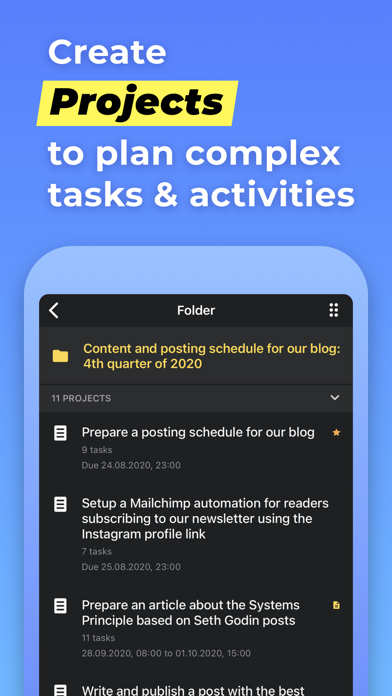
1) MANAGE YOUR PROJECTS
Project is a goal combined with a set of tasks you need to complete in order to achieve it. Create as many projects as you like to write down all the desired outcomes you have
2) ORGANIZE YOUR GOALS
Create unlimited number of projects and group them by category using Folders
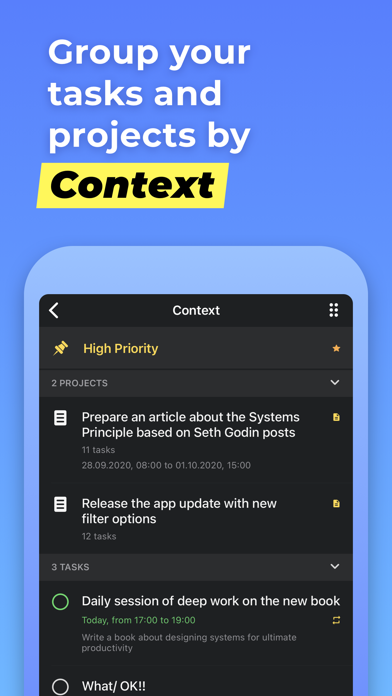
3) USE GTD CONTEXTS
Organize tasks from different projects using flexible context lists. If you are familiar with GTD you would just love this feature
4) PLAN YOUR DAY
Set due dates for tasks and make plans for any particular day
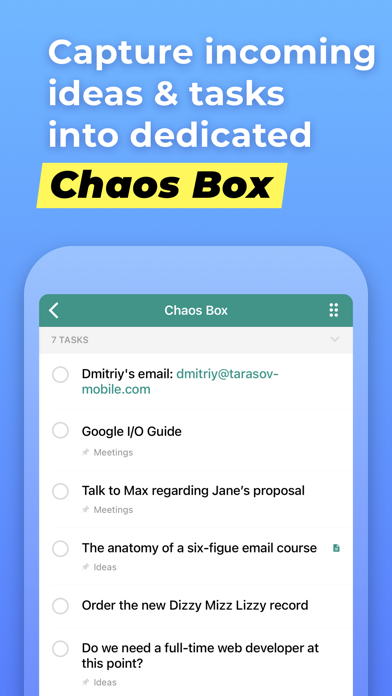
5) USE CHAOS BOX
Put all the incoming tasks, notes and ideas into Chaos Box in order to process them later. It works similar to GTD inbox, but you can use it as a simple to-do list
6) SYNC YOUR DATA
Chaos Control works on both desktop and mobile devices. Setup an account and sync your projects across all of your devices
This app is designed with creative people in mind. Designers, writers, developers, startup founders, entrepreneurs of all kinds and pretty much anyone with ideas and desire to make them happen. We combined the power of GTD with the convenient interface to help you with:
• personal goal setting
• task management
• time management
• planning your business and personal activities
• building your routine
• handling simple to do lists, checklists and shopping lists
• catching your ideas and thoughts to process them later
KEY FEATURES
• Seamless cloud sync across all major mobile and desktop platforms
• GTD-inspired Projects and Contexts supplemented with Folders, sub-folders and sub-contexts
• Recurring tasks (daily, weekly, monthly and chosen days of the week)
• Chaos Box - Inbox for your unstructured tasks, notes, memos, ideas and thoughts. Great tool for staying on track inspired by GTD ideas
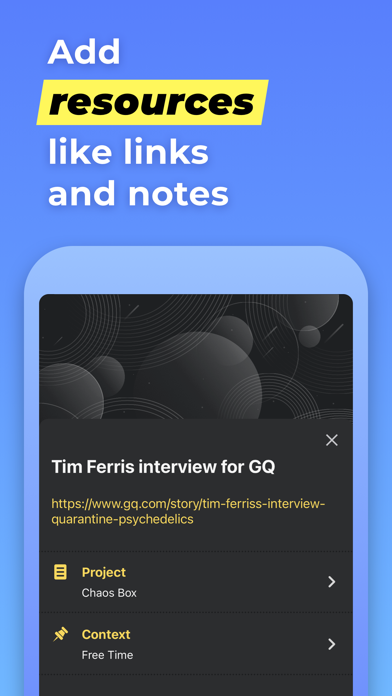
• Notes for tasks, projects, folders and contexts
• Fast and smart search
• Recurring tasks for managing activities that happen regularly
• Nested folders and contexts for better projects and tasks structuring
• PIN code protection: secure your data with a secure passcode
• Favorite tasks, projects and contents
Terms Of Use:
http://chaos-control.mobi/toc.pdf
Have a productive day!
Safety and technology
Found in the app by AppBrain- Price
- Free
- App size
- 318.3 MB
- Content rating
- Everyone
Technologies used by Chaos Control™: GTD Task List
Releases
Updates seen on the App Store- Version
- 1.43.5
- Launched
- January 2013
No changelog data
Alternatives
Similar apps and more from Tarasov MobileAlternatives to Chaos Control™: GTD Task List
More from Tarasov Mobile
Rankings
App Store top chartsApp Store Rankings for Chaos Control™: GTD Task List
About the app and developer
About Chaos Control™: GTD Task List
Chaos Control™: GTD Task List is a productivity app developed by Tarasov Mobile.
What is the rating of Chaos Control™: GTD Task List?
Chaos Control™: GTD Task List is rated 4.58 out of 5 stars, based on 490 ratings.
Is Chaos Control™: GTD Task List free?
Chaos Control™: GTD Task List is free. The app size is 318.29 MB. The latest version available is 1.43.5. The last update was on December 10, 2023.
What are the requirements for Chaos Control™: GTD Task List?
The app has a content rating of Everyone. The app has been available on the App Store since January 2013.
Developer information for Tarasov Mobile
Address:
Frequently asked questions about Chaos Control™: GTD Task List
Is Chaos Control™: GTD Task List free?
Yes. Chaos Control™: GTD Task List is free on the App Store.
Is Chaos Control™: GTD Task List still available?
Yes. Chaos Control™: GTD Task List is on the App Store, and the last update we saw was on December 10, 2023.
How large is Chaos Control™: GTD Task List?
Chaos Control™: GTD Task List is 318.29 MB.
Is Chaos Control™: GTD Task List suitable for children?
App Store rates the content of Chaos Control™: GTD Task List as suitable for everyone.
How do people rate Chaos Control™: GTD Task List?
Chaos Control™: GTD Task List scores 4.58 out of 5 stars, from 488 ratings on the App Store.
Who made Chaos Control™: GTD Task List?
Chaos Control™: GTD Task List was developed by Tarasov Mobile. It is listed in the productivity category on the App Store.
What are the best alternatives to Chaos Control™: GTD Task List?
People looking at Chaos Control™: GTD Task List also look at these productivity apps: Nirvana for GTD, Everdo: GTD and To-Do List, MyLifeOrganized 3, Todo Cloud: To-Do List & Tasks, Calendar Reminders Time Notes.