

Chess Lab is made and published by Giordano Vicoli. AppBrain is an independent app data site and isn't affiliated with Giordano Vicoli. The app name, icon, screenshots and description belong to Giordano Vicoli and are shown as published on the App Store.
AppBrain's verdict
- Last updated
- October 14, 2026
Rankings
App Store top chartsApp Store Rankings for Chess Lab
Competitors
Similar apps and more from Giordano VicoliMore from Giordano Vicoli


Releases
Updates seen on the App Store- Version
- 4.9.1
- Launched
- August 2021
No changelog data
User feedback
Ratings and reviews on the App StoreComments on Chess Lab for iOS
We don't have enough comments to show example comments. Please check back later.
Technology
Found in the app by AppBrain- Price
- Free
- App size
- 139.4 MB
- Content rating
- Everyone
Technologies used by Chess Lab
About the app and developer
About Chess Lab
Chess Lab is a games app developed by Giordano Vicoli.
User Ratings
The app has no ratings yet.
App Information
Chess Lab is freely available from the App Store. The app size is 139.42 MB. The latest version available is 4.9.1. The last update was on October 14, 2026.
Technical Requirements
The app has a content rating of Everyone. The app has been available on the App Store since August 2021.
Developer information for Giordano Vicoli
Address:
Frequently asked questions about Chess Lab
Is Chess Lab free?
Yes. Chess Lab is free on the App Store.
Is Chess Lab still available?
Yes. Chess Lab is on the App Store, and the last update we saw was on October 14, 2026.
How large is Chess Lab?
Chess Lab is 139.42 MB.
Is Chess Lab suitable for children?
App Store rates the content of Chess Lab as suitable for everyone.
Who made Chess Lab?
Chess Lab was developed by Giordano Vicoli. It is listed in the games category on the App Store.
Store listing
By Giordano Vicoli, from the App Store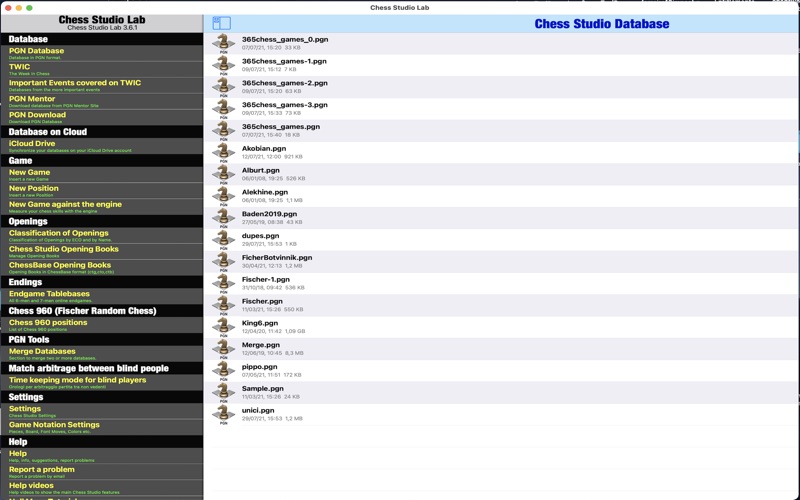


Description by Giordano Vicoli Written by the developer, not by AppBrain. Click to read.
Chess Lab is the first and only application to manage Chess Databases and Games in PGN format in a complete and efficient way.
Chess Studio Lab allows you to:
• Read database and games in PGN format (also with extended notation of moves).
• Create, delete and modify folders and databases.
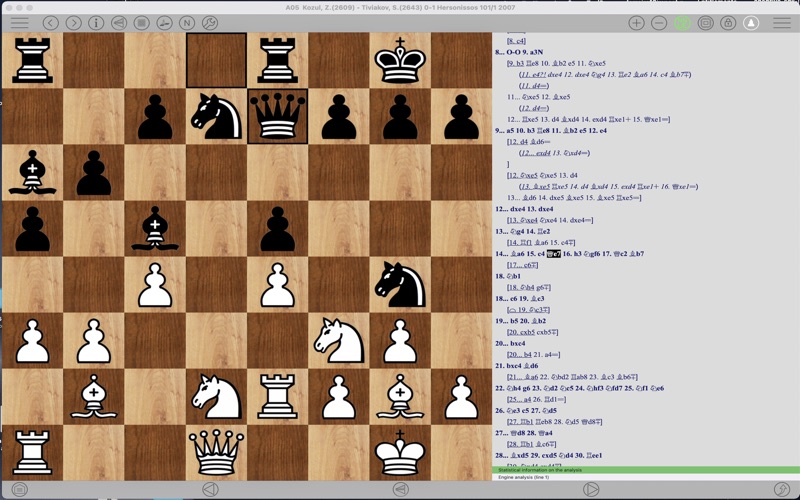
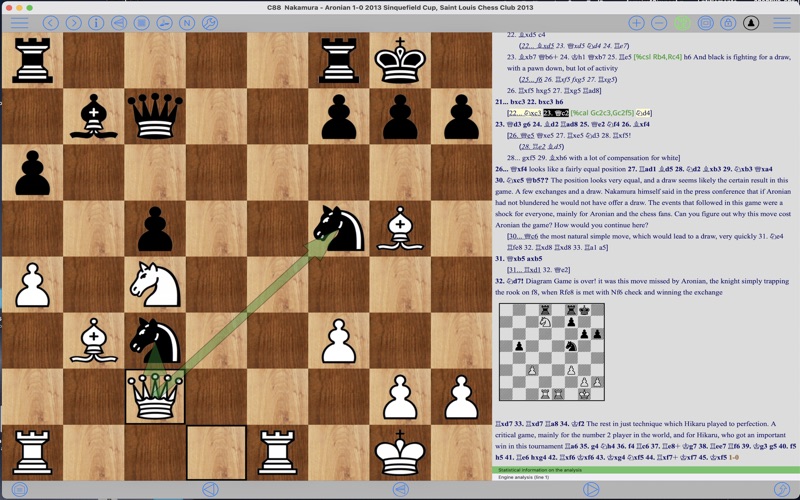
• View games with annotations and textual comments and keep track of the displayed games.
• Visualize moves and variants in compact mode or indented mode.
• Modify existing games with move annotation and textual comments.
• Insert new games and positions.
• Insert, replay and analyze games in Chess 960 mode.
• Insert moves with annotations and textual comments.
• Insert variation, subvariations etc.
• Insert and visualize graphical annotation (colored arrows and highlighted squares).
• Send games by email.
• Share Databases and Games through Airdrop.
• Download chess database from internet.
• Download chess database directly from PGN Mentor site.
• Import games, database and Opening Books from other applications.
• Merge two or more databases.
• Copy/Paste games and positions.
• Analyze games with Stockfish 19 Engine with the support of the Neural Networks (up to 5 lines of analysis simultaneously) and see the results also through the Engine Evaluation Bar.
• See graphic visualization of moves suggested by Stockfish 19 engine.
• See Win-Draw-Loss (WDL) probabilities during engine analysis.
• Replay games automatically.
• Visualize Pawn structure.
• Manage Variations and sub-variatons: delete and promote variations.
• Read the weekly Magazine The New In Chess (TWIC) and download the games..
• Three different modes for moving pieces.
• Analyze endgames with Endgame Tablebases.
• Analyze and study Chess Openings in the Chess Openings Section.
• Create and manage Opening Books in Polyglot format.
• Import and manage ChessBase Opening Books (ctg format).
• Automatically classify a database according to ECO code.
• Replay, enter and analyze Chess 960 games (Fischer Random Chess).
• Play against the engine both in standard mode and in Chess 960 mode.
• Play online through the LiChess platform
• Train by solving Puzzles
Other features and technical details:
• Modify the board size tapping on the board or through the Settings menu.
• Professional chess fonts and figurines for moves notation and annotation.
• Preview of the game in the board tapping the Info button.
• Quick search feature.
• Advanced search feature.
• Complete management of Null Moves with Tutorial.
• Visualization of ECO code and Opening during game replay or game insertion.
• Visualization of Book Openings during game replay or game insertion.
• Function to move up within variants and subvariants.
• Online manual frequently updated.
• Sharing of databases across devices via iCloud Drive.
• Sound option.
• VoiceOver/Accessibility support.
• Help section contains videos to show the main features of Chess Studio.
• Direct contact via email with the developer to report problems, ask for explanation and suggestions (very quick answer!).
• Languages: Italian, English, Spanish and German.
These are the main features.
The application is continuously updated with new features and improvements.
To view the terms of service visit https://www.apple.com/legal/internet-services/itunes/dev/stdeula/
No registration!
No advertising!
No sharing of personal data!