Download Android Apps and Games
AppBrain
  • Apps
  • Apps being viewed right now Trending apps today Most popular apps All-time most downloaded apps Top rated apps iPhone and iPad apps
  • Intelligence ▾
    Intelligence overview → Track any Android app or your whole market
    Track & analyze
    Keyword Tracker & OptimizerTrack & improve Play rankings App Performance ReportOne-off PDF for any app StatisticsFree Android & Play market stats
    Promote your app
    Featured Apps App Links
  • Intelligence
  • Pricing
  • Dashboard
  • Sign up
  • Log in
Last updated on: 2026-09-21
App Store Apps > Productivity > Chigiri Memo - Split Notes
Chigiri Memo - Split Notes icon

Chigiri Memo - Split Notes

1.0
Keiji Hirose
0.00
0 reviews
Free

Chigiri Memo - Split Notes Screenshot 1 of 8
Chigiri Memo - Split Notes Screenshot 2 of 8
Chigiri Memo - Split Notes Screenshot 3 of 8
Chigiri Memo - Split Notes Screenshot 4 of 8
Chigiri Memo - Split Notes Screenshot 5 of 8
Chigiri Memo - Split Notes Screenshot 6 of 8
Chigiri Memo - Split Notes Screenshot 7 of 8
Chigiri Memo - Split Notes Screenshot 8 of 8
Download from the App Store

About Chigiri Memo - Split Notes

Chigiri Memo - Split Notes is a productivity app developed by Keiji Hirose.

User Ratings

The app has no ratings yet.

App Information

Chigiri Memo - Split Notes is FREE to download. The download size is 35.32 MB. The latest version available is 1.0. The last update was on August 19, 2026.

Technical Requirements

The app has a content rating of Everyone. The app has been available on App Store 5 weeks ago.

Description
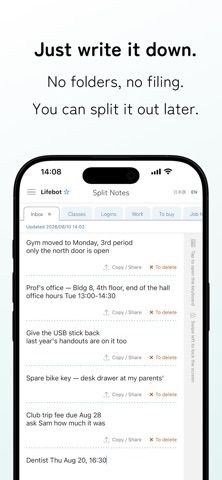
Write it all down first. Split it later.
Simple to use, with everything you need in one notepad.

Card-based note apps make you decide where something goes before you write it. Split Notes works the other way round: you write onto one page, and split out what you need afterwards. Filing becomes a decision you can postpone.

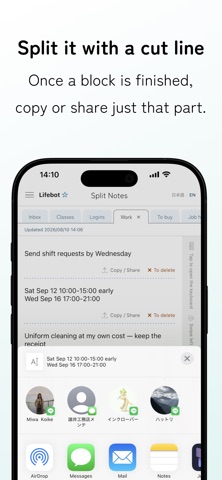
■ A cut line marks where a block ends
Tap "Insert cut line" in the footer and a dotted line appears wherever the cursor is. The Copy / Share and To delete buttons sit just above each line, and they act on the block above that line only. Press and hold a line to remove it, and the blocks above and below become one again.

■ Tabs instead of folders
Each tab holds one continuous page, so everything you wrote earlier stays in view while you type. Press and drag a tab to reorder it: gather the ones you use on the left, and the rest slide off the edge of the screen. Nothing is deleted, so scroll sideways and they come back. The order is the filing.

■ Move the cursor without opening the keyboard
You can select text without the keyboard popping up every time you touch the page. Tap the strip along the right edge when you want to write. While the keyboard is up, the Insert cut line button floats just above it, so you can split what you wrote without stopping.

■ We tell you when you repeat yourself
Press Search all and the app points out passages you wrote twice within the same tab. Tap a row to jump to the note, with both places lit up in yellow. If it turns out you need both, choose "Don't show" and that pair stops appearing.

■ Also included
- Full-text search across every tab, with the match lit up in yellow
- Earlier versions: the last 30 are kept for each tab
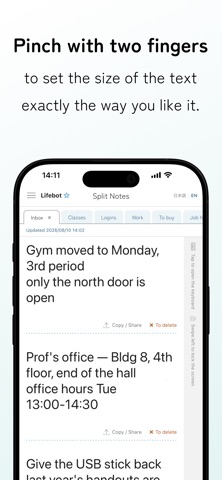
- Pinch with two fingers to resize the text; the size you choose is remembered
- Screen lock: swipe the right-edge strip to the left to cover the text. Unlock with Face ID / Touch ID, or your device passcode
- Dark mode
- A double tap selects a whole alphanumeric run, so 1234-5678, user_name and email addresses are not cut in half

■ Your notes never leave your device
What you write is stored only in a database on your iPhone. There is no mechanism for sending it to our servers, and there is no account and no sign-in.
The screen lock covers what is on the screen. It is not a vault that encrypts the text itself, so please use a dedicated password manager for anything that needs that level of protection.

■ Price
Every feature is there from the start, free. Tabs, cut lines and full-text search are unlimited, and the screen lock and dark mode work as well. The only difference is whether ads appear. Removing them is a one-time purchase, not a subscription.

Privacy Policy: https://lifebot.jp/chigirimemo/en/privacy/
Terms of Use: https://lifebot.jp/chigirimemo/en/terms/
Contact: https://lifebot.jp/chigirimemo/en/
Show more Show less

More data about Chigiri Memo - Split Notes

Price Free to download
Rating No ratings
Ranking Not ranked
Version 1.0
App download size 35.3 MB
Suitable for Everyone

Alternative downloads for the Chigiri Memo - Split Notes app

Biboloc icon Biboloc
Eiki Ogawa
0.0
Free
ScanNote icon ScanNote
YOSHIHIRO TAKAHASHI
0.0
Free
MemoTag – Simple Notes & Tags icon MemoTag – Simple Notes & Tags
naoya endo
0.0
Free
メモモモモ icon メモモモモ
Hiroki Sato
0.0
Free
メモ電卓: メモ付き電卓で計算をもっと便利に icon メモ電卓: メモ付き電卓で計算をもっと便利に
HANAUTA INC.
0.0
Free
AirCalc_ icon AirCalc_
AIR DESIGN, INC.
0.0
$0.99
Wrix 2 - Ultra Text Editor icon Wrix 2 - Ultra Text Editor
YONEKAWA Hideki
4.5
Free
2 ratings
Pond - Drop Your Ideas icon Pond - Drop Your Ideas
EUIHYUNG JUNG
5.0
$1.99
5 ratings

More from Keiji Hirose

FieldCue icon FieldCue
Keiji Hirose
0.0
$1.99
俺スピード icon 俺スピード
Keiji Hirose
0.0
Free

Changelog of Chigiri Memo - Split Notes

No changelog data

Developer information for Keiji Hirose

Keiji Hirose

Address:

Share Chigiri Memo - Split Notes

Comments on Chigiri Memo - Split Notes for iOS

We don't have enough comments to show example comments. Please check back later.

App Store Rankings for Chigiri Memo - Split Notes

This app is not ranked

Technologies used by Chigiri Memo - Split Notes

Frequently asked questions about Chigiri Memo - Split Notes

Is Chigiri Memo - Split Notes free?

Yes. Chigiri Memo - Split Notes is free to download from App Store.

Is Chigiri Memo - Split Notes still available?

Yes. Chigiri Memo - Split Notes is on App Store, and the last update we saw was on August 19, 2026.

How large is the Chigiri Memo - Split Notes download?

Chigiri Memo - Split Notes is 35.32 MB to download.

Is Chigiri Memo - Split Notes suitable for children?

App Store rates the content of Chigiri Memo - Split Notes as suitable for everyone.

Who made Chigiri Memo - Split Notes?

Chigiri Memo - Split Notes was developed by Keiji Hirose. It is listed in the productivity category on App Store.

What are the best alternatives to Chigiri Memo - Split Notes?

People looking at Chigiri Memo - Split Notes also look at these productivity apps: Biboloc, ScanNote, MemoTag – Simple Notes & Tags, メモモモモ, メモ電卓: メモ付き電卓で計算をもっと便利に.

Apps on sale Top new apps Apps other people are watching Today's trending apps Popular Productivity Apps
Biboloc icon Biboloc
ScanNote icon ScanNote
MemoTag – Simple Notes & Tags icon MemoTag – Simple Notes & Tags
メモモモモ icon メモモモモ
メモ電卓: メモ付き電卓で計算をもっと便利に icon メモ電卓: メモ付き電卓で計算をもっと便利に
AirCalc_ icon AirCalc_
Wrix 2 - Ultra Text Editor icon Wrix 2 - Ultra Text Editor
Pond - Drop Your Ideas icon Pond - Drop Your Ideas
Overview Reviews Alternatives Rankings Technology
AppBrain Intelligence premium content

Subscribe now to get full and unlimited access to AppBrain Intelligence. You'll have access to:

  • App Intelligence dashboard (performance timeline, competitor comparison, country rankings, insight cards)
  • Detailed ranking data per app
  • Full timeline per developer
  • Device market shares data per country
  • Unlimited keyword tracking
1 Month

$75/mo
(billed every month)

SAVE 0%
Subscribe
3 Months

$65/mo
($195 billed every 3 months)

SAVE 13%
Subscribe
1 Year

$57.50/mo
($690 billed every year)

SAVE 23%
Subscribe
Each subscription will automatically renew 3 days before the expiration date for the same time period. Subscriptions can be cancelled at any time before the renewal.

AppBrain is a directory focused on discovering great apps and games. We give statistics, rankings and search options that Google Play and the App Store don't have. All trademarks are owned by their respective owners. AppBrain doesn't offer APKs or binaries, and always lets users install the official version from Google Play or the App Store.

More apps

  • Top Android apps being viewed
  • View Wellth Rewards
  • Modern Warships: Naval Battles
  • Audio Cleaner: Noise Remover

App statistics

  • Android statistics
  • Google Play Developer stats
  • Trending Android Apps
  • Trending iOS apps
  • Top popular Apps
  • Buy the best Android phone

About AppBrain

  • Contact
  • Privacy
  • Documentation
  • DMCA takedowns
  • Articles
  • Blog
  • The AppBrain advertising system
© 2010-2026 - AppBrain