

FieldCue is made and published by Keiji Hirose. AppBrain is an independent app data site and isn't affiliated with Keiji Hirose. The app name, icon, screenshots and description belong to Keiji Hirose and are shown as published on the App Store.
AppBrain's verdict
- Last updated
- July 21, 2026
Rankings
App Store top chartsApp Store Rankings for FieldCue
Competitors
Similar apps and more from Keiji HiroseMore from Keiji Hirose


Releases
Updates seen on the App Store- Version
- 1.0
- Launched
- July 2026
No changelog data
User feedback
Ratings and reviews on the App StoreComments on FieldCue for iOS
We don't have enough comments to show example comments. Please check back later.
Technology
Found in the app by AppBrain- Price
- $1.99
- App size
- 55.0 MB
- Content rating
- Everyone
Technologies used by FieldCue
About the app and developer
About FieldCue
FieldCue is a photo & video app developed by Keiji Hirose.
What is the rating of FieldCue?
FieldCue has no ratings yet.
Is FieldCue free?
FieldCue costs $1.99. The app size is 55.04 MB. The latest version available is 1.0. The last update was on July 21, 2026.
What are the requirements for FieldCue?
The app has a content rating of Everyone. The app has been available on the App Store since July 2026.
Developer information for Keiji Hirose
Address:
Frequently asked questions about FieldCue
Is FieldCue free?
No. FieldCue costs $1.99 on the App Store.
Is FieldCue still available?
Yes. FieldCue is on the App Store, and the last update we saw was on July 21, 2026.
How large is FieldCue?
FieldCue is 55.04 MB.
Is FieldCue suitable for children?
App Store rates the content of FieldCue as suitable for everyone.
Who made FieldCue?
FieldCue was developed by Keiji Hirose. It is listed in the photo & video category on the App Store.
Store listing
By Keiji Hirose, from the App Store


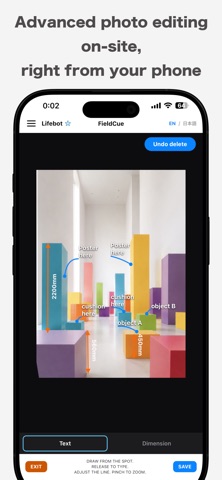

Description by Keiji Hirose Written by the developer, not by AppBrain. Click to read.
Photos' built-in perspective tool crops the image into a straight rectangle, but it can't reshape each corner independently. FieldCue adds that missing piece: corner-pin correction that moves all four corners on their own, straightening skewed edges in seconds. From there, add lead lines, text notes, and dimension lines in the fewest taps possible.
HOW IT WORKS
1. Place - Rotate the photo with two fingers to level it against the on-screen grid.
2. Warp - Drag each corner freely to square up the shot.
3. Crop - Trim to any ratio, keeping just what matters.
4. Annotate - Draw a lead line from the spot you want to mark, release, and type.
5. Dimension - Draw a line to measure, release, and enter a number.
6. Save - Crop in, choose your text size, and save straight to your camera roll.
No app UI ends up in the saved photo - just the straightened image with your notes and dimensions, ready to send by email or text exactly like you always have.
SPECIAL FEATURES
- Search what you write: tap the search icon on any note to look up a part or model number in the built-in browser, without retyping it.
- Save up to 20 in-progress files, with thumbnails sorted newest first.
- Launch straight from your camera roll: share a photo from the Photos app and open it directly in FieldCue.
Built for construction sites, retail displays, furniture layout, and any job where you need to straighten a photo, mark it up, and send it - fast.
One-time purchase, no subscriptions, no ads, no in-app purchases. iPhone only.
Privacy Policy: https://lifebot.jp/fieldcue/en/privacy/index.html
Terms of Use: https://lifebot.jp/fieldcue/en/terms/index.html
Contact: support@lifebot.jp