

Chmod Toolkit
Chmod Toolkit is made and published by Robert Frederique. AppBrain is an independent app data site and isn't affiliated with Robert Frederique. The app name, icon, screenshots and description belong to Robert Frederique and are shown as published on the App Store.
AppBrain's verdict
- Rating on App Store
- 5.00
- 4 ratings
- Last updated
- September 21, 2026
- Size
- 31.5 MB
It doesn't have enough ratings yet to judge what users think.
User feedback
Ratings and reviews on the App StoreComments on Chmod Toolkit for iOS
We don't have enough comments to show example comments. Please check back later.
Store listing
By Robert Frederique, from the App Store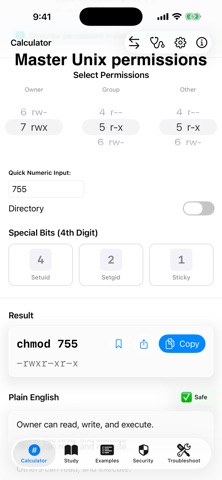
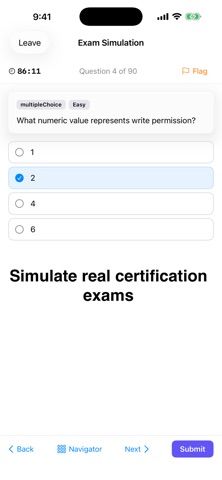
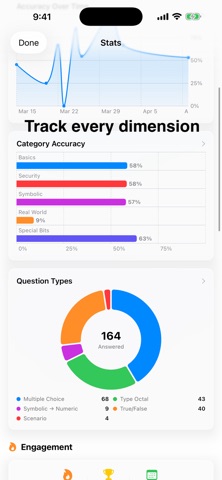

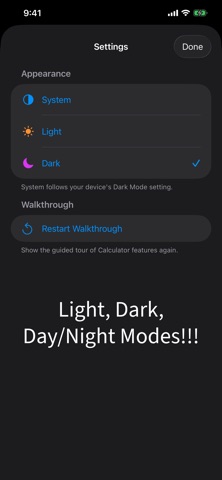


Description by Robert Frederique Written by the developer, not by AppBrain. Click to read.
Whether you're preparing for a Linux certification exam, hardening production servers, or learning Unix for the first time, Chmod Toolkit gives you the knowledge, the practice, and the proof.
SIMULATE REAL CERTIFICATION EXAMS
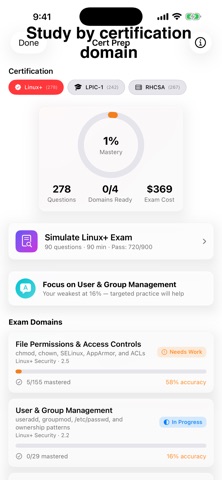
Three cert-specific exam modes that match actual exam methodology. Linux+ simulation: 90 questions, 90-minute timer, scaled scoring to 720/900. LPIC-1: 60 questions with fill-in-the-blank, 90 minutes, scored to 500/800. RHCSA: 18 hands-on tasks, 3 hours, reference materials available — just like the real exam. Skip, flag, and return to any question. Domain-by-domain results tell you exactly where to improve.
MASTER PERMISSIONS, NOT JUST MEMORIZE THEM
Spaced repetition tracks what you actually know — not what you crammed yesterday. Reviews are scheduled based on your accuracy, spending time where it matters most. Eight question types keep you sharp: multiple choice, type the octal, symbolic conversion, true/false, scenarios, fill-in-the-blank, typed commands, and multi-step task planning.
PREPARE BY EXAM DOMAIN
Study by exam domain for CompTIA Linux+, LPIC-1, and RHCSA. Every question maps to specific exam objectives so you know exactly what you're covering. Domain-by-domain progress tracking tells you when you're ready to test — and where to focus when you're not.
SEE YOUR GROWTH
A full stats dashboard with interactive charts shows your accuracy trends, category strengths, question type breakdown, difficulty performance, and certification readiness. Triple progress rings, daily challenge streaks, and engagement metrics give you the complete picture.
A COMPLETE MASTERY SYSTEM
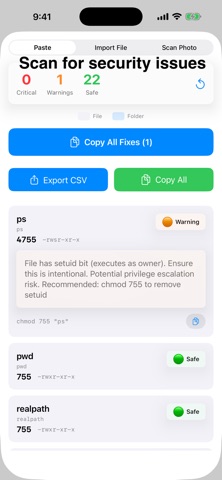
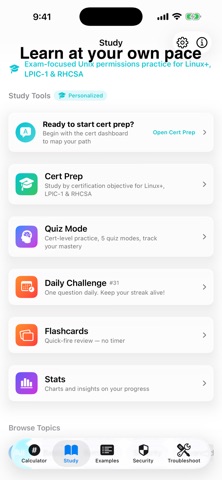
Learn the concepts with structured study topics. Practice with quizzes and daily challenges. Reinforce with flashcards that surface questions you've already attempted. Track your readiness with the stats dashboard. Prove it with exam simulation. Calculate permissions instantly, scan for security issues, and diagnose errors — all on-device. Every feature serves one goal: mastery.
BUILT FOR EVERY APPLE DEVICE
iPhone with haptic feedback and sound effects. iPad with full-screen layouts and split view. Mac with native sidebar navigation, keyboard shortcuts, and drag-and-drop folder scanning. iCloud syncs your progress across all your devices automatically.
One purchase. No subscription. Every future update included.
No account required. No data leaves your device. Your progress, your privacy.
Safety and technology
Found in the app by AppBrain- Price
- Free
- App size
- 31.5 MB
- Content rating
- Everyone
Technologies used by Chmod Toolkit
Releases
Updates seen on the App Store- Version
- 3.3
- Launched
- January 2026
No changelog data
Alternatives
Similar apps and more from Robert FrederiqueAlternatives to Chmod Toolkit


Rankings
App Store top chartsApp Store Rankings for Chmod Toolkit
About the app and developer
About Chmod Toolkit
Chmod Toolkit is an overall app developed by Robert Frederique.
User Ratings
Chmod Toolkit is rated 5.00 out of 5 stars. The rating is based on 4 ratings.
App Information
Chmod Toolkit is freely available from the App Store. The app size is 31.49 MB. The latest version available is 3.3. The last update was on September 21, 2026.
Technical Requirements
The app has a content rating of Everyone. The app has been available on the App Store since January 2026.
Developer information for Robert Frederique
Address: