

Clackalyzer
Clackalyzer is made and published by Y'all Tech Studios. AppBrain is an independent app data site and isn't affiliated with Y'all Tech Studios. The app name, icon, screenshots and description belong to Y'all Tech Studios and are shown as published on the App Store.
AppBrain's verdict
- Last updated
- July 11, 2026
Rankings
App Store top chartsApp Store Rankings for Clackalyzer
Competitors
Similar apps and more from Y'all Tech StudiosAlternatives to Clackalyzer


Releases
Updates seen on the App Store- Version
- 2.3.3
- Launched
- June 2026
No changelog data
User feedback
Ratings and reviews on the App StoreComments on Clackalyzer for iOS
We don't have enough comments to show example comments. Please check back later.
Technology
Found in the app by AppBrain- Price
- Free
- App size
- 10.9 MB
- Content rating
- Everyone
Technologies used by Clackalyzer
About the app and developer
About Clackalyzer
Clackalyzer is an utilities app developed by Y'all Tech Studios.
User Ratings
The app has no ratings yet.
App Information
Clackalyzer is freely available from the App Store. The app size is 10.91 MB. The latest version available is 2.3.3. The last update was on July 11, 2026.
Technical Requirements
The app has a content rating of Everyone. The app has been available on the App Store since June 2026.
Developer information for Y'all Tech Studios
Address:
Frequently asked questions about Clackalyzer
Is Clackalyzer free?
Yes. Clackalyzer is free on the App Store.
Is Clackalyzer still available?
Yes. Clackalyzer is on the App Store, and the last update we saw was on July 11, 2026.
How large is Clackalyzer?
Clackalyzer is 10.91 MB.
Is Clackalyzer suitable for children?
App Store rates the content of Clackalyzer as suitable for everyone.
Who made Clackalyzer?
Clackalyzer was developed by Y'all Tech Studios. It is listed in the utilities category on the App Store.
What are the best alternatives to Clackalyzer?
People looking at Clackalyzer also look at these utilities apps: SoundToneCoach, FieldKit Pro: Field Recorder, Safe In Sound, fieldtape, Clear recording - Voz.
Store listing
By Y'all Tech Studios, from the App Store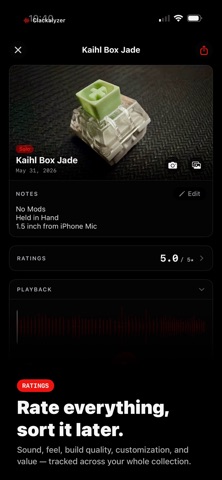

Description by Y'all Tech Studios Written by the developer, not by AppBrain. Click to read.
Over time your library becomes something valuable: a history of every board you've owned, every mod you've tried, every switch you've tested. You can go back, compare, share, and actually remember what that build sounded like six months ago.
**Each session captures:**
• A WAV audio recording
• A build photo
• Full build metadata — board, plate, switch, foams, mic distance
• Spectrum snapshots and spectral profile from the live analyzer
• Ratings across five categories: Sound, Feel, Build Quality, Customization, and Value
**Free recording modes**
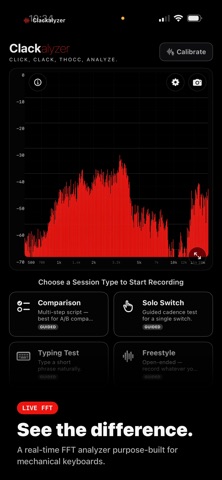
Four guided session types are provided: Comparison, Solo Switch, Typing Test, and Freestyle. Each one walks you through setup with a placement tip and best-practice checklist, counts you down from three, and auto-finishes when the session is done.
**Your library**
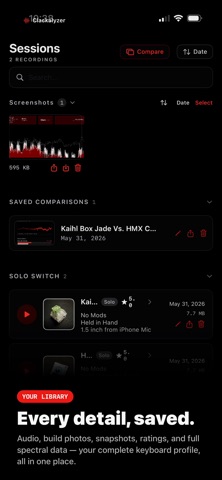
Browse every session with waveform previews, key build photos, acoustical metrics, and ratings at a glance. Tap any session for full playback, spectral profile, band energy breakdown, and complete build metadata. Save comparisons to revisit anytime.
**The tools**
A real-time FFT spectrum analyzer runs while you record — log-scale frequency display from 20 Hz to 20 kHz, peak hold, EMA average, cursor readout, and up to 6 labelled spectral peaks.
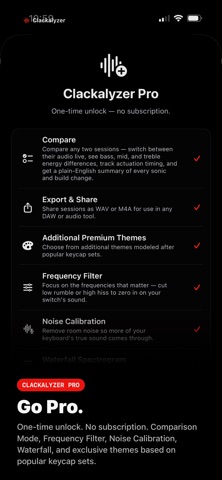
**Clackalyzer Pro — $9.99, one-time unlock, no subscription**
• Compare — record with Comparison Mode (Gentle, Normal, Hard, Rapid, and Typing Test steps timed to a metronome), then compare any two sessions side by side with A/B audio playback, spectrum overlay, band energy breakdown, and a plain-English summary of every sonic difference. Save comparisons and export to PDF.
• Export & Share — share sessions as WAV or M4A for use in any DAW or audio tool
• Frequency Filter — cut low rumble or high hiss to zero in on your switch's true sound
• Noise Calibration — remove room noise so more of your keyboard's sound comes through
• Waterfall Spectrogram — real-time scrolling spectrogram view
• FFT size control — fine-tune frequency resolution
• Three additional exclusive themes based on popular keycap sets; Metro-ish, Beige and Neon... (Kudo's to Nephock at NK!)
**Themes**
Five themes modeled after popular keycap sets. Default and Light are free — Metro-ish, Beige, and Neon unlock with Pro.