

ClassTiles Gradebook +
ClassTiles Gradebook + is made and published by Stefan Venekamp. AppBrain is an independent app data site and isn't affiliated with Stefan Venekamp. The app name, icon, screenshots and description belong to Stefan Venekamp and are shown as published on the App Store.
AppBrain's verdict
- Rating on App Store
- 5.00
- 1 ratings
- Last updated
- October 26, 2026
It doesn't have enough ratings yet to judge what users think.
Rankings
App Store top chartsApp Store Rankings for ClassTiles Gradebook +
Competitors
Similar apps and more from Stefan VenekampAlternatives to ClassTiles Gradebook +


Releases
Updates seen on the App Store- Version
- 1.1.9
- Launched
- July 2026
No changelog data
User feedback
Ratings and reviews on the App StoreComments on ClassTiles Gradebook + for iOS
We don't have enough comments to show example comments. Please check back later.
Technology
Found in the app by AppBrain- Price
- Free
- App size
- 26.4 MB
- Content rating
- Everyone
Technologies used by ClassTiles Gradebook +
About the app and developer
About ClassTiles Gradebook +
ClassTiles Gradebook + is an education app developed by Stefan Venekamp.
User Ratings
ClassTiles Gradebook + is rated 5.00 out of 5 stars. The rating is based on one rating ratings.
App Information
ClassTiles Gradebook + is freely available from the App Store. The app size is 26.41 MB. The latest version available is 1.1.9. The last update was on October 26, 2026.
Technical Requirements
The app has a content rating of Everyone. The app has been available on the App Store since July 2026.
Developer information for Stefan Venekamp
Address:
Frequently asked questions about ClassTiles Gradebook +
Is ClassTiles Gradebook + free?
Yes. ClassTiles Gradebook + is free on the App Store.
Is ClassTiles Gradebook + still available?
Yes. ClassTiles Gradebook + is on the App Store, and the last update we saw was on October 26, 2026.
How large is ClassTiles Gradebook +?
ClassTiles Gradebook + is 26.41 MB.
Is ClassTiles Gradebook + suitable for children?
App Store rates the content of ClassTiles Gradebook + as suitable for everyone.
How do people rate ClassTiles Gradebook +?
ClassTiles Gradebook + has one rating of 5.00 stars on the App Store.
Who made ClassTiles Gradebook +?
ClassTiles Gradebook + was developed by Stefan Venekamp. It is listed in the education category on the App Store.
What are the best alternatives to ClassTiles Gradebook +?
People looking at ClassTiles Gradebook + also look at these education apps: TeacherPlan, Lehrerkalender & Lehrerplaner, Bunt - Gradebook for Teachers, Notenbuch – Lehrer App, Skeme: Teacher Planner.
Store listing
By Stefan Venekamp, from the App Store




Description by Stefan Venekamp Written by the developer, not by AppBrain. Click to read.
WHAT MAKES CLASSTILES DIFFERENT
• Start right away instead of studying menus: the smart grade table asks you a few questions and builds your individual table structure — no nested menus, no manual needed.
• One data set instead of isolated tools: the exam grade, the project group, and tomorrow's seating chart all come from the same class and student data — nothing is maintained twice.
• Your students' data stays with you: no user account, no vendor server, no ads, no tracking. The app works fully offline; if you choose to sync, it runs exclusively through your personal iCloud.
• Buy once instead of subscribing: no running costs.
• Truly native apps for iPad, iPhone, and Mac — not a web service in an app shell.
GRADING THAT FITS YOUR TEACHING
• Every class gets gradebooks with freely designed tabs — exams, oral participation, terms, projects: you define the structure.
• Custom grading scales, including symbol and level scales (e.g. "achieved / partly / not achieved") — great for primary school and special education.
• Weighting, configurable rounding, and statistics with averages, distribution, and trends: see at a glance where a class or a single student stands.
• Export as PDF and Excel — for grading conferences, parent meetings, or your records.
FROM GRADEBOOK TO CLASSROOM
• Groups at the tap of a button: mixed-ability, similar-ability, or random — based on your actual grades, optionally gender-balanced.
• Seating charts created quickly and adjusted just as fast.
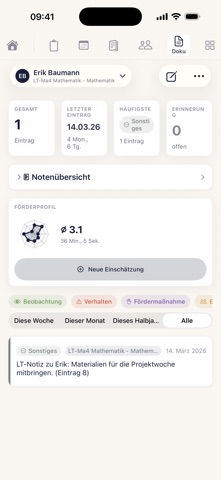
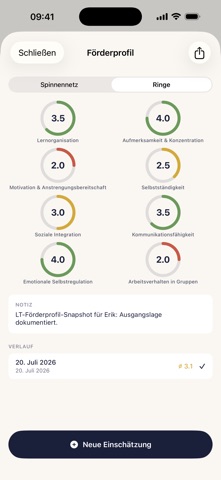
• Record observations, conversations, and classroom events per student — everything at hand for the next parent meeting.
PLAN & ORGANIZE
• Weekly calendar view with your timetable; handwritten notes with Apple Pencil (iPad).
• Prepare lessons with materials and attachments.
• Class tasks: to-do lists for everything around your class — field trip, parents' evening, supplies. Use them on your own or share them via link with your class team: everyone sees what's open and what's done, and checks things off together.
YOUR DATA, YOUR CONTROL
• Everything lives on your device. iCloud sync is optional and uses only your own iCloud account.
• Back up wherever you want: locally, to iCloud Drive, or to your own WebDAV server (e.g. Nextcloud) — encrypted if you wish.
• No data collection by the developer.
PRICING — FAIR, NO SUBSCRIPTION
• Start free with one class — try ClassTiles in real school life.
• The full version (unlimited classes, tabs, and exports) is a one-time purchase. Data you have already entered is never locked.
Questions or ideas? classtiles@icloud.com — feedback flows directly into development.