


AppBrain's verdict
- Last updated
- September 28, 2026
- Size
- 15.3 MB
User feedback
Ratings and reviews on the App StoreComments on Skeme: Teacher Planner for iOS
We don't have enough comments to show example comments. Please check back later.
Store listing
By Andrew MacLeod, from the App StoreDescription by Andrew MacLeod Written by the developer, not by AppBrain. Click to read.
Made by a teacher, for teachers.
Plan a topic once. Skeme schedules its lessons across the right periods, in the right order, for every class you teach. When a lesson cannot happen — a field trip, a PD day, a closure — Skeme bumps the rest of the sequence along, and the homework and preparation move with it.
SCHEDULING THAT DOES ITSELF
• Schedule one lesson, the rest of the topic, or your whole teaching order across topics
• See exactly which lesson lands in which period before you commit to it
• Topics can be reordered so that every class group follows its own Teaching Order
WHEN PLANS CHANGE — AND THEY ALWAYS DO
• Bump a sequence forward or back, a slot at a time
• Lock a period that cannot move — a test, an assembly, a lesson already taught — and the bump goes round it
• Mark a day as non-teaching and the lessons shift themselves
• Homework dates and preparation tasks follow the lesson, not the calendar
YOUR DAY, ON ONE SCREEN
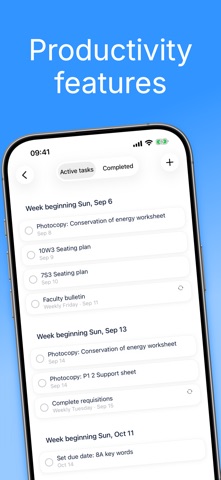
• Every lesson, event and task for today, in order
• Four ways to look at it: day, week, class group and schedule
• One-week or two-week schedules, with A and B days
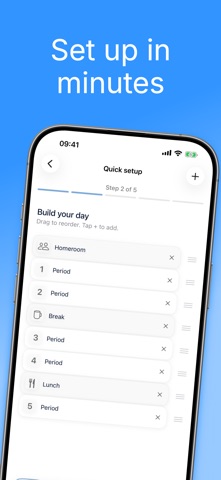
• Homeroom, break and lunch named the way your school names them
PLAN ONCE, REUSE FOR YEARS
• A proper curriculum: courses, topics and lessons, with rich-text plans and outcomes
• The same lesson works in any period, any class group, any academic year
• Preparation checklists become tasks the moment the lesson is scheduled
HOMEWORK THAT KEEPS UP
• Set homework on a lesson once — every class that reaches that lesson gets it
• Set and due dates both attach to lessons rather than calendar dates, so each group's dates arrange themselves around their own schedule
• The Class Planner grid shows every group side by side: what is set, what is due, what is next
YOUR SCHOOL'S WORDS, YOUR SCHOOL'S YEAR
• Terminology for the US, Canada, the UK, Ireland, Australia, New Zealand, South Africa, Japan, Brazil, Italy, Germany, Hungary, India, Russia and international schools
• Homeroom or tutor time or roll call; semester or term; Grade 9 or Year 9
• Available in 31 languages
NO ACCOUNT. NO SERVER. NO SIGN-UP.
• There is nothing to sign up for and no email address to give
• Your planning syncs privately between your own iPhone and iPad through your own iCloud
• Export any curriculum or whole academic year to a file, at any time
SHARE YOUR PLANNING WITH COLLEAGUES
• Export a course, send the file, and a colleague imports it
• Re-importing a revised scheme updates it rather than duplicating it — and never deletes anything you added yourself
ONE SUBSCRIPTION, THE WHOLE APP
Skeme has one subscription, with everything included. Setting up your school year is free. Then try everything in Skeme free for 14 days — no subscription or payment details required, and nothing to cancel. After the trial, choose a yearly or monthly subscription to keep planning and editing. The App Store shows your local price before you subscribe. Cancel any time.
If your trial or subscription ends, nothing is locked away. Your planner stays fully readable and everything stays exportable.
Terms of Use: https://skeme.app/legal/terms
Privacy Policy: https://skeme.app/legal/privacy
Safety and technology
Found in the app by AppBrain- Price
- Free
- App size
- 15.3 MB
- Content rating
- Everyone
Technologies used by Skeme: Teacher Planner
Releases
Updates seen on the App Store- Version
- 1.0.2
- Launched
- September 2026
No changelog data
Alternatives
Similar apps and more from Andrew MacLeodAlternatives to Skeme: Teacher Planner


Rankings
App Store top chartsApp Store Rankings for Skeme: Teacher Planner
About the app and developer
About Skeme: Teacher Planner
Skeme: Teacher Planner is an education app developed by Andrew MacLeod.
User Ratings
The app has no ratings yet.
App Information
Skeme: Teacher Planner is freely available from the App Store. The app size is 15.26 MB. The latest version available is 1.0.2. The last update was on September 28, 2026.
Technical Requirements
The app has a content rating of Everyone. The app has been available on the App Store since September 2026.
Skeme: Teacher Planner is made and published by Andrew MacLeod. AppBrain is an independent app data site and isn't affiliated with Andrew MacLeod. The app name, icon, screenshots and description belong to Andrew MacLeod and are shown as published on the App Store.
Developer information for Andrew MacLeod
Address: